
 LinkedIn
 X
X Boomi Companion real-world use case: from WhatsApp DM to a QAD ERP sales order

Ahead of the QAD conference in Bangkok, we were tasked with building a real-world demo showcasing the capabilities of Boomi Companion for manufacturing customers using QAD ERP. The challenge was straightforward, but the underlying problem it addressed is one most manufacturers deal with every day.
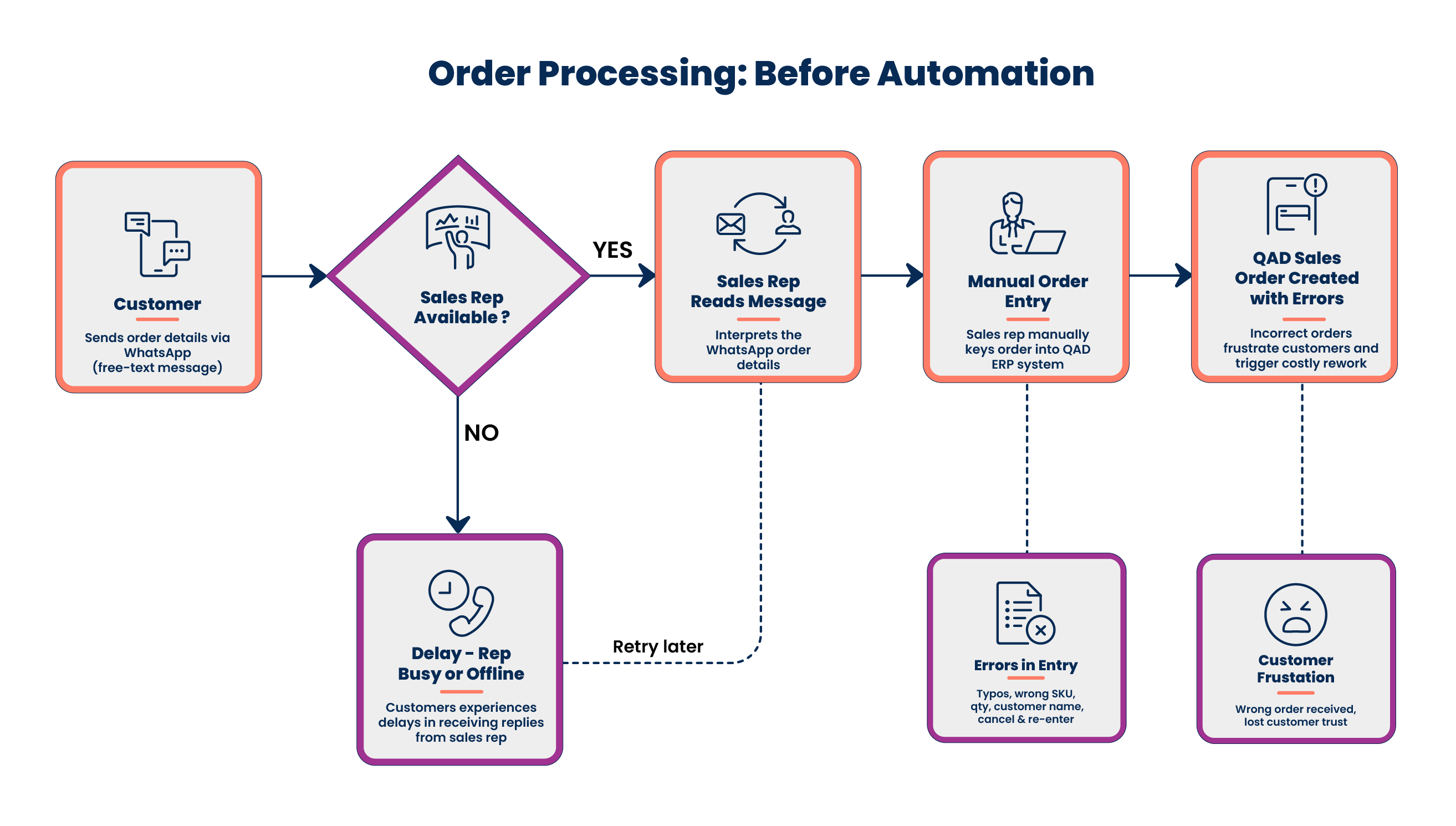
Many customers in Indonesia still don't use EDI (Electronic Data Interchange) for order processing. Orders often arrive via channels such as WhatsApp, SMS, and email, creating manual overhead and delays that slow down every transaction.
In less than a few hours, we were able to build a working prototype where:
- A customer sends a sales order request over WhatsApp.
- Boomi processes the request.
- A sales order gets created directly in QAD via QDoc APIs.
- The customer queries order status directly from WhatsApp.
What made this especially impressive was how much of the heavy lifting Boomi Companion handled autonomously:
- Generated the integration processes and subprocesses.
- Configured Twilio integration.
- Built and refined prompts for structured API interactions.
- Handled XML request/response formatting for QAD QDoc services.
- Debugged errors during implementation.
- Resolved issues like Cloudflare bot challenges by intelligently applying user-agent headers.
- Executed self-tests and validation scenarios.
- Generated multilingual documentation in English, Thai, and Bahasa.
- Created eval/test case documentation with prompt traces and skill/no-skill execution comparisons.
The entire prototype went from idea to working demo in a few hours, showing just how Boomi Companion can accelerate real-world integration and automation scenarios with minimal manual effort. In this blog, we walk you through exactly how we built it, including failures that Boomi Companion diagnosed and fixed on its own, because those are the parts most likely to be useful to other developers.
The human experience
The before-picture is familiar. An order arrives on WhatsApp. Operations reads the message, opens QAD, navigates to Sales Order Maintenance, finds the customer, types the SO header, types each line item, saves, copies the SO number back into WhatsApp, and hits send. The work is mechanical, and the failure mode is human: typos, dropped lines, customers waiting on a confirmation that didn't get sent because someone went to lunch.
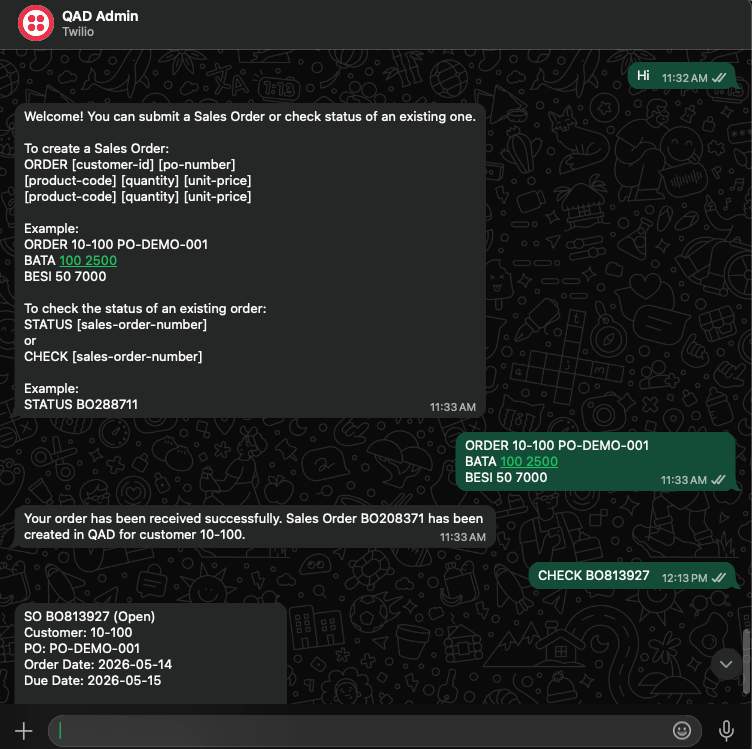
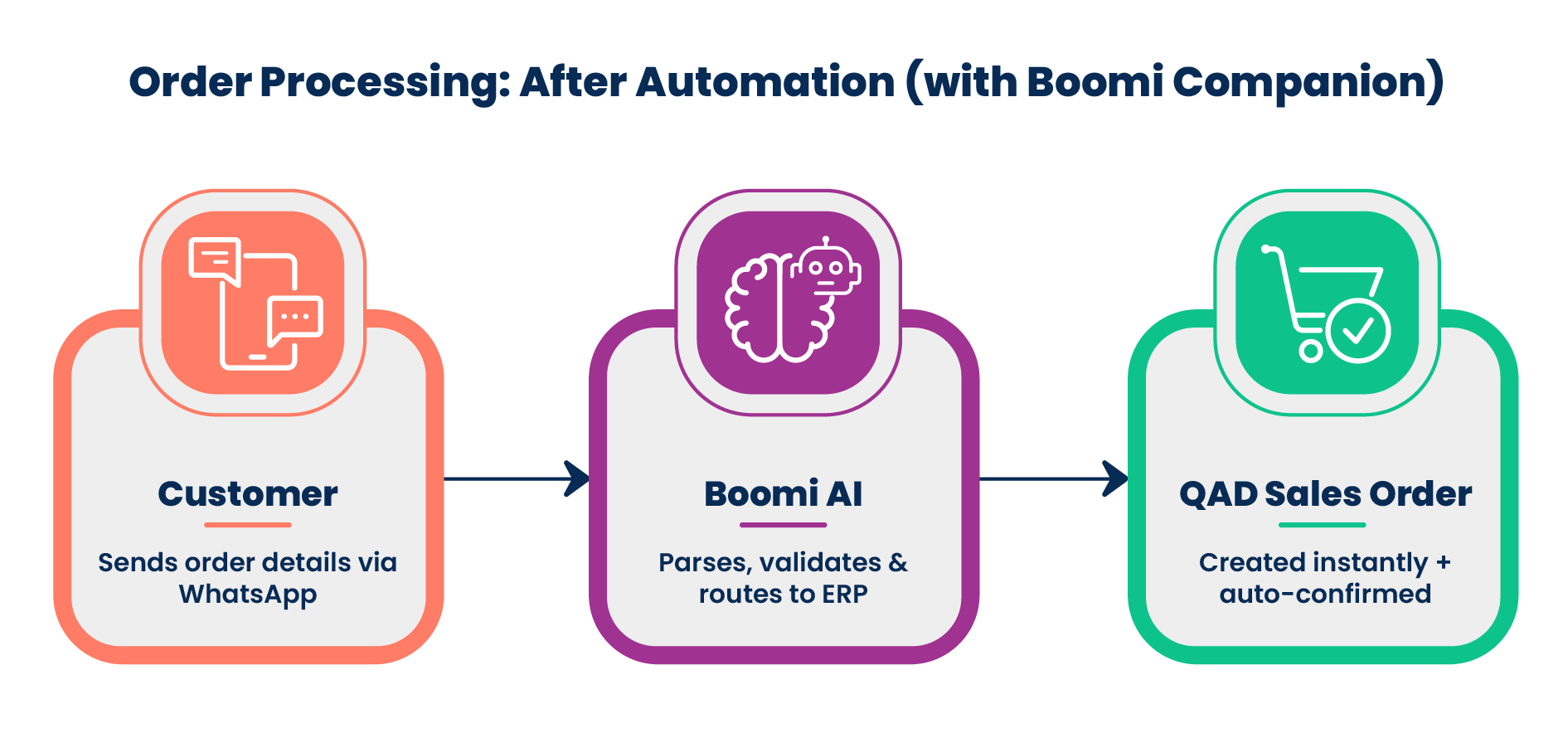
The after-picture is what we built for the demo. The customer texts the order details in the specified format "ORDER 10-100 PO-DEMO-001 / BATA 100 2500 / BESI 50 7000". WhatsApp delivers the message to Twilio. Twilio delivers it to a Boomi runtime over an HTTPS webhook. Boomi parses the intent, validates the order, maps the JSON into QAD's QDoc XML, posts to maintainSalesOrder, parses the response, and the customer receives a confirmation with the QAD SO number once the Platform has heard back. End-to-end, the Sales Order took anywhere from 3 to 25 seconds, depending on the QAD load.
The same WhatsApp number doubles as a status channel. A customer texts STATUS BO288711 and gets back a structured reply — built from a querySalesOrderIMI call to the same endpoint, covering customer, PO, order date, due date, line items with quantities and prices, total, and shipped status.
What we built
Profiles
Six profiles in total — two JSON profiles for the WhatsApp side (j.WhatsApp.Order.Inbound.REQ and j.O2C.Response.RESP) and four XML profiles for QAD's QDoc SOAP service (x.QAD.MaintainSalesOrder.REQ/RESP and x.QAD.QuerySalesOrder.REQ/RESP). The QAD profiles wrap a SOAP 1.1 envelope with WS-Addressing headers, a dsSessionContext block of repeating ttContext rows, and a dsSalesOrder body with repeating salesOrder elements that each cascade to repeating salesOrderDetail line items.
Connections
Two connections power the integration — a WSS Server connection for the inbound webhook, a REST/HTTP Client connection to QAD's QdocWebService base URL, and a Twilio outbound connection for pushing async confirmation messages.
Operations
Five operations in total — two WSS listeners (/ws/simple/createWhatsapporder for direct JSON tests and /ws/simple/executeTwilioinbound for Twilio's form-encoded webhook), two QAD SOAP POSTs (MaintainSalesOrder and QuerySalesOrder), and one Twilio outbound Send Message POST. The QAD operations carry the header set that QDoc actually wants: SOAPAction="", Accept: text/html, Content-Type: text/html, plus a non-default User-Agent, which we'll come back to.
Map
One map — M WhatsApp to QAD MaintainSO. It translates the WhatsApp JSON header and the repeating items[] array into QAD's salesOrder and salesOrderDetail. The dsSessionContext rows are not mapped here. They are templated at runtime inside a Message shape using Process Properties, which keeps the map environment-agnostic.
Processes
Nine processes in total — two parent processes and seven subprocesses. The two parent processes handle the main entry points:
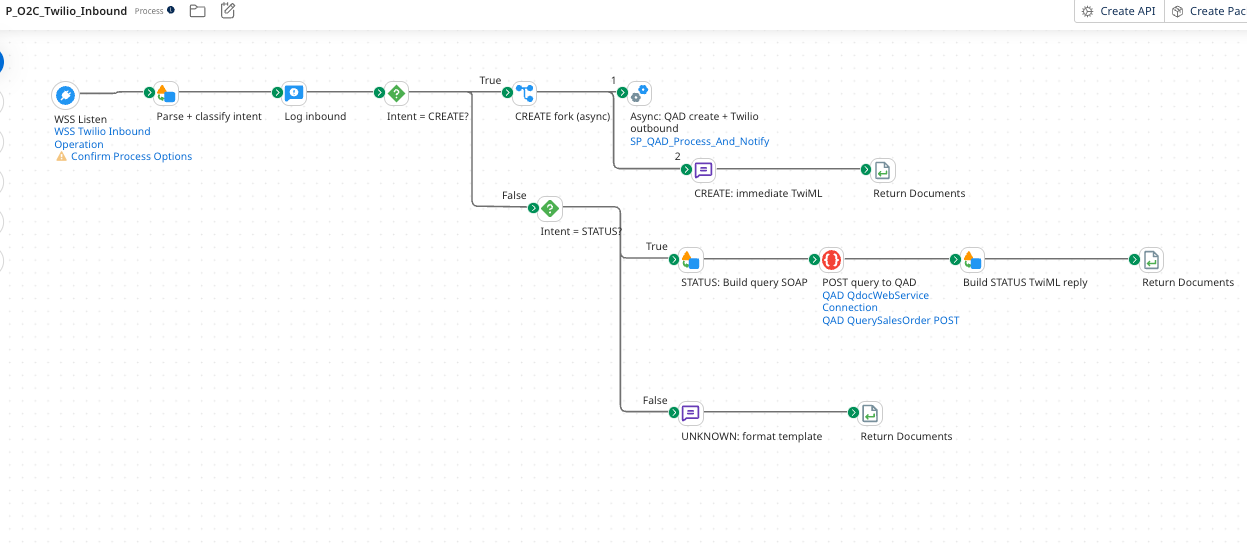
P_O2C_WhatsApp_to_QAD_Mainhandles the JSON entrypoint.P_O2C_Twilio_Inboundhandles the Twilio webhook, parses the intent (CREATE / STATUS / UNKNOWN), and dispatches accordingly.
The seven subprocesses separate concerns:
SP_Translate_Twilio_to_Orderparses the message bodySP_Validate_Orderchecks required fieldsSP_Invoke_QAD_with_Retrywraps the SOAP call in aTry/CatchwithretryCount=3SP_Query_Order_From_QADandSP_Status_And_Notifyhandle the read pathSP_QAD_Process_And_Notifyis the async create workerSP_Audit_LoggerandSP_Error_Handler_Notifierare the cross-cutting concerns
How the orchestration is shaped
The parent process is intentionally small. The shapes you see on the canvas are routing and state-setting; the work happens inside the subprocesses. The state for each transaction lives in Dynamic Document Properties. DDP_CORRELATION_ID is built once from the timestamp and the WhatsApp message ID, then carried through every shape, every log line, and every audit record: so one ID joins the inbound payload to the outbound SO number, and on to whatever the dashboard later shows. DDP_ORDER_STATUS is the state machine: RECEIVED → PASS / FAIL → SUCCESS / QAD_REJECTED / QAD_FAILED / VALIDATION_FAILED / UNCAUGHT_ERROR. DDP_QAD_SO_NUMBER, DDP_ERROR_REASON, and a small handful of Twilio-specific DDPs round out the dictionary.
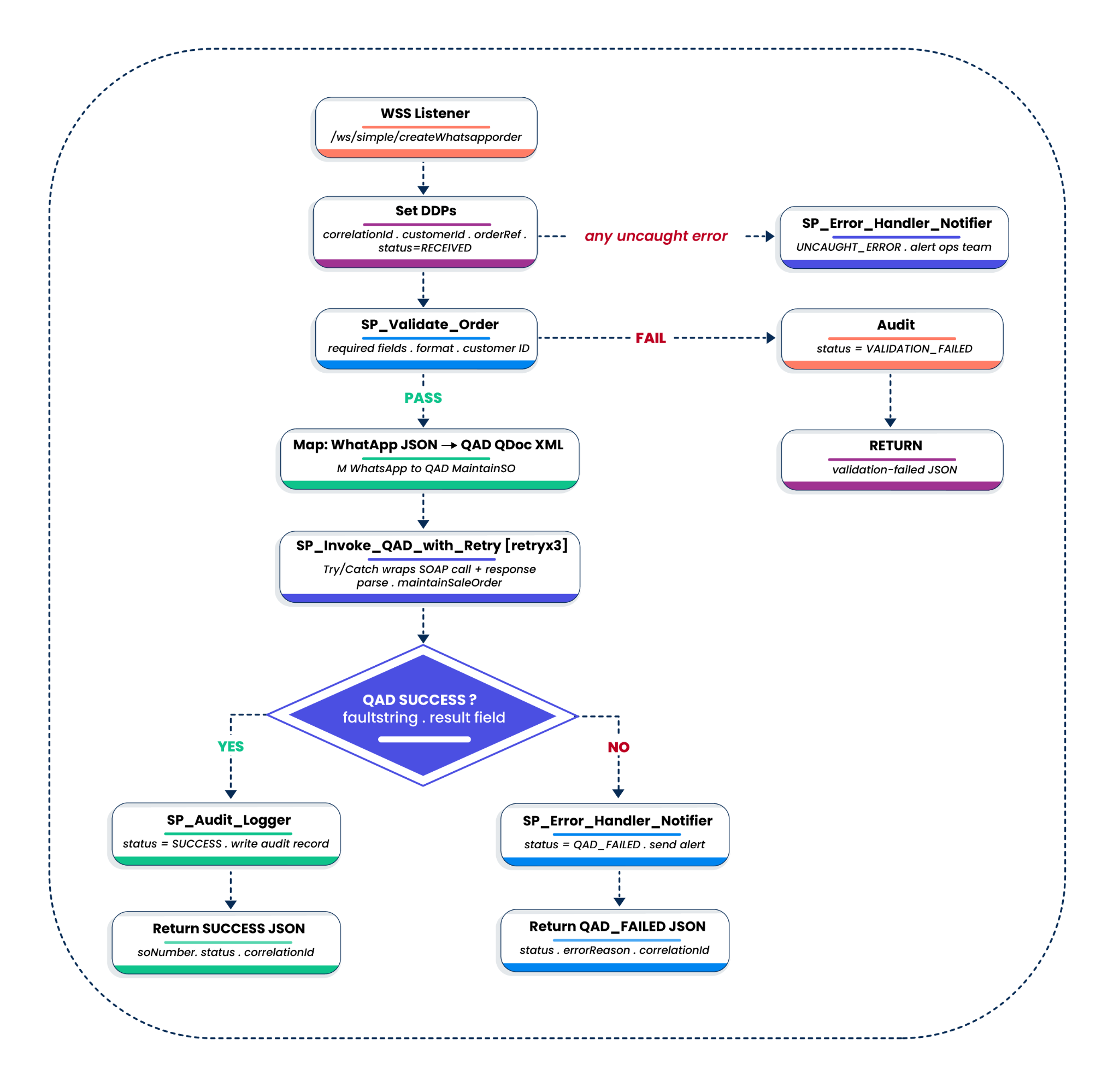
The retry boundary sits inside SP_Invoke_QAD_with_Retry. A Try/Catch with retryCount=3 wraps the entire QAD call: envelope build, POST, response parse, so a transient blip retries the whole unit cleanly. After three failures, the catch path sets DDP_ORDER_STATUS=QAD_FAILED and returns control to the parent.
P_O2C_WhatsApp_to_QAD_Main canvas: The happy path runs left-to-right at the top, the validation-failed branch peels off to the right, and the catch lane lands at the bottom-right error handler.
The Twilio side is intent-driven. P_O2C_Twilio_Inbound runs a Groovy Data Process that URL-decodes the form body, splits on the first line of the message, and writes one of three intents into a DDP. A Decision routes to one of three paths: CREATE fans out asynchronously to SP_QAD_Process_And_Notify and returns an immediate TwiML acknowledgment; STATUS calls SP_Query_Order_From_QAD synchronously and returns a rich TwiML reply with up to ten line items; UNKNOWN returns a help template. The async fan-out for CREATE is the move that keeps the WhatsApp UX feeling instant.
How we built it
The boomi-integration skill in Boomi Companion drove the entire build. We wrote prompts, the agent wrote XML, we reviewed and approved, the agent pushed to the Platform, and we tested. That loop ran from blueprint to working two-way integration over the course of an afternoon. A few things about that loop are worth describing in detail.
The blueprint comes first, the XML comes second
The first prompt was the broad one: "Build a Boomi integration that takes a WhatsApp message containing a sales order, validates it, posts to QAD QDoc, and supports status queries." Boomi Companion did not start generating XML. It returned a complete component blueprint: seven profiles, three connections, five operations, one map, a parent process, six subprocesses, and a Process Properties component, and asked us to approve the shape before it generated anything.
That separation of design and generation is the practical equivalent of a code review before the code exists. We could argue with the shape: push back on a subprocess boundary, ask for a different name, request a separate read path — without anyone having written or pushed a line of XML. The agent then generated against the approved shape, not a guessed one.
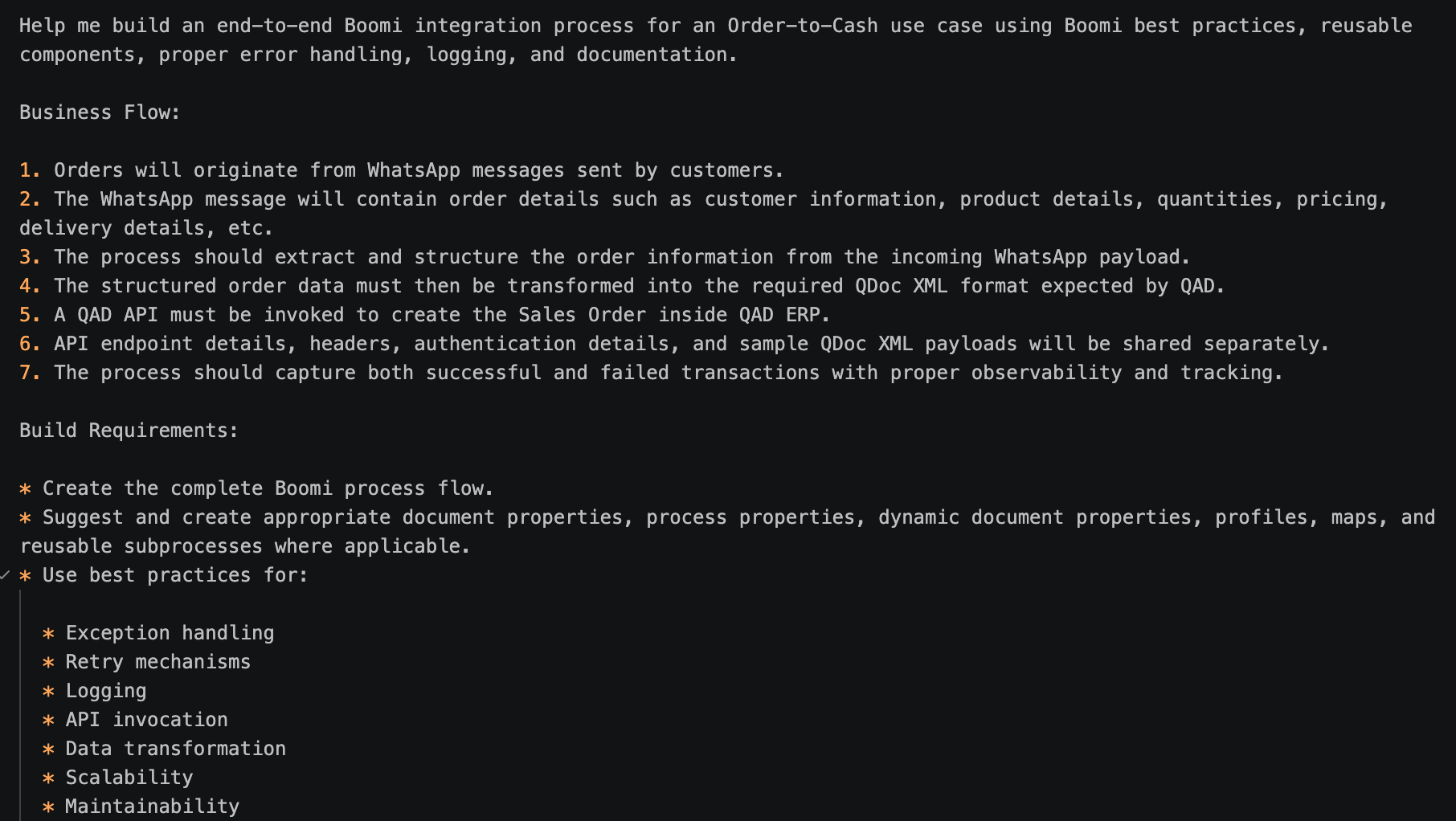
Initial prompt and the blueprint response in the agent's terminal. The component list, the orchestration shape, and the deployment plan are all laid out before any XML is written. This is the moment the developer's job becomes that of a reviewer.
The map is environment-agnostic; the envelope is not
The cleanest design call in the build came from the agent and surprised us. The QAD SOAP envelope includes a dsSessionContext block: domain, version, scopeTransaction, mnemonicsRaw. The agent declined to add those rows to the map and instead templated the envelope within a Message shape in SP_Invoke_QAD_with_Retry, pulling the values from Process Properties at runtime.
That means the same map deploys to DEV, TEST, and PROD without modification: only the Process Properties extension changes per environment. The first time we asked the skill to do this style of build, it put the session context inside the map. We pushed back. The skill learned from it. Subsequent QAD-shaped builds used the runtime-template pattern by default.
Automated testing: the agent diagnoses what the agent built
Most of the time in this build was not spent creating the integration. It was spent diagnosing five non-obvious runtime failures, each of which could easily have consumed hours for a human developer. What made the workflow interesting was how much of that debugging loop happened automatically.
The cycle stayed consistent throughout the project: the developer described the symptom in one or two lines, the agent formed a hypothesis, updated the relevant Boomi component, redeployed the process, executed a targeted test, pulled the logs, and verified the outcome. Every resolved issue effectively became reusable knowledge for future QAD-shaped integrations.
Boomi Companion was not just generating XML or suggesting fixes in chat. The skill had direct access to CLI utilities for component creation, deployment, execution, process testing, and log retrieval. After updating a component, the agent would push it to the Platform, deploy the process, fire a known-good payload to the WSS listener, retrieve execution logs, inspect runtime behavior, and decide whether the issue was resolved or not.
That significantly changed the developer's role. Instead of spending most of the session manually redeploying integrations and reproducing issues, the developer mainly reviewed hypotheses and validated architectural decisions. The interaction started feeling less like operating the tooling and more like reviewing another engineer's work.
One example stood out during the QAD integration flow. Requests returned HTTP 200 responses, but the response body contained cdn-cgi/challenge-platform markers. The agent correctly inferred that Cloudflare was intercepting requests because the connector lacked a valid User-Agent header. It updated the operation, redeployed the process, reran the exact same payload, and attached the successful execution logs in the next iteration.
The five failures covered in the next section all surfaced and were resolved through this same loop: deploy, execute, inspect, diagnose, patch, and retest.
Five real failures Boomi Companion diagnosed on its own
The impressive part of this build was not that the integration worked. It was that Boomi Companion repeatedly diagnosed and fixed non-obvious runtime failures almost entirely on its own. In each case, the workflow stayed the same: inspect logs, form a hypothesis, patch the component, redeploy, rerun the test, verify the outcome.
Most of these would normally take hours of debugging.
1. The WSS listener that never registered
The deployment succeeded. Authentication worked. But every request returned:
404 Unknown operation for the given URL path
Boomi Companion identified that the WSS Start shape incorrectly carried a connectionId attribute. WSS listeners do not behave like traditional connectors and silently fail registration when that attribute exists.
The agent removed the attribute, redeployed the process, reran the test, and the listener came online immediately.
2. Cloudflare was blocking QAD requests
The next issue appeared to be a SOAP failure. QAD returned HTTP 200 responses, but every order failed, and QAD admins could not even see the requests.
Boomi Companion inspected the response body and detected cdn-cgi/challenge-platform markers. The problem was not QAD. Cloudflare was intercepting requests because the connector lacked a valid User-Agent header.
The agent automatically added a browser-style User-Agent, redeployed the operation, reran the payload, and the requests started flowing normally.
One header fixed the entire integration.
3. QAD rejected sales order numbers
maintainSalesOrder kept throwing generic SOAP faults even though the payload structure looked valid.
Boomi Companion traced the issue to an undocumented QAD limitation: soNbr supports only eight characters.
The agent rewrote the generator to produce IDs like:
BO780953
Two-character prefix plus six digits. Small fix. Completely blocked flow.
4. "temp_err_msg" wasn't actually an error
After successful runs, the dashboard suddenly showed nearly 50% failures.
The reason was subtle. QAD returns warning messages inside <temp_err_msg> elements even during successful transactions. A naive parser that checked for the word "error" falsely marked successful orders as failed.
Boomi Companion rewrote the parser to use authoritative SOAP fault indicators instead of string matching and automatically separated warnings from real failures.
The success rate immediately corrected itself.
5. Twilio silently dropped messages
This one was painful because everything looked healthy.
- Boomi returned HTTP 200.
- Process Reporting looked clean.
- Twilio accepted the response.
But customers never received WhatsApp confirmations.
Boomi Companion traced the issue to invalid XML inside the TwiML response. A placeholder like <customer-id> inside the message body was being parsed as an XML tag.
The agent escaped the values, redeployed the process, reran the test, and WhatsApp confirmations started arriving instantly.
- No connector issue.
- No API outage.
- Just one invalid XML token buried inside a response template.
What stood out across all five failures was not just the fixes. It was the speed of the loop. Boomi Companion generated the patch, deployed it, ran validation tests, retrieved logs from the Platform, and automatically verified the outcome. The developer mostly reviewed reasoning and architecture decisions rather than manually driving deployments or troubleshooting sessions.
The real shift
The most important takeaway from this project was not that Boomi Companion can generate integrations.
Many tools can generate code. The real shift was that Boomi Companion understood how Boomi actually works.
It understood the difference between profiles, operations, maps, processes, and Process Properties. It understood environment-aware deployment patterns. It understood WSS listener behavior, Twilio response handling, SOAP envelope structure, retry boundaries, and QAD-specific quirks that were never explicitly mentioned in the prompts. When something broke, it did not just throw generic suggestions into chat. It inspected logs, formed hypotheses, patched components, redeployed processes, reran tests, and validated outcomes.
That is a very different experience from asking a generic model to generate XML and hoping it deploys.
Without the skill, most AI-generated integrations eventually fall apart at runtime. Connector references break. IDs get hallucinated. Platform conventions get mixed up. The generated flow looks convincing until deployment actually starts. Boomi Companion stayed grounded in real Platform behavior because it operated against actual Boomi components, deployments, execution logs, and runtime feedback loops.
The most interesting part was watching the skill improve inside the same session. Every failure above became reusable knowledge. Once the Cloudflare issue was diagnosed, the agent began automatically checking response bodies after external HTTPS calls. Once the QAD soNbr limitation was discovered, the generator adjusted itself. Once TwiML XML parsing failed, the response templates were automatically made safer.
That is where this starts becoming genuinely powerful. Not because the agent replaces developers. But because it removes huge amounts of repetitive Platform work, dramatically shortens debugging loops, and lets developers spend more time thinking about architecture and business logic instead of fighting connector behavior at 2 AM.
The fastest way to understand the difference is to try it yourself — Point Boomi Companion at a real system. Build something slightly messy. Break it. Watch how the loop behaves. You don't need a perfect use case to start. The messier the problem, the more useful the loop becomes. If you're working with QAD or any other ERP and want to skip the manual overhead, Boomi Companion is worth your time. Try Boomi Companion today!
