
 LinkedIn
 X
X Claude Code Skills for Boomi Companion: Empowering every customer to build what they need

Your integration Platform is only as powerful as what your team can build with it. That gap between Platform capability and your team's capability has always been the real challenge in enterprise integration. Claude Code Skills are designed to close it.
By embedding AI-powered development capabilities directly into the Boomi Platform through Claude Code Skills, Boomi enables you to build, test, and deploy integrations using natural language, regardless of your technical background. This blog explores what that means in practice, how the architecture works, and why it represents a fundamental shift in how you realize value from Boomi.
What are Claude Code Skills
Claude Code Skills are installable bundles of AI capabilities — instructions, tools, and domain knowledge packaged together and made available through an AI developer Companion interface. Built on Anthropic’s Claude, they give you a conversational partner that understands both the task at hand and the Platform being used to accomplish it.
In the context of Boomi, Skills mean that the AI Companion doesn’t just understand general programming concepts — it understands Boomi’s component model, deployment pipeline, EDI standards, error patterns, and best practices. It can take action on your behalf in the Platform, not just give you instructions.
What makes Skills different from general AI
A few things make Skills fundamentally different from general AI tools:
- Domain-specific knowledge: Skills encode Boomi-specific expertise, not just general coding ability.
- Tool access: Skills give the AI the ability to act — deploy, test, and modify — not just to advise.
- Installable and shareable: Skills plug into your team's environment and update over time.
- Marketplace distribution: Skills are published and distributed through plugin marketplaces.
- Consistent best practices: Skills give every team member access to the same encoded expertise.
The Boomi developer Companion: Architecture overview
The Boomi developer Companion is built on a layered architecture that combines natural language understanding, Platform knowledge, and direct tool access. Understanding this architecture explains what makes it more capable than a generic AI assistant.
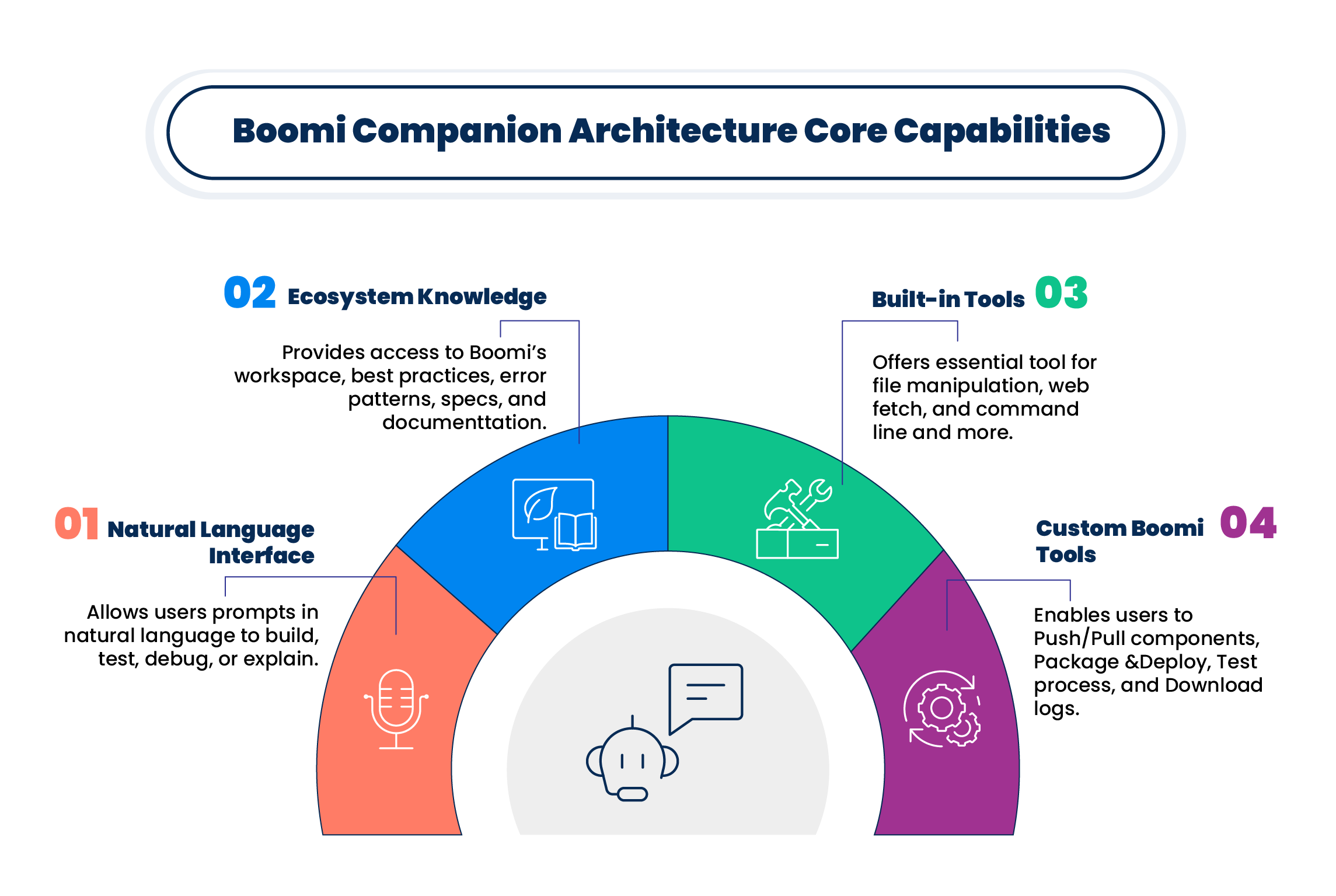
Each layer builds on the one above it. The natural language interface captures your intent. The ecosystem knowledge grounds that intent in the Boomi-specific context. The built-in tools provide general execution capabilities. The custom Boomi tools provide the Platform-specific actions that make the Companion genuinely useful for Boomi work.
The Companion isn’t a chatbot that describes how to use Boomi — it’s an agent that uses Boomi. That distinction is what makes Skills transformative rather than incremental.
Custom Boomi tools: What the AI can actually do
The custom Boomi tools are what give Claude Code Skills their practical power. These are not suggestions or generated code snippets — they are direct integrations with the Boomi Platform that the AI companion can invoke on your behalf.
| Tool | What It Does |
|---|---|
| Push/Pull Components | Retrieve and publish Boomi components directly from a conversational prompt. |
| Package & Deploy | Package a process and deploy it to an environment without leaving the AI interface. |
| Test Process | Execute a Boomi process in test mode and return results to the conversation. |
| Download Logs | Pull execution logs and surface failures with natural language explanations. |
These tools work together to create a complete development loop: pull a component to understand it, build or modify it, test it, review the logs, fix any issues, and deploy — all without leaving the conversational interface. For EDI work specifically, this means the entire partner onboarding cycle can be managed through natural language.
Real-world example: Salesforce opportunity enrichment
Here's a real example of what Claude Code Skills enabled in a production Boomi environment. The following prompt was used to build a complete, multi-system integration from scratch:
The full prompt (verbatim)
Here's a challenge for your Claude. Please create a process that can be called as an API. It should query Salesforce opportunities by ID, and it should pass the opportunity details into two parallel subscriber processes.
- Subscriber 1: Call the Anthropic API, generate a summary and a recommended next step, post it to Slack and also add the summary to the Salesforce opportunity notes.
- Subscriber 2: Push the opportunity into Boomi Data Hub.
For the Slack, Hub, and Salesforce connectivity we already have some existing bits that can be reused, cascade out the component references in this link: <your-api-specification-URL>
You'll need to create the LLM connectivity. You should have a key for the Anthropic API. Here is the documentation link: <your-api-specification-URL>
Tell the AI to skip markdown since it's going to both Slack and Salesforce. Everything else for the use case, also create new.
You are welcome to test as you build, but you won't be able to see the async subscriber records. I can manually test whatever you want there.
A valid Salesforce ID is: <guid>
What the AI built
From this single, conversational prompt, Boomi’s Claude Code Companion produced a complete, production-ready integration. The architecture it built included:
- An API-callable entry process that accepts a Salesforce opportunity ID as input.
- Salesforce connectivity to query opportunity details by ID.
- Two parallel async subscriber processes wired to receive the opportunity data.
- Anthropic LLM connectivity — created from scratch using the provided documentation.
- A Slack connector to post the AI-generated summary to the appropriate channel.
- A Salesforce update to write the summary back to the opportunity notes field.
- A Boomi Data Hub push for the second subscriber stream.
The Companion reused existing Slack, Data Hub, and Salesforce components by cascading the provided component references, created net-new LLM connectivity from the Anthropic documentation, applied the plain-text formatting requirement, and tested the flow — all from the single prompt above.
An integration like this would typically take an experienced Boomi developer a full day or more to design, build, and test. Claude Code Skills completed it in a single conversation.
How Skills accelerate customer outcomes
The direct benefit of Claude Code Skills is speed: faster builds, faster testing, faster deployment. But the deeper benefit is democratization. When AI Skills encode Boomi expertise and make it available to every user on the Platform, the capability gap between expert developers and less experienced users shrinks significantly.
The impact varies depending on your role in the team.
For less experienced Boomi users
- Get best-practice guidance embedded in every interaction, not just available in documentation.
- Build processes that would previously have required specialist involvement.
- Debug using natural language error explanations, no specialist required.
- Reduce dependency on a small pool of Boomi experts within the organization.
For experienced Boomi developers
- Implement routine patterns faster and free up time for architectural decisions.
- Let the AI handle repetitive work — component creation, test generation, and log analysis.
- Take on more projects simultaneously without a proportional increase in effort.
- Generate natural language documentation as a side effect of the build process.
For EDI and Integration teams
- Onboard partners without needing EDI specialist involvement at every step.
- Achieve systematic test coverage that improves quality without increasing manual effort.
- Resolve errors without needing deep EDI expertise to diagnose and fix them.
- Build compounding ROI as Skills encode your organization's best practices over time.
Getting started with Claude Code Skills for Boomi
Claude Code Skills are available through the Boomi Platform and the Claude Code CLI. If you’re already a Boomi Companion user, you have access to the core Skills that power the EDI and integration capabilities described in this series. Here’s how to get the most out of them:
- Start with a real task: Pick a current project and work through it with Companion. Real tasks produce better learning than demos.
- Reference your components: Link to existing Boomi processes and components in your prompts so Companion can reuse what’s already built.
- Use test-as-you-build: Ask Companion to test at each stage rather than building everything first.
- Explore the Skills marketplace: Additional Skills for specialized Boomi use cases are available and installable.
- Share what works: When you develop effective prompt patterns for your team’s use cases, those can be codified into custom Skills.
The Boomi Platform and Claude Code Skills are evolving rapidly. The capabilities described in this series represent the current state — and the roadmap points toward increasingly autonomous, deeply integrated AI that handles more of the complexity so your team can focus on what matters most: delivering business value through integration.
The question isn’t whether AI will transform how integration teams work. It already is. The question is how quickly your team will adopt it — and how much of a head start you’ll give yourself by starting today.
Ready to see what your team can build with Claude Code Skills? Explore Boomi Companion and Claude Code Skills. Start bringing AI into your integration practice today.
AI-generated code and configurations should always be reviewed before production deployment. Claude Code Skills are under active development; capabilities described here reflect the current Platform state.
