
 LinkedIn
 X
X Publisher Integration Pack APIs: streamlining and automating Integration Pack management

Boomi's March 2025 release introduces the Publisher Integration Pack APIs, a go-to for solution builders. These APIs revolutionize how you manage Integration Packs, enabling automation of key tasks like publication, tracking, and account group management. They reduce manual overhead, streamline operations, and enable teams to focus on innovation rather than administrative complexity.
With this release, Boomi now offers a complete set of APIs for managing the entire lifecycle of Integration Packs—from creation and administration to distribution across multiple accounts, installation, configuration, and consumption within sub-accounts.
In this blog, we’ll focus on the actions performed by the publisher. If you’re interested in managing the consumer side via API, we recommend reviewing our community article, Provisioning and Managing Integration Packs via the API. Additionally, here are a few helpful links to the integration pack consumer-side objects for your reference:
- Integration Pack Object
- Integration Pack Environment Attachment object
- Integration Pack Instance object
- Environment Extensions object
- Process Schedules object
Let’s explore how these new and updated APIs enhance integration management within your organization.
Key Features
The Publisher Integration Pack APIs offer a set of tools designed to simplify and scale the management of Integration Packs:
-
Comprehensive Operations: Seamlessly CREATE, UPDATE, DELETE, and QUERY integration packs.
-
Automation: Automate the deployment of integration packs across multiple environments and account groups.
-
Tracking & Reporting: Easily monitor the release status of integration packs and track the deployment progress.
-
Flexible Deployment: The APIs support single-attach and multi-attach installation types, providing flexibility in deploying integration packs.
Where can these APIs add value?
-
CI/CD Pipeline Integration: Automate deployment and release of integration packs in a continuous integration and delivery workflow.
-
Release Tracking: Monitor integration pack release progress using the Release Integration Pack Status API for smoother deployments.
-
Account Group Management: Easily manage integration packs within account groups, deploying only necessary packs at scale.
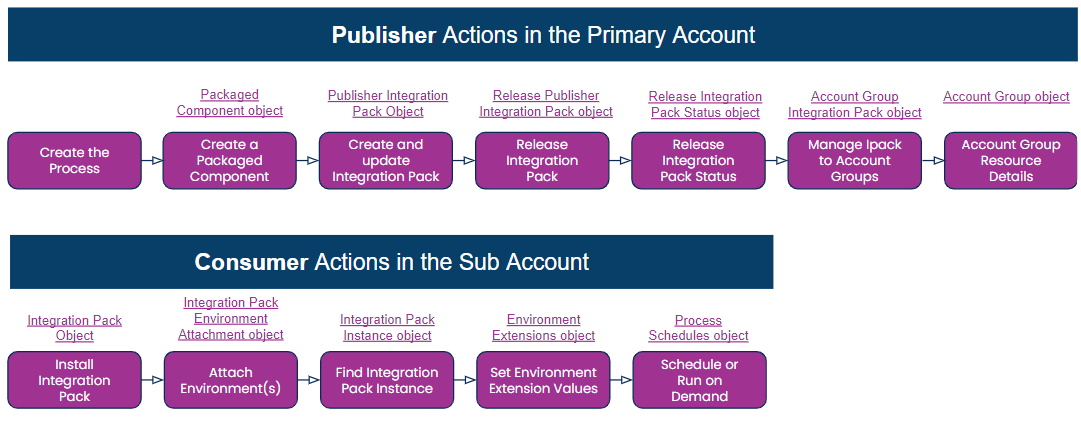
As a publisher, you can perform the following:
Step 1: Creating a Packaged Component using APIs
The PackagedComponent object represents a component packaged for deployment to an environment. You can use the PackagedComponent object to create, query, or restore deleted packaged components. After creating the process you want to distribute and manage at the sub-account level, the first step is to create a packaged component. For this, you need the component ID of the process you want to package.
POST: https://api.boomi.com/api/rest/v1/<Account ID>/PackagedComponent
Example request
<bns:PackagedComponent
    xmlns:bns="http://api.platform.boomi.com/"
    xmlns:xsi="http://www.w3.org/2001/XMLSchema-instance">
    <bns:componentId>6aa2023c-eb0d-465e-a5b6-96cb9bb0d38f</bns:componentId>
    <bns:packageVersion>1.0</bns:packageVersion>
    <bns:notes>Publisher Ipacks PC</bns:notes>
    <bns:shareable>true</bns:shareable>
</bns:PackagedComponent>
Example response
<?xml version="1.0" encoding="UTF-8" standalone="yes"?>
<bns:PackagedComponent
    xmlns:xsi="http://www.w3.org/2001/XMLSchema-instance"
    xmlns:bns="http://api.platform.boomi.com/">
    <bns:packageId>027417cc-d4c2-46d2-86ff-8d2b9944d4f7</bns:packageId>
    <bns:packageVersion>1.0</bns:packageVersion>
    <bns:componentId>6aa2023c-eb0d-465e-a5b6-96cb9bb0d38f</bns:componentId>
    <bns:componentVersion>2</bns:componentVersion>
    <bns:componentType>process</bns:componentType>
    <bns:createdDate>2025-03-13T22:12:27Z</bns:createdDate>
    <bns:createdBy>jennifer.weidenfeller@boomi.com</bns:createdBy>
    <bns:notes>Publisher Ipacks PC</bns:notes>
    <bns:deleted>false</bns:deleted>
    <bns:shareable>true</bns:shareable>
    <bns:fullyPubliclyConsumable>false</bns:fullyPubliclyConsumable>
    <bns:branchName>main</bns:branchName>
</bns:PackagedComponent>
Step 2: Creating an Integration Pack
The PublisherIntegrationPack Object empowers developers to manage Integration Packs from creation to removal. It supports a range of operations, such as GET, QUERY, CREATE, UPDATE, and DELETE, enabling users to tailor data retrieval and handle bulk operations efficiently. Let’s look at a basic flow, with the first step being to create the Integration Pack shell.
POST: https://api.boomi.com/api/rest/v1/<Account ID>/PublisherIntegrationPack
Example request
<bns:PublisherIntegrationPack
    xmlns:xsi="http://www.w3.org/2001/XMLSchema-instance"
    xmlns:bns="http://api.platform.boomi.com/"
    name="Integration Pack Example"
    installationType="MULTI">
    <bns:Description>Integration Pack Example for Blog</bns:Description>
</bns:PublisherIntegrationPack>
Example response
<?xml version="1.0" encoding="UTF-8" standalone="yes"?>
<bns:PublisherIntegrationPack
    xmlns:xsi="http://www.w3.org/2001/XMLSchema-instance"
    xmlns:bns="http://api.platform.boomi.com/"
    id="94e11e66-e5c4-4655-b2ba-344575c3bc93"
    name="Integration Pack Example"
    installationType="MULTI">
    <bns:Description>Integration Pack Example for Blog</bns:Description>
</bns:PublisherIntegrationPack>
Next, we must add the package component to our Integration Pack shell. To do so, we need:
-
The Integration Pack ID (94e11e66-e5c4-4655-b2ba-344575c3bc93) returned in the above POST.
-
The component ID (6aa2023c-eb0d-465e-a5b6-96cb9bb0d38f) returned from Creating a Packaged component POST.
POST: https://api.boomi.com/api/rest/v1/<Account ID>/PublisherIntegrationPack/94e11e66-e5c4-4655-b2ba-344575c3bc93
Example request
<bns:PublisherIntegrationPack
    xmlns:xsi="http://www.w3.org/2001/XMLSchema-instance"
    xmlns:bns="http://api.platform.boomi.com/"
    id="94e11e66-e5c4-4655-b2ba-344575c3bc93"
    name="Integration Pack Example"
    installationType="MULTI"
    operationType="ADD">
    <bns:Description>description update</bns:Description>
    <bns:PublisherPackagedComponents>
        <bns:PublisherPackagedComponent
            componentId="6aa2023c-eb0d-465e-a5b6-96cb9bb0d38f"/>
    </bns:PublisherPackagedComponents>
</bns:PublisherIntegrationPack>
Example response
<?xml version="1.0" encoding="UTF-8" standalone="yes"?>
<bns:PublisherIntegrationPack
    xmlns:xsi="http://www.w3.org/2001/XMLSchema-instance"
    xmlns:bns="http://api.platform.boomi.com/"
    id="94e11e66-e5c4-4655-b2ba-344575c3bc93"
    name="Integration Pack Example"
    installationType="MULTI">
    <bns:Description>description update</bns:Description>
    <bns:PublisherPackagedComponents>
        <bns:PublisherPackagedComponent
            componentId="6aa2023c-eb0d-465e-a5b6-96cb9bb0d38f"
            componentName="Publisher Side Integration Pack Build"
            componentType="process"
            currentVersion=""
            pendingVersion="1.0"
            latestVersion=""/>
    </bns:PublisherPackagedComponents>
</bns:PublisherIntegrationPack>
Step 3: Release an Integration Pack
With the new ReleaseIntegrationPack Object, you can automate an integration packs' deployment and version control. It allows you to schedule or immediately release Integration Pack updates via the CREATE and UPDATE methods, simplifying the deployment process. For our example, to create a scheduled Integration Pack for release we will need that Integration Pack ID again obtained from POST in Step 2.
POST: https://api.boomi.com/api/rest/v1/<Account ID>/ReleaseIntegrationPack/
Example request
<bns:ReleaseIntegrationPack
    xmlns:xsi="http://www.w3.org/2001/XMLSchema-instance"
    xmlns:bns="http://api.platform.boomi.com/"
    id="94e11e66-e5c4-4655-b2ba-344575c3bc93"
    releaseOnDate="2025-04-20"
    releaseSchedule="RELEASE_ON_SPECIFIED_DATE">
    <bns:ReleasePackagedComponent
        packageId="027417cc-d4c2-46d2-86ff-8d2b9944d4f7"
        version="1.0"/>
</bns:ReleaseIntegrationPack>
Example response
<?xml version="1.0" encoding="UTF-8" standalone="yes"?>
<bns:ReleaseIntegrationPack
    xmlns:xsi="http://www.w3.org/2001/XMLSchema-instance"
    xmlns:bns="http://api.platform.boomi.com/"
    id="94e11e66-e5c4-4655-b2ba-344575c3bc93"
    installationType="MULTI"
    name="Integration Pack Example"
    releaseSchedule="RELEASE_ON_SPECIFIED_DATE"
    releaseOnDate="2025-04-20"
    requestId="release-d6154ab1-886b-476c-bcdd-4a4a8aec7798"
    releaseStatusUrl="https://platform.boomi.com/api/rest/v1/<Account ID>/ReleaseIntegrationPackStatus/release-d6154ab1-886b-476c-bcdd-4a4a8aec7798/">
</bns:ReleaseIntegrationPack>
Step 4: Check the Status of the Release
Use the new ReleaseIntegrationPackStatus Object to monitor the status of Integration Pack releases, retrieve details on released components, and track ongoing deployments, ensuring you stay informed on your release progress. To check on the status of our integration pack, collect the Request ID from the response in step 3 and include it in the URL.
GET: https://api.boomi.com/api/rest/v1/<Account ID>/ReleaseIntegrationPackStatus/release-d6154ab1-886b-476c-bcdd-4a4a8aec7798
Example response
<?xml version="1.0" encoding="UTF-8" standalone="yes"?>
<bns:ReleaseIntegrationPackStatus
    xmlns:xsi="http://www.w3.org/2001/XMLSchema-instance"
    xmlns:bns="http://api.platform.boomi.com/"
    responseStatusCode="202"
    integrationPackId="94e11e66-e5c4-4655-b2ba-344575c3bc93"
    name="Integration Pack Example"
    installationType="MULTI"
    releaseSchedule="RELEASE_ON_SPECIFIED_DATE"
    releaseOnDate="2025-04-20"
    requestId="release-d6154ab1-886b-476c-bcdd-4a4a8aec7798"
    releaseStatus="SCHEDULED"/>
Step 5: Add an Integration Pack to an account group
Efficiently manage integration packs within account groups using the new AccountGroup IntegrationPack Object and the AccountGroup Object. You can retrieve, add, or remove integration packs, with the ability to filter by accountGroupId for more precise results, making it easier to manage packs across large-scale deployments.
For example, to add an integration pack to an existing account group you need the Group ID for your request.
Let’s list out all the account groups for an account.
POST: https://api.boomi.com/api/rest/v1/<Account ID>/AccountGroup/query
For this, you must pass the argument of our account ID to get all of the Account Groups.
Example request
<?xml version="1.0" encoding="UTF-8"?>
<QueryConfig xmlns="http://api.platform.boomi.com/">
    <QueryFilter>
        <expression
            operator="EQUALS"
            property="accountId"
            xmlns:xsi="http://www.w3.org/2001/XMLSchema-instance"
            xsi:type="SimpleExpression">
            <argument><Account ID></argument>
        </expression>
    </QueryFilter>
</QueryConfig>
Example response
<bns:QueryResult
    xmlns:xsi="http://www.w3.org/2001/XMLSchema-instance"
    xmlns:bns="http://api.platform.boomi.com/"
    numberOfResults="3">
    <bns:result
        xsi:type="bns:AccountGroup"
        id="b329ab50-345f-48fc-a22a-1c2f11aea3e8"
        accountId="<Account ID>"
        name="All Accounts"
        autoSubscribeAlertLevel="none"
        defaultGroup="true" />
    <bns:result
        xsi:type="bns:AccountGroup"
        id="532ccf88-db4c-4e7b-91ee-63fc450b9af7"
        accountId="<Account ID>"
        name="Jennifer"
        autoSubscribeAlertLevel="none"
        defaultGroup="false" />
    <bns:result
        xsi:type="bns:AccountGroup"
        id="3c0be923-6294-44d4-8fc3-25eb10936238"
        accountId="<Account ID>"
        name="Sub Account Group A"
        autoSubscribeAlertLevel="none"
        defaultGroup="false" />
</bns:QueryResult>
We plan to add this Integration Pack to Sub Account Group A, Account Group. The ID for that Account Group is 3c0be923-6294-44d4-8fc3-25eb10936238. We will use this ID in our next request using the Account Group Integration Pack API.
POST: https://api.boomi.com/api/rest/v1/<Account ID>/AccountGroupIntegrationPack
Example request
<bns:AccountGroupIntegrationPack
    xmlns:xsi="http://www.w3.org/2001/XMLSchema-instance"
    xmlns:bns="http://api.platform.boomi.com/"
    accountGroupId="3c0be923-6294-44d4-8fc3-25eb10936238"
    integrationPackId="94e11e66-e5c4-4655-b2ba-344575c3bc93" />
Example response
<?xml version="1.0" encoding="UTF-8" standalone="yes"?>
<bns:AccountGroupIntegrationPack
    xmlns:xsi="http://www.w3.org/2001/XMLSchema-instance"
    xmlns:bns="http://api.platform.boomi.com/"
    accountGroupId="3c0be923-6294-44d4-8fc3-25eb10936238"
    integrationPackId="94e11e66-e5c4-4655-b2ba-344575c3bc93"
    integrationPackName="Integration Pack Example"
    installationType="MULTI"
    id="MTE4Njd8M2MwYmU5MjMtNjI5NC00NGQ0LThmYzMtMjVlYjEwOTM2MjM4" />
Step 6: List of Integration Pack Account Group Resources
The updated AccountGroup Object makes it easier to retrieve and manage resources linked to each account group beyond Integration Packs. With enhanced GET and QUERY operations, you can access resources like environments, connectors, and roles, offering more flexibility in managing your account groups.
This object was enhanced to include the resources associated with each account group. The request and response below show that our addition was successful. You can also see that we have additional resources for roles and a custom connector in this account group.
GET: https://api.boomi.com/api/rest/v1/<Account ID>/AccountGroup/3c0be923-6294-44d4-8fc3-25eb10936238
Example response
<?xml version="1.0" encoding="UTF-8" standalone="yes"?>
<bns:AccountGroup
	xmlns:xsi="http://www.w3.org/2001/XMLSchema-instance"
	xmlns:bns="http://api.platform.boomi.com/"
    id="3c0be923-6294-44d4-8fc3-25eb10936238"
    accountId="
	<Account ID>"
    name="Sub Account Group A"
    autoSubscribeAlertLevel="none"
    defaultGroup="false">
		<bns:Resources>
			<bns:Resource
            resourceId="6a008da8-05e3-4b50-a381-0a5780a7b13f"
            resourceName="Hearthstone Get Cards Package"
            objectType="Integration Pack"/>
			<bns:Resource
            resourceId="94e11e66-e5c4-4655-b2ba-344575c3bc93"
            resourceName="Integration Pack Example"
            objectType="Integration Pack"/>
			<bns:Resource
            resourceId="defcb4b3-4e36-4064-a3ba-2aae401d575e"
            resourceName="Get HS Cards 2"
            objectType="Integration Pack"/>
			<bns:Resource
            resourceId="4b1ac60b-77c8-451a-9d4a-fd8d55f9343b"
            resourceName="Test Role"
            objectType="Role"/>
			<bns:Resource
            resourceId="16852"
            resourceName="Salesforce REST (Test)"
            objectType="Connector"/>
		</bns:Resources>
	</bns:AccountGroup>
To sum up, integration packs help manage integrations shared among many accounts. The Publisher Integration Pack enables the entire lifecycle management of integration packs and allows the publisher side of the APIs to build and manage the processes.
While Boomi has supported integration pack consumption for some time, these new publisher APIs now empower administrators to handle the complete process. If you are a publisher, go ahead and try them out!
