
 LinkedIn
 X
X Build smarter listener connectors: they don’t just send, they learn

Have you ever built a connector that sends data into a process and then just waits, wondering what happens next? You’re not alone, we’ve all been there. The good news is that with Connector SDK 2.28.3, your connectors can finally stop guessing and start learning!
Earlier SDKs let connectors send data and maybe get a status, but not the actual output. The new document retrieval feature in SDK 2.28.3 changes that, letting listener connectors not just send data but also receive the documents and properties a process generates. Now your connectors can react to real outcomes, adapt intelligently, and deliver what developers rely on.
Key requirements
You must include the following elements in your listener connector to react to the process outcome:
WaitMode.PROCESS_COMPLETION: Ensures your connector waits for the process to finish before reacting.- Return Documents Shape: Enables document retrieval to send data back to process.
ListenerExecutionDocumentswith try-with-resources: Keeps your code safe and clean while processing returned documents.
Quick example
Here’s a minimal implementation to leverage the new listener feature in your connector.
Sample example
SubmitOptions options = new SubmitOptions()
    .withWaitMode(WaitMode.PROCESS_COMPLETION)
    .withReturnDocuments(true);
ListenerExecutionResult result = listener.submit(PayloadUtil.toPayload(message), options).get();
try (ListenerExecutionDocuments docs = result.getReturnedDocuments()) {
    for (ListenerExecutionData data : docs) {
        // Process stream + properties to control connector behavior
    }
}
What this enables
- Intelligent Response Handling: Build connectors that automatically adapt behavior based on process results.
- Dynamic Routing Capabilities: Control connector behavior through returned properties.
- Rich Feedback Mechanisms: Provide detailed status updates and error handling back to external systems.
- Conditional Processing: Enable connectors to make decisions based on process results.
Document retrieval APIs and interfaces
The document retrieval feature in SDK 2.28.3 introduces several helpful new interfaces and updates to existing ones.
Here’s a quick overview of the new APIs and interfaces.
-
Enhanced API
SubmitOptions.withReturnDocuments(boolean)- Enables document retrieval from process execution when set to
true. - Requires
WaitMode.PROCESS_COMPLETION. Documents can only be retrieved after the process is complete.
- Enables document retrieval from process execution when set to
-
New APIs
-
ListenerExecutionResult.getReturnedDocuments()- Returns a collection of documents returned by the process.
- Collection implements
CloseableandIterable
-
- Provides an iterable collection of returned documents.
- Extends
CloseableandIterable<ListenerExecutionData>for easy cleanup and iteration.
-
- Wrapper for an individual returned document.
- Provides access to its content (
getData(), size (getDataSize()), and dynamic properties (getDynamicProperties()).
-
Listener in action: Document retrieval
Here’s how to implement document retrieval in your listener.
Implementation example
public class DocumentRetrievingListener implements SingleMessageHandler {
    private final Listener listener;
    @Override
    public void onMessage(InputStream message) {
        // Configure submit options to wait for completion and return documents
        SubmitOptions options = new SubmitOptions()
            .withWaitMode(WaitMode.PROCESS_COMPLETION)
            .withReturnDocuments(true);
        try {
            // Submit the process execution
            Future<ListenerExecutionResult> execution =
                listener.submit(PayloadUtil.toPayload(message), options);
            // Wait for completion
            ListenerExecutionResult result = execution.get();
            // Process returned documents with proper resource management
            try (ListenerExecutionDocuments documents = result.getReturnedDocuments()) {
                for (ListenerExecutionData data : documents) {
                    try {
                        // Access document metadata
                        LOG.info("Document size: " + data.getDataSize());
                        // Process document content stream directly
                        try (InputStream content = data.getData()) {
                            processDocumentStream(content); // Pass stream to your processing logic
                        }
                        // Access dynamic properties for control decisions
                        Map<String, String> properties = data.getDynamicProperties();
                        for (Map.Entry<String, String> property : properties.entrySet()) {
                            LOG.info("Property: " + property.getKey() + " = " + property.getValue());
                        }

                    } finally {
                        // Always close the document data
                        IOUtil.closeQuietly(data);
                    }
                }
            } // ListenerExecutionDocuments automatically closed here
        } catch (ExecutionException | IOException e) {
            throw new ConnectorException("Failed to process execution", e);
        } catch (InterruptedException e) {
            Thread.currentThread().interrupt();
        }
    }
}
Resource management
The SDK provides multiple levels of Closeable resources that must be managed properly:
- ListenerExecutionDocuments: Represents the entire collection of returned documents. Close it when you have processing all documents.
- ListenerExecutionData: Each document wrapper should be closed after processing its content.
- InputStream: The content stream of each document, which should be closed after reading.
Use try-with-resources for automatic cleanup, or manually manage resources with .close().
Use cases
Smart message queue connectors
Let’s build message queue connectors where you have full control over acknowledgment behavior, using both the data and properties returned by your processes. With this setup, you can validate and enrich message data, and send back both the processed results and instructions so the connector knows exactly how to handle each message.
Sample example
// In your listener operation
try (ListenerExecutionDocuments documents = result.getReturnedDocuments()) {
    for (ListenerExecutionData data : documents) {
        // Properties control connector behavior
        Map<String, String> properties = data.getDynamicProperties();
        String ackMode = properties.getOrDefault("acknowledgment_mode", "positive");
        String retryCount = properties.get("retry_count");
        if ("positive".equals(ackMode)) {
            messageQueue.acknowledge(originalMessageId); // Your queue API calls
            // Forward the processed data stream directly without loading into memory
            try (InputStream processedStream = data.getData()) {
                forwardToDownstreamSystem(processedStream); // Your downstream system
            }
        } else if ("negative".equals(ackMode)) {
            // Only read content if we need to log specific error details
            if (LOG.isLoggable(Level.WARNING)) {
                try (InputStream errorStream = data.getData()) {
                    String errorMessage = StreamUtil.toString(errorStream, StandardCharsets.UTF_8);
                    LOG.warning("Process failed: " + errorMessage);
                }
            }
            handleRetry(originalMessageId, retryCount); // Your retry logic
        }
    }
}
Adaptive file processing connectors
Let’s build file connectors that receive processed file content along with routing instructions. With this setup, your processes can transform file formats, validate content, apply business rules, and tell the connector exactly where to place the results and how to handle the original files.
Sample example
// Process developer returns both transformed file content and routing metadata
Map<String, String> properties = data.getDynamicProperties();
String outputFileName = properties.get("output_filename");
String targetLocation = properties.get("target_location");
// Write the transformed content stream directly to the target location
try (InputStream transformedContent = data.getData()) {
    writeProcessedFile(transformedContent, targetLocation, outputFileName); // Your file I/O
}
// Handle archival based on process decision
String archiveMode = properties.get("archive_mode");
if ("archive".equals(archiveMode)) {
    archiveOriginalFile(originalFile); // Your archival logic
} else if ("quarantine".equals(archiveMode)) {
    quarantineFile(originalFile, properties.get("quarantine_reason")); // Your quarantine logic
}
API response connectors
Let’s build REST API connectors that return rich, process-crafted responses. With this setup, your processes can implement complex business logic, validate requests, format custom responses, and control HTTP status codes, content types, and custom headers, all through a flexible header format.
Sample example
// Process developer sets values for predefined properties
Map<String, String> properties = data.getDynamicProperties();
int statusCode = Integer.parseInt(properties.getOrDefault("http_status_code", "200"));
String contentType = properties.getOrDefault("content_type", "application/json");
String responseHeaders = properties.get("response_headers");
// Build the HTTP response with process-generated content stream
HttpResponse.Builder responseBuilder = HttpResponse.builder()
    .statusCode(statusCode)
    .contentType(contentType);
// Parse and add custom headers from structured format
// Process developer can set: "Cache-Control:no-cache,X-Custom-ID:12345,X-Data-Version:1.0.0"
if (responseHeaders != null && !responseHeaders.trim().isEmpty()) {
    String[] headers = responseHeaders.split(",");
    for (String header : headers) {
        String[] parts = header.split(":", 2);
        if (parts.length == 2) {
            responseBuilder.header(parts[0].trim(), parts[1].trim());
        }
    }
}
// Pass the response body stream directly without loading into memory
try (InputStream responseBodyStream = data.getData()) {
    return responseBuilder.body(responseBodyStream).build();
}
Connector & Process requirements
Design requirements (Connector flow)
The general pattern for designing a connector includes the following settings:
- Dynamic Properties (optional): Configure connector behavior using Set Properties.
- Response Data (optional): Use Map shapes to format what gets returned data.
- Implement Business Logic: Use Decision shapes to decide actions.
- Error Handling: Use Try/Catch shapes for clear and controlled failure responses.
Process requirements (Process flow)
To enable intelligent connector behavior, the process can use:
-
Set Properties Shape: Configure any dynamic properties your connector supports.
-
Return Documents Shape: Enables document retrieval to send data back to the listener.
note- Return Documents Shape is only mandatory if your connector needs to return data.
- If your process does not use Set Properties or Return Documents, your connector should fall back to its default behavior, which is to automatically send a positive acknowledgment.
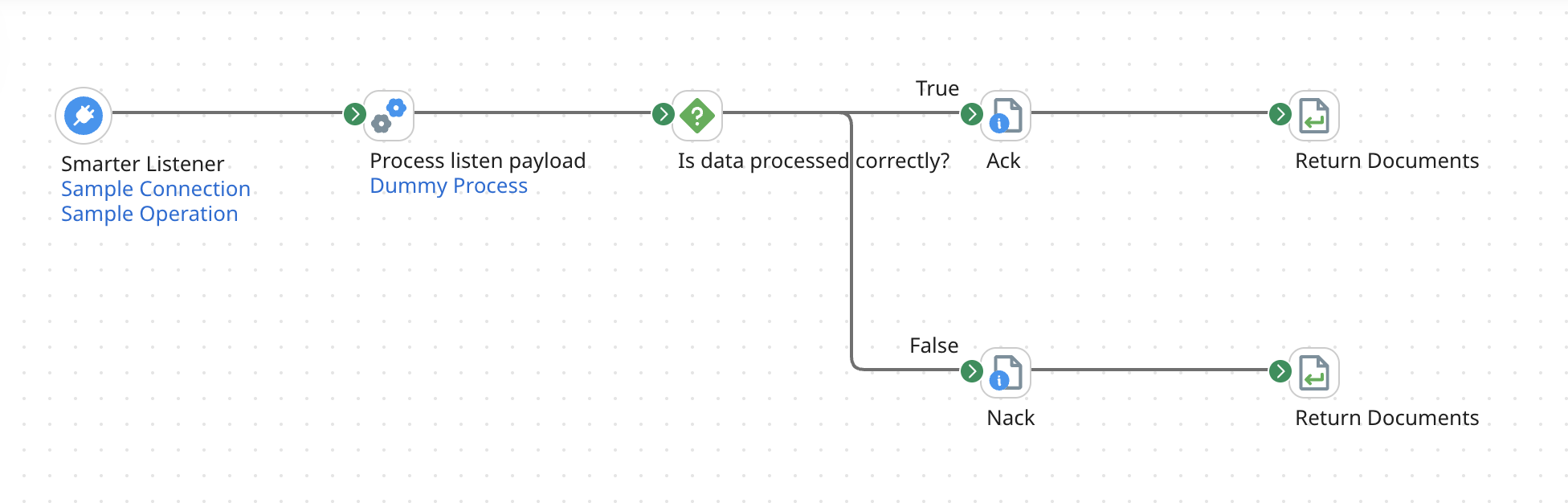
Example: Message queue integration
This example demonstrates how a process can guide the connector’s behavior using dynamic properties and the Return Documents shape.
This is a hypothetical example. Your connector’s properties and behavior may vary.
Next steps
Step 1: Update your project
-
Upgrade to Connector SDK 2.28.3 or later.
-
Add dynamic properties to your
connector-descriptor.xmlso they appear in the Set Properties Shape UI:Add dynamic properties example
<GenericConnectorDescriptor>
    <!-- Your LISTEN operation here -->
    <!-- Dynamic properties that process developers can set -->
    <dynamicProperty id="acknowledgment_mode" label="Acknowledgment Mode" type="string"/>
    <dynamicProperty id="retry_count" label="Retry Count" type="integer"/>
    <dynamicProperty id="target_location" label="Target Location" type="string"/>
    <dynamicProperty id="http_status_code" label="HTTP Status Code" type="integer"/>
    <dynamicProperty id="content_type" label="Content Type" type="string"/>
</GenericConnectorDescriptor> -
Update your listener implementation (ensuring backward compatibility) to handle both data and properties. Your listener should process returned documents and dynamic properties, using sensible defaults. For example, defaulting to a positive acknowledgment.
importantYour connector should handle cases where process do not return documents or set properties by falling back to sensible defaults. Ensure that you document this default behavior clearly so that developers know what to expect.
Update listener implementation example
private void processReturnedDocuments(ListenerExecutionResult result) throws IOException {
    try (ListenerExecutionDocuments documents = result.getReturnedDocuments()) {
        for (ListenerExecutionData data : documents) {
            try {
                handleDocumentData(data);
            } finally {
                IOUtil.closeQuietly(data);
            }
        }
    }
}
private void handleDocumentData(ListenerExecutionData data) throws IOException {
    // Get control properties - provide sensible defaults for missing ones
    Map<String, String> properties = data.getDynamicProperties();
    String ackMode = properties.getOrDefault("acknowledgment_mode", "positive");
    // Process the returned document content stream
    try (InputStream documentStream = data.getData()) {
        processDocumentStream(documentStream, properties);
    }
}
Step 2: Start simple
- Begin with basic property-based control, for example, acknowledgment modes.
- Add document processing as needed.
- Test with both success and error scenarios.
Step 3: Document the contract
- Clearly document which properties your listener supports.
- Specify default behavior when properties are not set.
- Provide example process flows for process developers.
Step 4: Consider performance
- Use
WaitMode.PROCESS_COMPLETIONonly when intelligence or post-process logic is needed. - Keep fire-and-forget mode for high-throughput scenarios.
- Process streams efficiently. Avoid loading entire documents into memory, traverse the
InputStreamdirectly for specific data. - Monitor resource usage when handling large documents.
Troubleshooting tips
If you encounter issues while implementing intelligent connectors, check the following common scenarios:
-
No documents returned: Ensure
withReturnDocuments(true)is set, the connector uses WaitMode.PROCESS_COMPLETION, and the process actually reaches a Return Documents shape. -
Resource leaks: Always close resources properly, for example, use try-with-resources and
.close()to prevent leaks. -
Missing properties: Verify that property names match those defined in your connector descriptor, and provide sensible defaults for missing values.
Give your connectors the intelligence they deserve! Start using intelligent connectors today to turn every process interaction into a high-performing, responsive workflow.
