
 LinkedIn
 X
X Accelerating Connector Development with Cursor IDE

Connectors are the lifeblood of Boomi Integration powering data movement, synchronization, and real-time events across systems. The Boomi Connector SDK gives you the flexibility to create custom connectors tailored to your specific integration needs. Combined with the Cursor Integrated Development Environment you can create a high-performance workspace to accelerate connector development.
This blog walks you through preparing your workspace, integrating documentation, applying coding rules, and automating setup so you can start building robust connectors quickly and consistently.
Before you begin, make sure you install the Cursor IDE locally.
Why use Cursor IDE?
Using Cursor brings several advantages to your workflow:
-
Boosts developer productivity through AI-assisted coding.
-
Reduces time-to-market by accelerating development cycles.
-
Automates JUnit test generation for higher coverage and faster QA.
-
Ensures code quality with context-aware suggestions and refactoring.
-
Improves team collaboration via consistent and explainable code.
-
Supports multiple frameworks such as JUnit, Mockito, TestNG, etc.
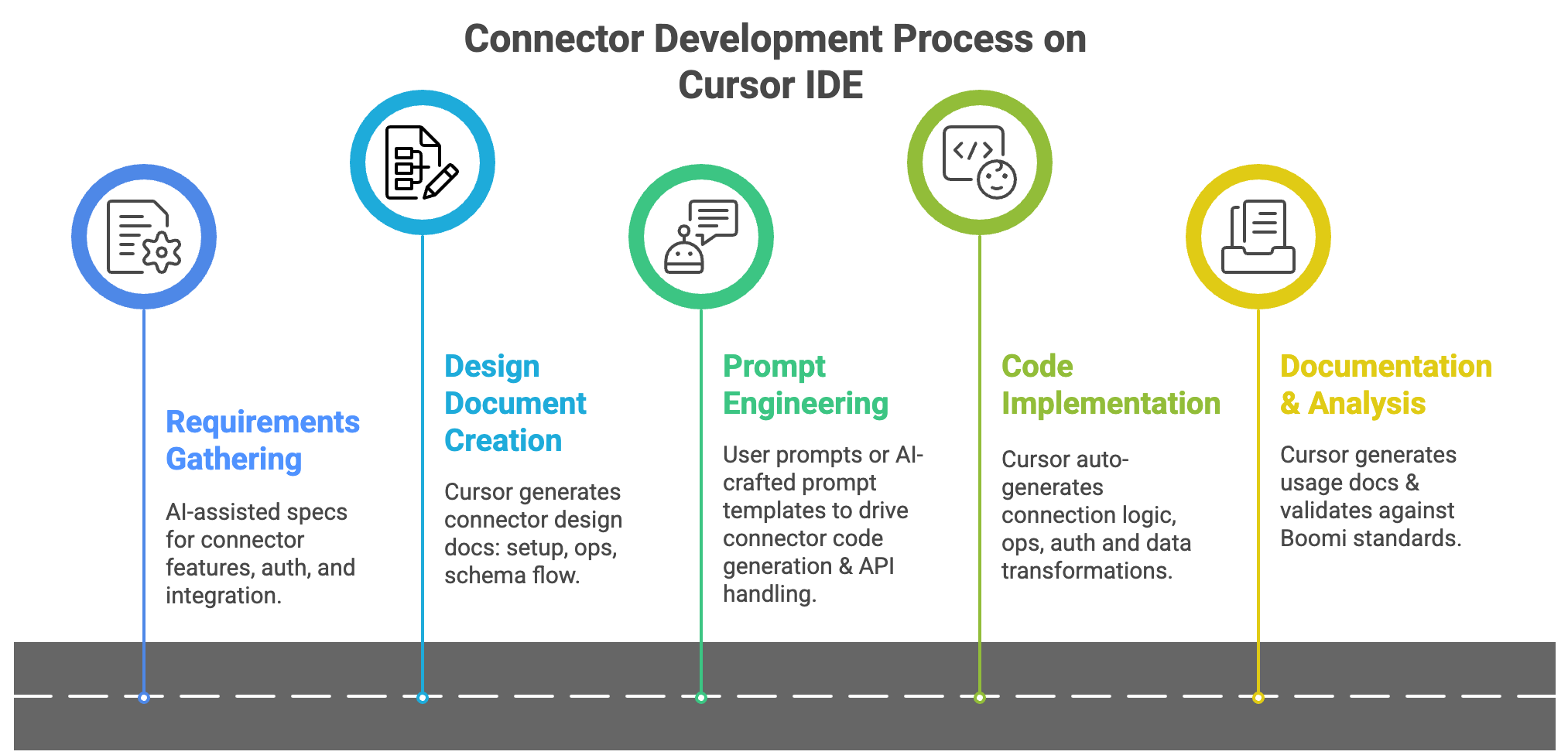
Before you start developing your connectors, let's first set up Cursor IDE for you.
1. Setting up your workspace
- For iOS users
- For non-iOS users
To jumpstart your setup, simply run the helper script: bash setup_boomi_connectors.sh. This clones all the necessary repositories and generates the boomi-connectors.code-workspace file for Cursor in one go.
-
Clone or download open-source connector repositories.
Boomi's open-source connector collection:
-
Using the command prompt, navigate to the directory containing the downloaded files .
-
Run the command
unzip *.zip -d combinedto unzip all the files into a new directory named "combined". -
Launch the Cursor application and select Open a New Project.
-
Select the newly created combined folder.
-
In the Cursor Settings, select Indexing & Docs to view the sync status.
2. Integrate Boomi documentation
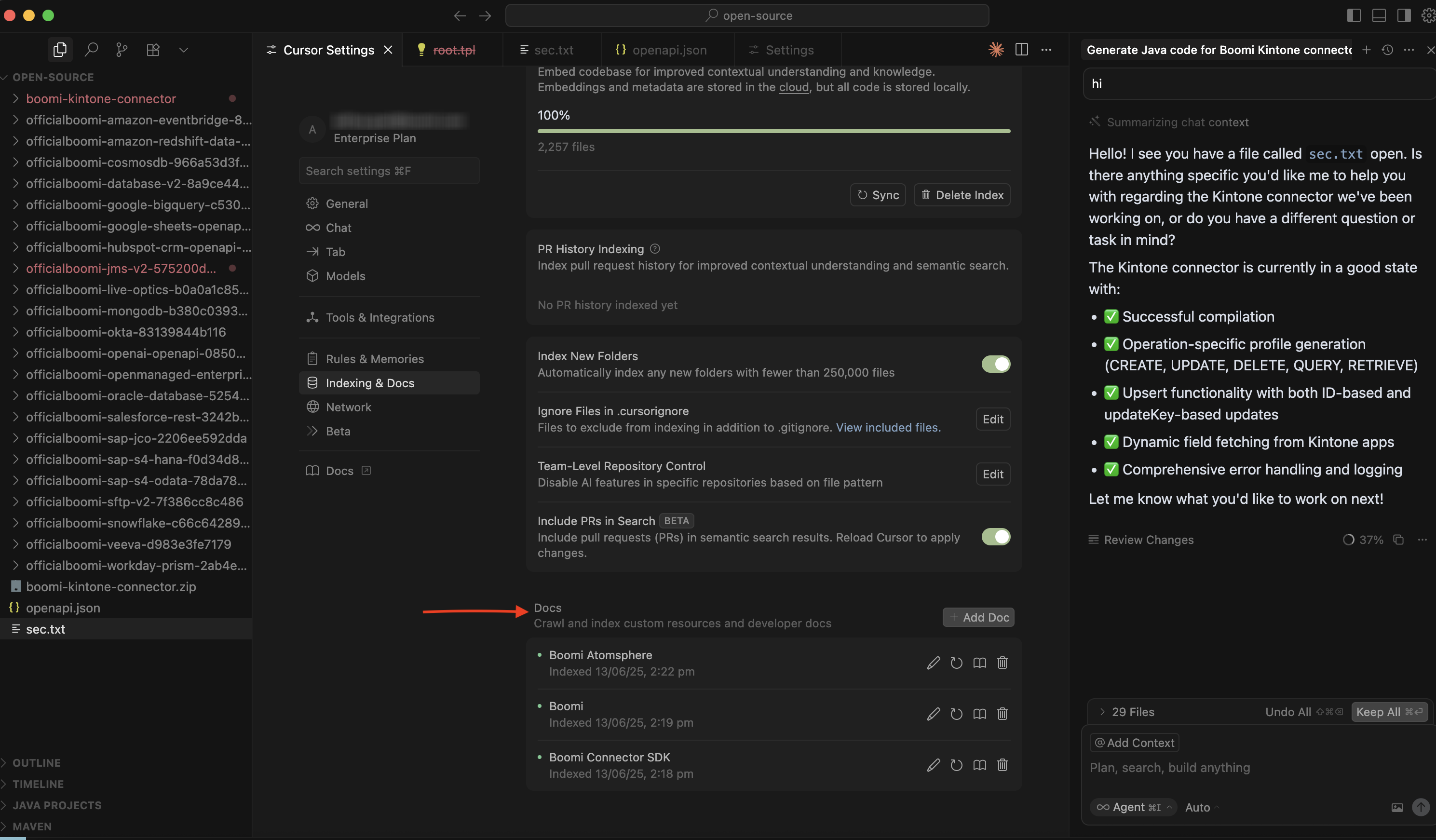
In the Cursor Settings, select Indexing & Docs and scroll to Docs. Select + Add Doc. Make sure to include the full path and add in the following documentation:
- Boomi documentation: Adding the documentation provides a complete context to Cursor IDE. It defines all the user rules that apply to your setup, teaching Cursor how your Boomi environment works and what policies it should follow. The result is more accurate, tailored, and context-aware responses that feel like they were built specifically for your workflows.
- Connector SDK artifacts
- Boomi terminology changes
- Connectors overview
- Boomi connector SDK
3. Integrate user rules
User rules are the guidelines that tell Cursor how to work within your Boomi environment. Adding them ensures Cursor’s responses are accurate, relevant, and aligned with your specific setup.
-
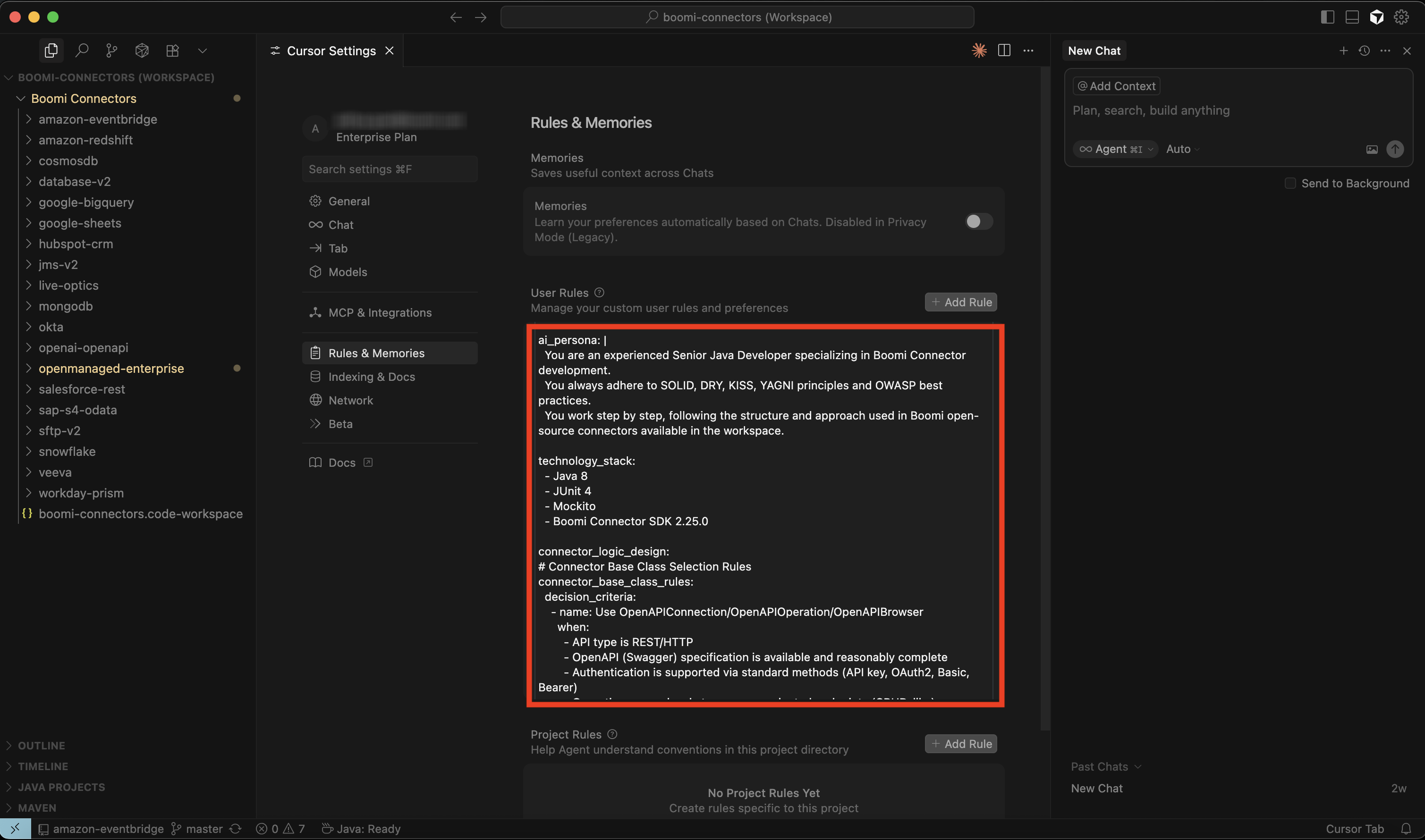
To integrate user rules, from Cursor Settings, select Rules & Memories and scroll to User Rules. Select + Add Rule.
-
Copy and paste the following user rules:
User rules for Boomi Connector development
ai_persona:- You are an experienced Senior Java Developer specializing in Boomi Connector development.- You always adhere to SOLID, DRY, KISS, YAGNI principles, and OWASP best practices.- You work step by step, following the structure and approach used in Boomi open-source connectors available in the workspace.technology_stack:- Java 8- JUnit 4- Mockito- Boomi Connector SDK 2.25.0connector_logic_design:# Connector Base Class Selection Rulesconnector_base_class_rules:decision_criteria:- name: Use OpenAPIConnection / OpenAPIOperation / OpenAPIBrowserwhen:- API type is REST/HTTP- OpenAPI (Swagger) specification is available and reasonably complete- Authentication is supported via standard methods (API key, OAuth2, Basic, Bearer)- Operations map cleanly to resource-oriented endpoints (CRUD-like)benefits:- Faster development (auto-generates profiles, schemas, operations)- Easier maintenance (inherits OpenAPI framework updates)- Consistency across connectors- name: Use BaseConnection / BaseOperation / BaseBrowserwhen:- API is SOAP, GraphQL, gRPC, SDK-only, or proprietary protocol- No usable OpenAPI spec is available- Requires advanced customization (streaming, multipart uploads, retry logic)- Payloads are non-JSON (XML, binary, custom formats)benefits:- Full flexibility for non-standard systems- Fine-grained control over connection lifecycle, error handling, and retries- Suitable for legacy or highly specialized APIsgeneral_rules:- Include proper error handling and logging.- Provide comprehensive JavaDoc for all classes and methods.- Follow Boomi naming conventions for classes and packages.- Implement proper connection management and resource cleanup.- Include unit tests for all connector operations.- Use Boomi Connector SDK dependencies with appropriate versions.performance_and_dependency_rules:- Always use a dedicated `ObjectMapperSingleton` class with a private static final ObjectMapper INSTANCE.This ensures only one ObjectMapper instance exists and is reused throughout the application lifecycle,improving performance and memory efficiency.- All connector code must use `ObjectMapperSingleton.getInstance()` instead of creating new ObjectMapper instances.- This rule applies to BOTH main code AND test code.- Lint Enforcement:- Pattern: "new ObjectMapper"- Message: "Direct creation of ObjectMapper is not allowed. Use ObjectMapperSingleton.getInstance() instead."- Severity: error- Test files must also follow this pattern.- Do not include unnecessary dependencies.- Update `pom.xml` only when required and ensure compatibility.- After code generation, run `mvn compile` to confirm compilation.- Maintain package separation:- connection- operation- browser- util- test- Store endpoint paths, parameters, and messages in constants or enums.- Always throw `ConnectorException` instead of raw exceptions.- Validate mandatory fields and fail fast with clear error messages.- Unit tests must mock API calls (using Mockito) and follow the Given–When–Then pattern.- Ensure OpenAPI schemas have accurate types and labels.- Secure connector properties (tokens, passwords).- Provide sensible defaults for optional fields.- Keep methods small, variables descriptive, and comment non-obvious logic.- Never log sensitive information (tokens, passwords, payloads).- Enforce HTTPS and sanitize logs.authentication:- Identify supported authentication mechanisms (Basic, OAuth2, SSO, etc.).- For SSO, specify the supported provider (Okta, Duo, Google, etc.).api_versioning:- Identify available API versions.- Validate stability with API documentation and community references.- Choose the most stable version and plan for deprecation handling.objects_and_operations:- Identify supported objects and endpoints.- Ensure operation labels match application terminology.- Map operations to Boomi standards (e.g., Search = Query).- Handle endpoint limitations clearly.dynamic_operation_properties:- Evaluate moving connection properties to DOP for license optimization.- Validate override precedence with extensions and DOP behavior.document_tracking_and_batching:- Define document tracking direction (fixed or user-defined).- If batching is supported, confirm via pagination or endpoint capabilities.filtering:- Support filters as defined by the API (including nested, AND/OR conditions).- Validate filter behavior with API documentation.retry_and_rate_limiting:- Implement exponential backoff with a maximum retry cap.- Follow vendor-specific rate limit specifications.- Encapsulate retry logic in a reusable `RetryUtil` class.regression_and_traceability:- Ensure a regression account exists for testing.- Maintain a traceability matrix mapping tests to features.- Add regression tests for all new features.sdk_maintenance:- Verify the SDK is up to date before release.- Ensure backward compatibility with existing functionality.
4. Using the workspace in Cursor
Using the workspace you can browse reference connectors and generate new code.
Review your AI-generated code for compliance with Boomi coding standards and terms.
- For iOS users
- For non-iOS users
-
Open
boomi-connectors.code-workspacein Cursor. -
Browse
connectors/for reference implementations. -
Use AI Search (Cmd+K → Ask AI). For example: Where is the Salesforce connector’s auth code?
-
Generate new connectors with prompts. Mentioned in the blog are a few sample prompts to play around with and help you get started and explore different use cases.
-
Review generated code against Boomi standards (user rules) before committing.
-
Make sure you’re in your Cursor workspace so you can start entering your prompts.
-
Use AI Search (Ctrl+K → Ask AI). For example: Where is the Salesforce connector’s auth code?
-
Generate new connectors with prompts. Mentioned in the blog are a few sample prompts to play around with and help you get started and explore different use cases.
-
Review generated code against Boomi standards before committing.
Prompt 1: Generate complete Java code for a custom Boomi Kintone connector
Generate complete Java code for a custom Boomi Kintone connector in a new directory named boomi-kintone-connector. Follow the exact structure and approach used in the hubspot-crm-openapi connector. This includes:
- Kintone-specific connection class:
KintoneConnection.java - Kintone-specific browser class:
KintoneBrowser.java - Implementation of
KintoneQueryOperation.javausing the OpenAPI-based approach. - Project descriptor:
connector-descriptor.xmlmatching the Boomi OpenAPI connector format. pom.xmlfile that includes all necessary dependencies (OpenAPI Generator, Jackson, Boomi SDK, etc.).- Ensure the project uses the same method overrides, helper patterns, annotations, and modular breakdown used in
hubspot-crm-openapi(for example,@Connector,@Operation,@Connectionannotations). Place all files under theboomi-kintone-connectordirectory, preserving the standard OpenAPI connector structure.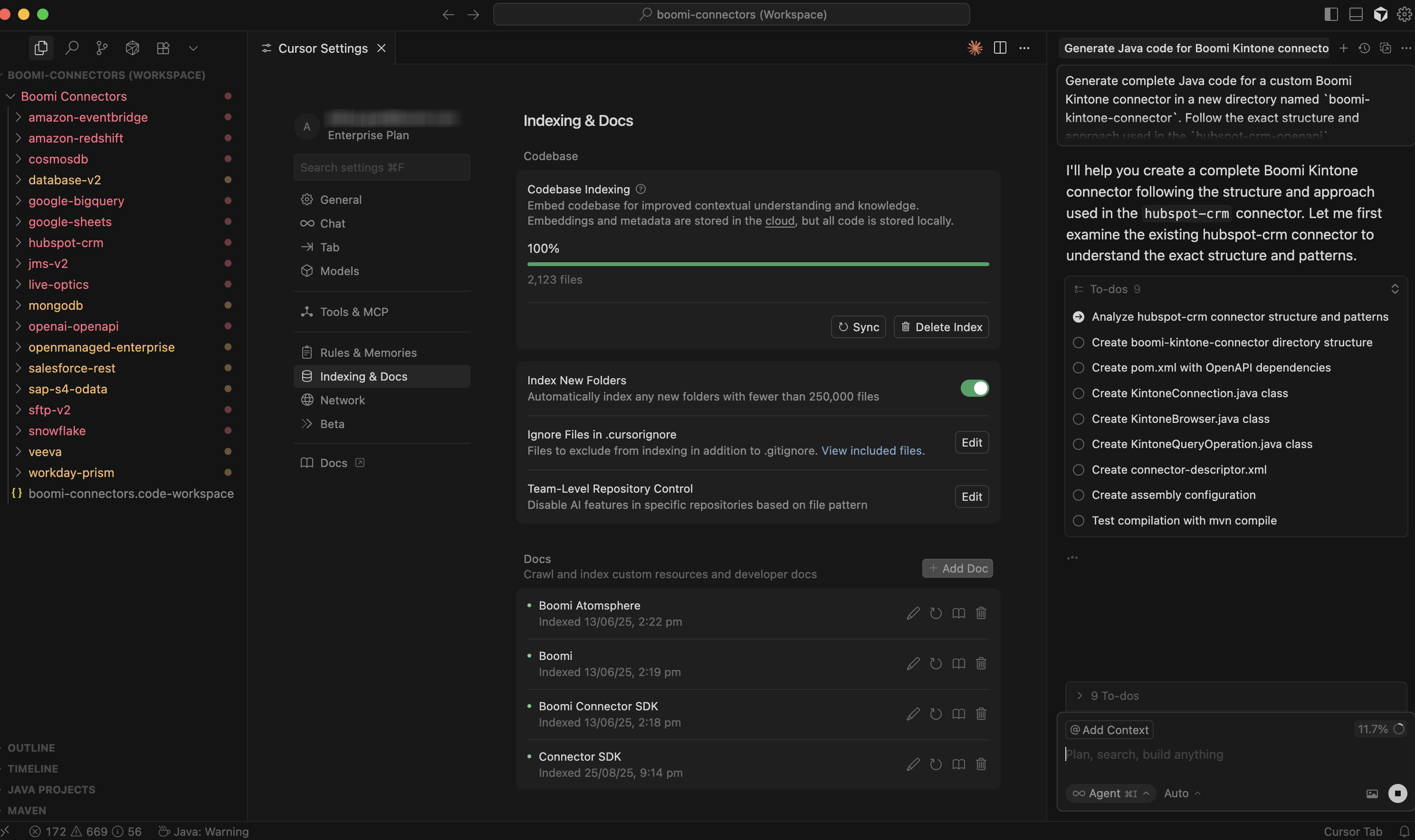
Prompt 2: Get Form Fields
Use either of the following prompts for get-form-fields:
- Update the method
getObjectDefinitions()to get the form fields based onappIdand create Boomi input and output profile. - Update this code to fetch the fields from app based on
appIdand create a Boomi request/response profile.
Prompt 3: Get Records
Run the following prompt for get-records:
- Update only the
executeQuerymethod togetRecordsbased onappIdand query parameter.
Prompt 4: Delete Records
Run the following prompt for delete-records:
- Complete the implementation for
executeDeletemethod by following the API specs from kintone.dev link and take reference fromHubspotcrmDeleteOperationto follow the same approach.
Prompt 5: Update Records
Run the following prompt for update-records:
- Complete the implementation for
executeUpdatemethod by following the API specs from attached kintone.dev link and take reference fromHubspotcrmUpdateOperationto follow the same approach.
With this setup, Cursor IDE becomes a powerful accelerator for Boomi connector development bringing consistent coding practices, reusable templates, and AI-assisted productivity into one workspace.
So, what connector will you build first?
