
 LinkedIn
 X
X Unlocking governance and audit insights with the Boomi Data Hub Platform API

Primary data is not static. It is constantly evolving as systems update records, contributors make changes, and models get revised. What starts as a simple dataset can quickly turn into a complex web of pipelines, models, and dependencies.
Managing this evolution requires visibility, not just into the data itself, but into how it changes, who modifies it, and how it flows across systems.
This is where the Boomi Data Hub Platform API comes into play.
The Boomi Data Hub Platform API exposes the governance and metadata capabilities that power Data Hub. It gives you access to audit events, repository, and universe metadata, and model definitions. With these APIs, you can build automated workflows for governance, lineage, and compliance, all without touching the Data Hub UI.
In this blog, you will learn how to leverage the Data Hub Platform API to explore governance and audit data programmatically. For the complete technical reference, check out the Dev Docs on the Boomi Data Hub Platform API.
What you can do with the Data Hub Platform API
Think of the Data Hub Platform API as the “operations and metadata” layer of Data Hub. With it, you can:
- Retrieve audit events for Data Hub data, models, and configuration changes.
- Discover repositories and the universes they contain.
- Inspect Data Hub model definitions and their versions.
- Track configuration and deployment changes.
- Support workflows for compliance, lineage, and operational monitoring workflows.
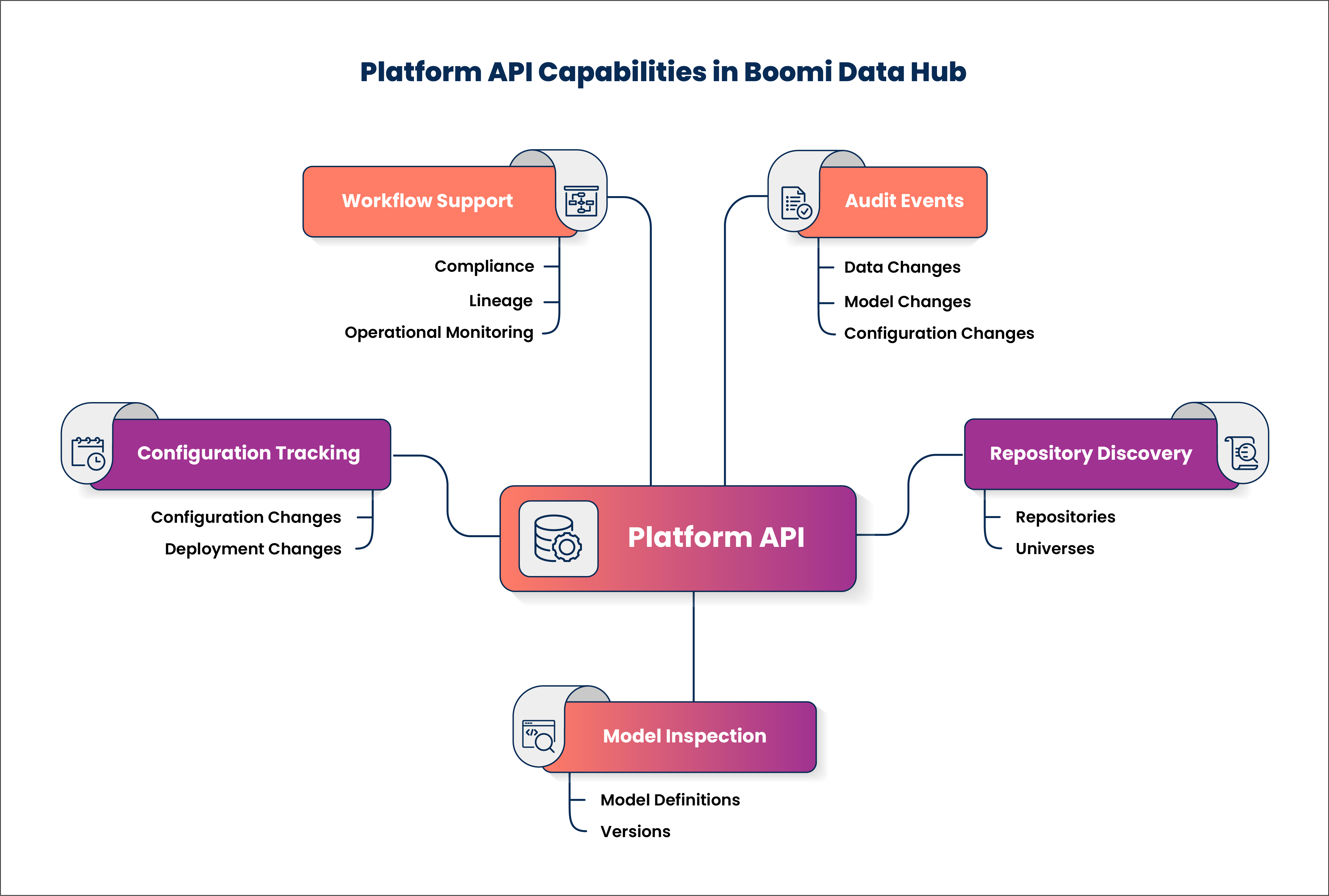
The Data Hub Platform API provides access only to governance and metadata access. It does not provide access to Golden Record data.
Authentication
The Data Hub Platform API uses Basic Authentication for all requests. To authenticate with the Data Hub Platform API:
- Use a Boomi username and password to authenticate.
- If the account uses SSO, provide an API token instead of a password.
- For accounts with two-factor authentication (2FA) enabled, include the
X-Boomi-OTPheader with your request.
JSON Web Token (JWT) authentication is not supported for the Data Hub Platform API.
Working with audit logs (the most powerful feature)
Audit events are accessed through the Data Hub Platform API AuditLog object. Audit logs capture activity across Data Hub and the broader Boomi platform, including data changes, model changes, deployments, configuration updates, and user activity.
For Data Hub-specific audit events, filter using the type, action, and modifier fields defined for primary Data Hub activity.
Querying audit logs
Audit logs are queried via a POST request to the /AuditLog/query endpoint, rather than using URL parameters.
-
Audit log endpoint:
POST /AuditLog/query -
The fully qualified endpoint is:
https://api.boomi.com/api/rest/v1/<accountID>/AuditLog/query
AuditLog endpoints use the core Data Hub Platform API base path (/api/rest/v1), while Data Hub metadata endpoints use the /mdm/api/rest/v1 namespace.
Sample request
The following example shows an AuditLog query request that retrieves Data Hub data change events by filtering on the type and action fields:
{
  "QueryFilter": {
    "expression": {
      "operator": "and",
      "nestedExpression": [
        {
          "property": "type",
          "operator": "EQUALS",
          "argument": ["mdm.data"]
        },
        {
          "property": "action",
          "operator": "EQUALS",
          "argument": ["EDIT"]
        }
      ]
    }
  }
}
Sample response
The following is a sample response returned from the request above:
{
  "result": [
    {
      "date": "2025-01-12T15:24:03Z",
      "type": "mdm.data",
      "action": "EDIT",
      "modifier": "NONE",
      "userId": "crm-system",
      "message": "Updated field EMAIL on record CUST-00001"
    }
  ]
}
This approach provides a reliable, documented way to retrieve Data Hub-specific audit events, avoiding unsupported or ambiguous filters.
Working with repository, universe, and model metadata
Repository, universe, and model metadata can be accessed through the Data Hub Platform API, enabling automation for governance, validation, and monitoring workflows.
List repository metadata and hosted universes
Repository metadata and hosted universes are retrieved via a GET request to the /repositories/<repositoryID> endpoint.
-
Repository metadata endpoint:
GET /repositories/<repositoryID> -
The fully qualified endpoint is:
https://api.boomi.com/mdm/api/rest/v1/<accountID>/repositories/<repositoryID>
This endpoint returns repository metadata, including the universes hosted in the repository.
Working with model definitions
Model definitions are retrieved using Data Hub Platform API model operations. The Get Models and Get Model endpoints are commonly used for governance, validation, and cross-environment comparison.
-
Get all models:
GET /models -
The fully qualified endpoint is:
https://api.boomi.com/mdm/api/rest/v1/<accountID>/models -
Get a specific model:
GET /models/<modelID> -
The fully qualified endpoint is:
https://api.boomi.com/mdm/api/rest/v1/<accountID>/models/<modelID>
Use case: Building a "who changed what" dashboard
A common governance scenario is creating visibility into how data and models change over time.
A typical approach includes:
- Querying the AuditLog object on a scheduled interval.
- Storing audit events in an external system such as Snowflake, Postgres, or Elasticsearch.
- Visualizing activity using a BI or monitoring tool.
Minimal Python example
Query AuditLog and print results using Python:
import requests

resp = requests.post(
    "https://api.boomi.com/api/rest/v1/<accountID>/AuditLog/query",
    auth=("username", "password"),
    json={
        "QueryFilter": {
            "expression": {
                "operator": "and"
            }
        }
    }
)

for event in resp.json()["result"]:
    print(event["action"], event["date"], event["message"])
Best practices
These best practices can help you make the most of the Data Hub Platform API while keeping workflows smooth and reliable:
- Always filter audit log queries to limit result size.
- Store audit events externally for long-term analysis.
- Use reasonable query intervals to avoid excessive polling.
- Combine Data Hub Platform API audit data with Repository API record access for full lineage context.
- Validate models and configurations before promoting changes across environments to avoid unintended production impact.
The Data Hub Platform API opens up new ways to understand and govern your primary data. It gives visibility into how data and models evolve, helping you stay on top of changes and maintain control over your environments.
When combined with the Data Hub Repository API, it makes it possible to tie governance, lineage, and compliance together in a way that is fully auditable.
Dive into the Data Hub Platform API reference and start building your governance pipeline today. Share your experience or insights in the Boomi Community. It is always exciting to see how others leverage these tools in their workflows.
