
 LinkedIn
 X
X Connecting primary data access with the Boomi Data Hub Repository API

If you have worked with Boomi Data Hub you already know how critical clean, governed primary data is for downstream systems. But when that data needs to flow into analytics platforms, operational applications, or machine learning pipelines, relying solely on the UI quickly becomes a bottleneck.
That’s where the Boomi Data Hub Repository API comes in!
Boomi Data Hub Repository API provides a secure, supported solution to programmatically access golden records. This blog walks you through how to authenticate, query, retrieve, and update primary data using the officially documented REST APIs and shows how these APIs map directly to Boomi Integration connector actions.
Why the Repository API matters for developers
The Repository API is the primary REST access layer for operational data stored in Data Hub. It’s commonly used to integrate with platforms such as Snowflake, Databricks, Salesforce, ServiceNow, Kafka, and custom applications.
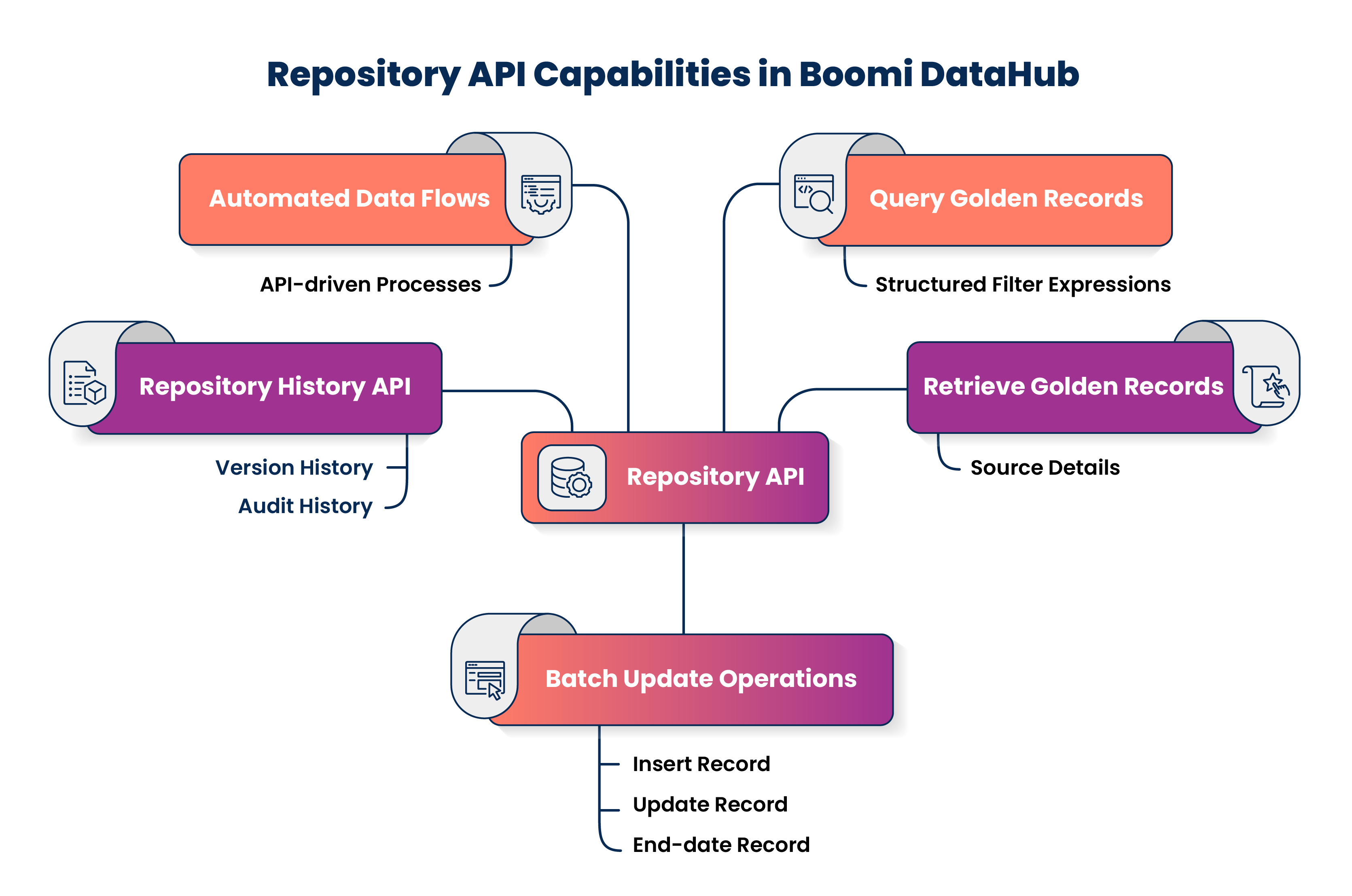
With the Repository API, you can:
- Query golden records using structured filter expressions.
- Retrieve golden records along with their source contributions.
- Insert, update, or end-date records from external systems using batch update operations.
- Access version and audit history using the repository history API.
- Build automated, API-driven data flows without relying on the UI.
Authentication options for the Repository API
The Repository API supports two authentication models depending on how it is accessed. Basic authentication is simpler and suited for internal testing or controlled integrations, while JSON Web Token (JWT) authentication is recommended for modern integrations due to its security, scalability, and flexibility.
Check out the Repository API Authentication Help Docs for detailed information on both Basic and JWT authentication methods.
Basic authentication
Basic authentication uses a Hub username and Hub Authentication Token.
With basic authentication:
- Send credentials in the
Authorizationheader using Basic authentication. - Use this method internally within the Boomi Data Hub connector.
- Apply it for controlled service integrations.
- Avoid it for modern automation patterns.
Header example: Authorization: Basic <base64(username:token)>
JWT authentication
JWT authentication is recommended when calling the Repository API directly.
With JWT authentication:
- Generate a JSON Web Token via the Boomi Platform API.
- Send the token using the Bearer authorization scheme.
- Enforce access through Data Hub domain roles and permissions.
- Use this method for CI/CD pipelines, cloud services, and custom applications.
Header example: Authorization: Bearer <JWT>
When using JWT authentication, most Repository API calls require the repositoryId query parameter.
The Boomi Data Hub connector does not support JWT authentication. JWT is supported only when calling the Repository API directly.
Base URL selection
The base URL for the Repository API is determined by the Hub Cloud URL configured for your repository, which you can find in Data Hub > Repository > Configure:
https://<hub-cloud-url>/mdm/
Searching for golden records
All record discovery in Data Hub is performed using the Query Golden Records API.
When using JWT authentication, the repositoryId=<repositoryID> query parameter is required for this endpoint:
Endpoint: POST /mdm/universes/<universeID>/records/query
Request schema
All Query Golden Records API requests use XML, which allows you to define structured queries including filters, views, sorting, and metadata constraints.
The root element for each request is <RecordQueryRequest>.
The request supports several attributes to control results and behavior:
limit: Controls the maximum number of records returned.offsetToken: Supports pagination for large result sets.includeSourceLinks: Controls whether source metadata is returned.
Child elements of <RecordQueryRequest> specify filters, views, and additional constraints such as createdDate and updatedDate.
Sample request
<RecordQueryRequest limit="1" includeSourceLinks="true">
  <filter op="AND">
    <fieldValue>
      <fieldId>EMAIL</fieldId>
      <operator>EQUALS</operator>
      <value>john.doe@example.com</value>
    </fieldValue>
  </filter>
</RecordQueryRequest>
Sample response
<RecordQueryResponse resultCount="1" totalCount="1">
  <Record recordId="CUST-00001"
          createdDate="2023-11-02T14:12:31Z"
          updatedDate="2024-09-18T09:44:55Z"
          recordTitle="John Doe">
    <Fields>
      <customer>
        <email>john.doe@example.com</email>
        <firstName>John</firstName>
        <lastName>Doe</lastName>
      </customer>
    </Fields>
    <links>
      <link source="CRM"
            entityId="12345"
            establishedDate="2023-11-02T14:12:31Z"/>
    </links>
  </Record>
</RecordQueryResponse>
Pagination behavior
Repository queries are intentionally bounded for performance. When retrieving large result sets, you must implement pagination. Pagination uses the limit attribute and the offsetToken returned in the response to fetch subsequent pages.
Retrieving a single golden record
Once you know how to query records, you can retrieve them directly by ID using the Get Golden Record API.
When using JWT authentication, the repositoryId query parameter must be included for this endpoint:
Endpoint: GET /mdm/universes/<universeID>/records/<recordID>
Sample response
<customer createddate="2023-11-02T14:12:31Z"
          updateddate="2024-09-18T09:44:55Z"
          grid="CUST-00001"
          source="CRM">
  <id>CUST-00001</id>
  <email>john.doe@example.com</email>
  <firstName>John</firstName>
  <lastName>Doe</lastName>
</customer>
Data Hub does not expose any supported REST endpoint under /repository/... for record retrieval. All documented record access endpoints are under /mdm/universes/....
Creating or updating data using batch updates
When you need to create or update multiple records, the Repository API supports upsert behavior via batch update operations.
When using JWT authentication, the repositoryId query parameter must be included for this endpoint:
Endpoint: POST /mdm/universes/<universeID>/records
Sample request
<batch src="CRM">
  <customer>
    <id>12345</id>
    <email>john.doe@example.com</email>
    <firstName>John</firstName>
    <lastName>Doe</lastName>
  </customer>

  <customer op="CREATE">
    <id>67890</id>
    <email>jane.smith@example.com</email>
    <firstName>Jane</firstName>
    <lastName>Smith</lastName>
  </customer>
</batch>
Sample response
https://<hub-cloud-url>/mdm/universes/851a6a64-6a88-4916-a5b7-d6a974d54318/records/updates/42
The returned URL represents the batch update resource and can be polled for status.
Mapping Repository APIs to Boomi Integration connector actions
The Boomi Data Hub connector maps directly to the same Repository APIs, making it easier to move between direct API calls and integration processes.
| Repository API | Connector action | Notes |
|---|---|---|
POST /mdm/universes/<universeID>/records/query | Query Golden Records | Builds RecordQueryRequest and RecordQueryResponse profiles. |
GET /mdm/universes/<universeID>/records/<recordID> (by GRID) GET /mdm/universes/<universeID>/records/sources/<sourceID>/entities/<entityID> (by source entity ID) | Get Golden Record | Supports golden record ID or source entity ID. |
POST /mdm/universes/<universeID>/records | Update Golden Records | Uses batch XML payloads. |
| Batch update status URL | Get Batch Update Status | Optional follow-up for asynchronous updates. |
End-to-end use case: exporting golden records to a data warehouse
A common pattern is to extract golden records and load them into Snowflake, BigQuery, or Kafka.
The typical flow is:
- Query records using the Query Golden Records API.
- Iterate through paginated responses.
- Extract field values from the
Fieldselement. - Load records into downstream systems.
This pattern works well with Airflow, AWS Lambda, Azure Functions, and GCP Cloud Run.
Best practices for using the Repository API
Consider the following best practices to work effectively with the Repository API:
- Use JWT authentication for custom REST integrations for secure, role-based access.
- Filter queries aggressively to avoid full-domain scans.
- Implement pagination defensively to handle bounded results.
- Expect masked fields unless Reveal permission is granted to enforce governance.
- Use batch updates for write operations for efficient upserts.
- Monitor throughput and implement graceful retries for reliability.
Automation
The Repository API supports scheduled, event-driven, and pipeline-based access to golden records without manual interaction with the Data Hub UI. Typical automation approaches include:
- Scheduled jobs: Use the Query Golden Records API to extract records updated since a given timestamp. Often implemented with Airflow, cron, or cloud-native schedulers.
- Serverless functions: Use JWT authentication to retrieve or update primary data in response to events.
- Orchestrated pipelines: Combine Repository API calls with transformation and loading steps.
- Boomi Integration processes: Use Data Hub connector actions when direct REST access is not required.
The Boomi Data Hub Repository API lets you automate and govern primary data access at scale when used in accordance with its documented contract. With structured APIs, batch updates, and secure authentication, you can build reliable, production‑ready data pipelines that integrate cleanly into your architecture, without ever clicking through a UI.
Ready to put your golden records to work? Start building API-driven primary data pipelines today.
