
 LinkedIn
 X
X A developer's guide to configuring Boomi Connectors

Thinking about building a Boomi connector? One crucial element is how your connector handles data, specifically how it accepts and processes that data. As a connector developer, you're creating a bridge that needs to handle complex configurations while remaining user-friendly.
Boomi offers various property types, each serving a specific purpose. Choosing the right one is essential to ensure your connector is smooth, efficient, and intuitive.
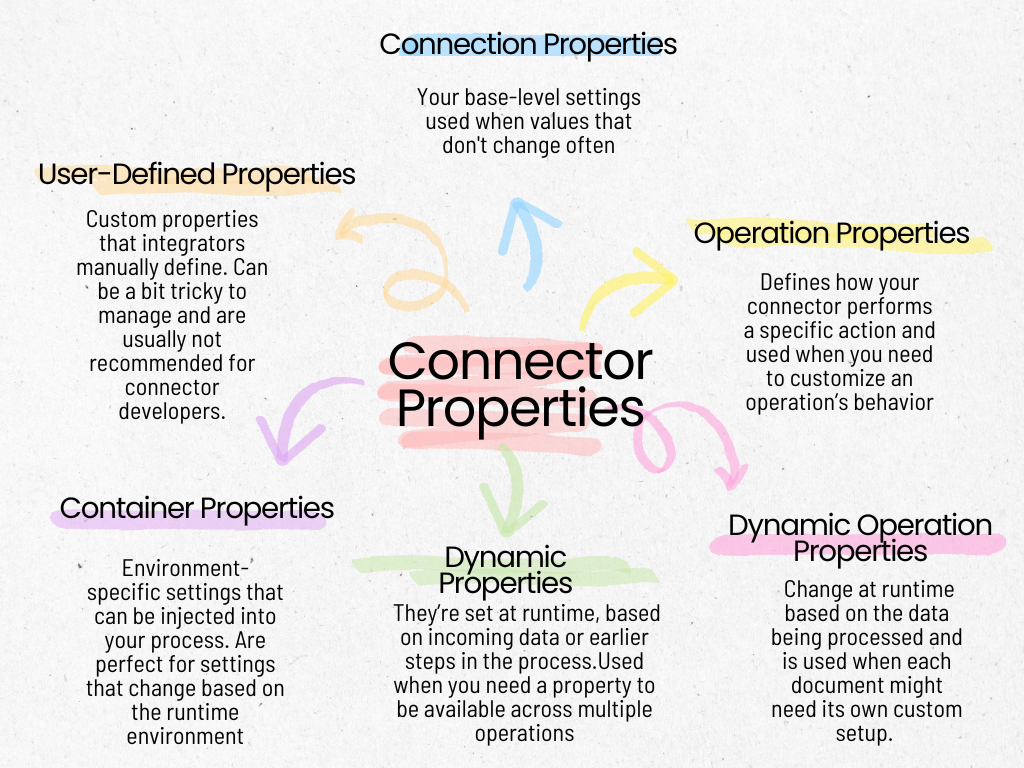
In this post, we’ll walk through six types of properties you can use in your Boomi connector, with some real-world examples and best practices to guide you along the way. Ready to dive in? Let’s do it!
Connection properties
Connection properties define the base-level settings required to connect Boomi and a target system. These properties typically include authentication credentials, base URLs, API keys, and connection configurations. In most cases, an integrator only needs a single connection component per connector to fulfill their requirements.
Use connection properties to configure foundational settings that won't change frequently, such as API credentials or hostnames.
However, if you need to frequently change a property within the connection component, this may indicate that the property should not have been a connection property in the first place. A common scenario for changing connection values is when working across multiple environments (e.g., Production, Development, Testing), where different instances require distinct connection settings. In such cases, integrators can leverage Boomi's Connection Extension feature to manage environment-specific values dynamically without altering the deployed process. For more information, refer to Boomi's guide on setting environment-level connection settings.
Example
For a Shopify connector, connection properties would include the shop URL and access token, which are necessary to authenticate API calls.
Best practices
-
Keep connection logic minimal: Ensure that connection properties are focused solely on establishing the connection (e.g., URLs, credentials). Avoid adding logic related to operations or runtime decisions within connection properties. The connection component should serve as a lightweight, reusable module for all operations.
-
Surface only essential fields: When designing connection properties, expose only the necessary fields to the user. Ensure developers do not overwhelm users with too many options. This simplifies the integration experience and reduces the risk of misconfiguration.
-
Plan for extensibility: Design connection properties with future scalability in mind. For example, if additional authentication methods or API versions are anticipated, structure properties to accommodate future updates without breaking existing integrations.
-
Optimize validation and error handling: Implement robust validation and error messaging for connection properties to catch misconfigurations early in the process. This helps users resolve issues before runtime failures occur.
How can you use them?
Here is an example connection configuration:
<?xml version="1.0"?>
<GenericConnectorDescriptor
    requireConnectionForBrowse="false">
    <description>This is an example connector</description>
    <field id="url" label="URL" type="string">
        <helpText>The base url for the Example service</helpText>
        <defaultValue>http://www.example.com/service</defaultValue>
    </field>
    <field id="username" label="User" type="string">
        <helpText>The User Name for logging into the Example service</helpText>
    </field>
    <field id="password" label="Password" type="password">
        <helpText>The Password for logging into the Example service</helpText>
    </field>
    <field id="connectionHeaders" label="Connection Headers" type="customproperties">
    <helpText>The restricted keys are "username" and "password" and these are case insensitive.</helpText>
    ...
</GenericConnectorDescriptor>
The above descriptor creates the following fields in the connection screen for the connector:
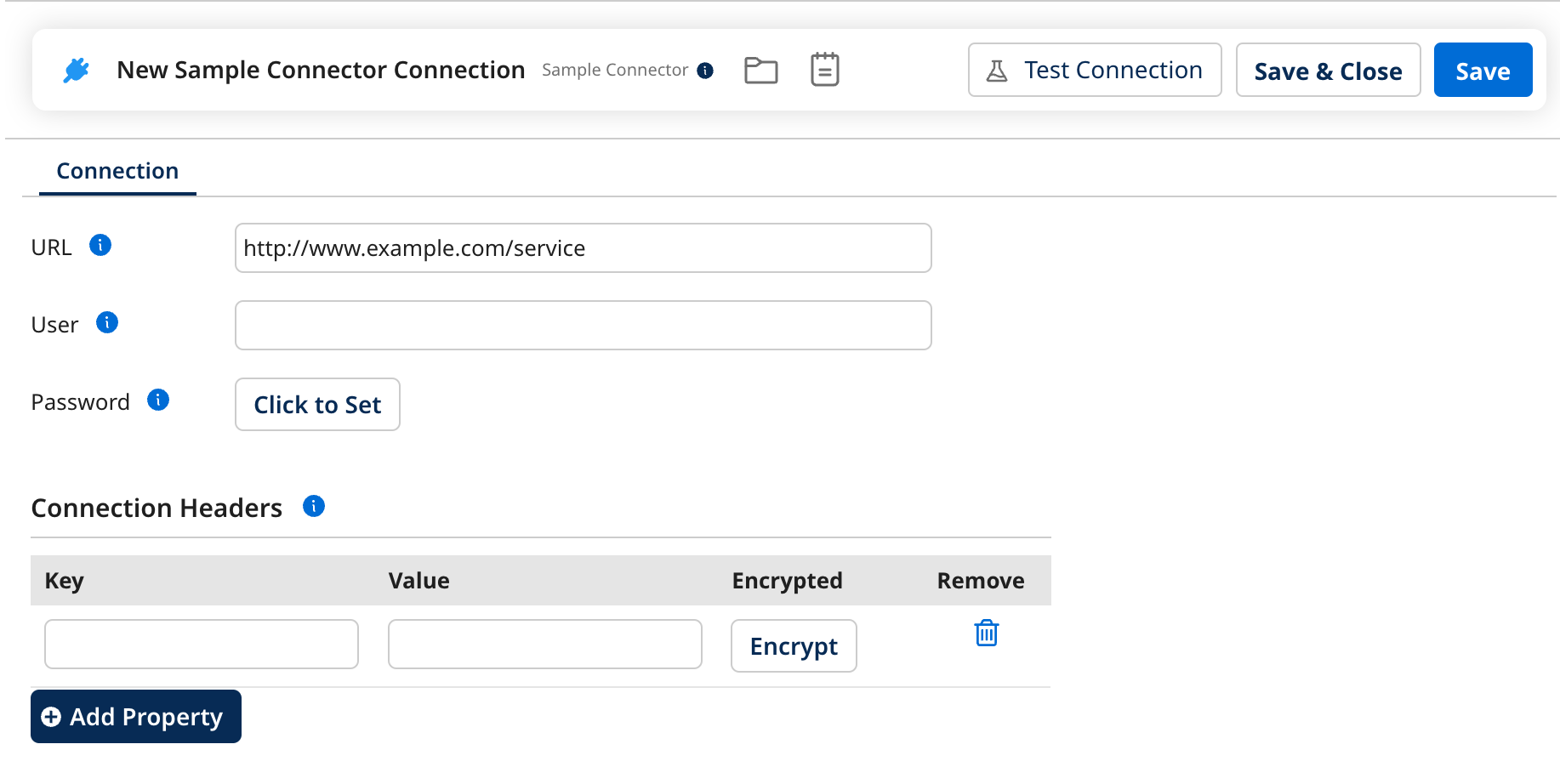
Notice that the fields in the connection screen are simply what is needed to establish and maintain a connection to some example service.
Operation properties
Operation properties configure how the connector interacts with the target system for specific actions. These properties define the scope and behavior of a particular operation, such as querying, creating, or updating records and how the connector handles special conditions during the operation.
Use operation properties to manage individual connector interactions that can vary between operations. For instance, they can define how to handle scenarios where a resource doesn’t exist (e.g., whether to create it or throw an error), control data formats, or specify encryption schemes for data being written to the target system.
Example
In the Disk V2 connector’s CREATE operation, one of the operation properties allows users to specify whether the connector should create a directory if it doesn’t exist. This option is configured directly within the Operation Screen, allowing for flexibility in file creation behavior.
Best practices
-
Maintain modularity: Design operation properties to support specific, isolated operations. Avoid mixing different types of logic within a single operation property to keep operations concise and easier to debug.
-
Provide clear descriptions: In the UI, clearly describe the functionality of each operation property. This ensures that users understand the impact of the selected operation properties on the integration.
-
Set default values: Provide sensible default values for operation properties to minimize user error and make the connector more user-friendly. Defaults should reflect common use cases but remain customizable when needed.
-
Support future enhancements: Structure operation properties to be forward-compatible. Consider potential future requirements or enhancements, such as new operation types or system capabilities, and design the properties to accommodate future expansion without breaking existing functionality.
How can you use them?
Here is an example operation configuration:
<?xml version="1.0"?>
<GenericConnectorDescriptor requireConnectionForBrowse="true">
    ...
    <operation types="CREATE">
        <field id="actionIfObjectExists" type="string" label="Action if Object Exists">
            <helpText>
				Specify how the operation behaves if the object already exists.
            </helpText>
            <defaultValue>ERROR</defaultValue>
            <allowedValue label="Create unique name">
                <value>FORCE_UNIQUE_NAMES</value>
            </allowedValue>
            <allowedValue label="Overwrite">
                <value>OVERWRITE</value>
            </allowedValue>
            <allowedValue label="Append">
                <value>APPEND</value>
            </allowedValue>
            <allowedValue label="Generate error">
                <value>ERROR</value>
            </allowedValue>
        </field>
    </operation>
</GenericConnectorDescriptor>
The above descriptor creates the following field in the operation screen for the connector:
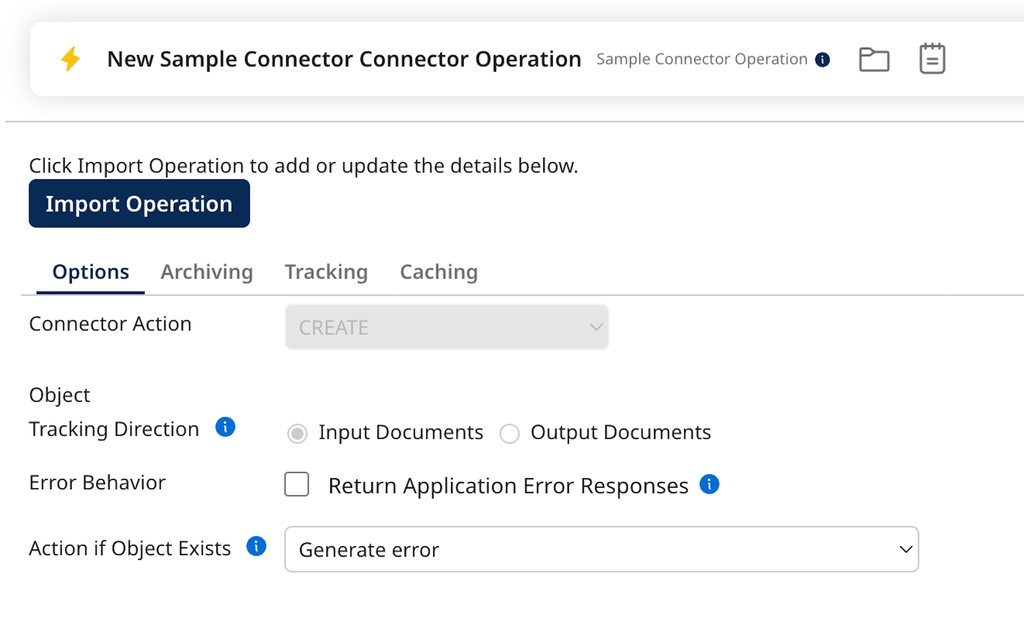
Note that the field gives you a sensible default behavior but also allows an integrator to change this by selecting from available drop down options.
To pull in the Operation Properties, use the BrowseContext.getOperationProperties() method. If you need more details, you can always check out the BrowseContext Javadoc for a deeper dive!
Dynamic operation properties
Dynamic operation properties allow for runtime definition of operation-specific parameters that can change per document. Unlike static operation properties, dynamic operation properties provide flexibility by enabling values to be set dynamically based on the document data or process flow at runtime.
Use dynamic operation properties when the behavior of an operation needs to adapt for each document processed. This is useful when a single process handles various data types or requires different configurations for each document or message.
Example
In the JMS V2 connector’s Send operation, the operation property "priority" can be statically configured in the operation screen, but it is also dynamically editable through the Dynamic Operation Properties screen. This allows the priority of each message or document sent via the JMS V2 connector to be adjusted dynamically based on the document's content or other process parameters.
Best practices
-
Limit dynamic properties to key fields: Only expose dynamic properties for fields that are likely to change based on document-specific data. Overusing dynamic properties can make a connector unnecessarily complex and harder to maintain.
-
Ensure proper default handling: Always provide a fallback or default value for dynamic properties if no dynamic value is supplied at runtime. This prevents errors when dealing with incomplete or unexpected document data.
-
Design with performance in mind: Dynamic operation properties may require additional processing time due to the need to evaluate each document individually. Ensure that dynamic evaluation does not introduce significant performance bottlenecks, especially in high-volume environments.
-
Provide clear documentation: Clearly document which properties are dynamic and how they will impact runtime behavior. This will help developers understand when and why to use them and how to properly configure these properties to avoid errors.
-
Robust error handling: Implement thorough validation and error handling when working with dynamic operation properties to handle potential runtime exceptions, such as missing or invalid dynamic data, without failing the entire process.
How can you use them?
Here is an example of a dynamic operation configuration:
<?xml version="1.0"?>
<GenericConnectorDescriptor requireConnectionForBrowse="true">
    ...
    <operation types="CREATE">
        <field id="metaData" type="string" displayType="textarea" overrideable="true" label="Object Metadata">
            <helpText>
                Specify metadata to attach to the object that is being created
            </helpText>
        </field>
    </operation>
</GenericConnectorDescriptor>
Notice the overrideable attribute on the metadata field. The above descriptor creates the following field in the operation screen for the connector:
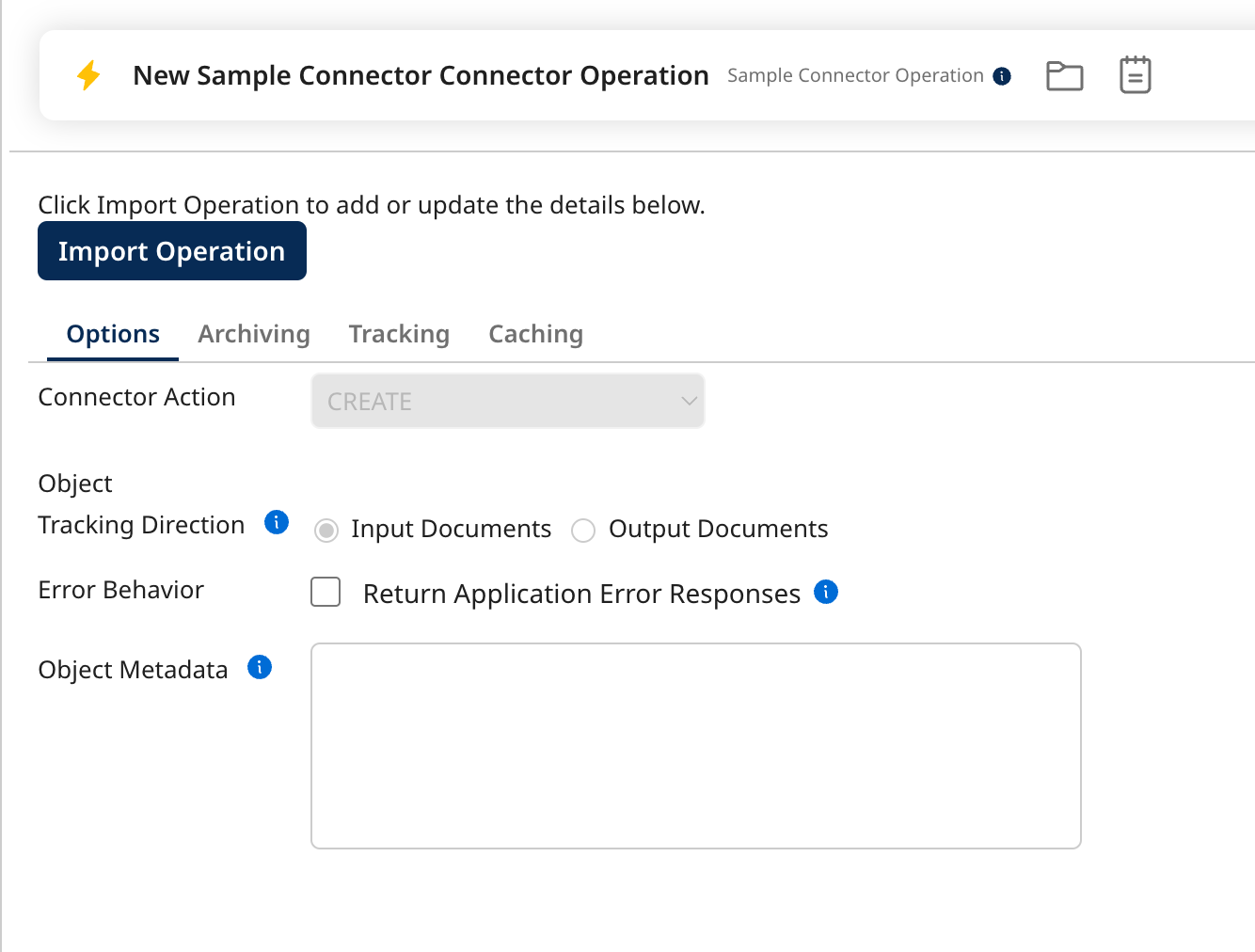
The Object Metadata Operation Property can then be extended in the Dynamic Operation Properties screen:
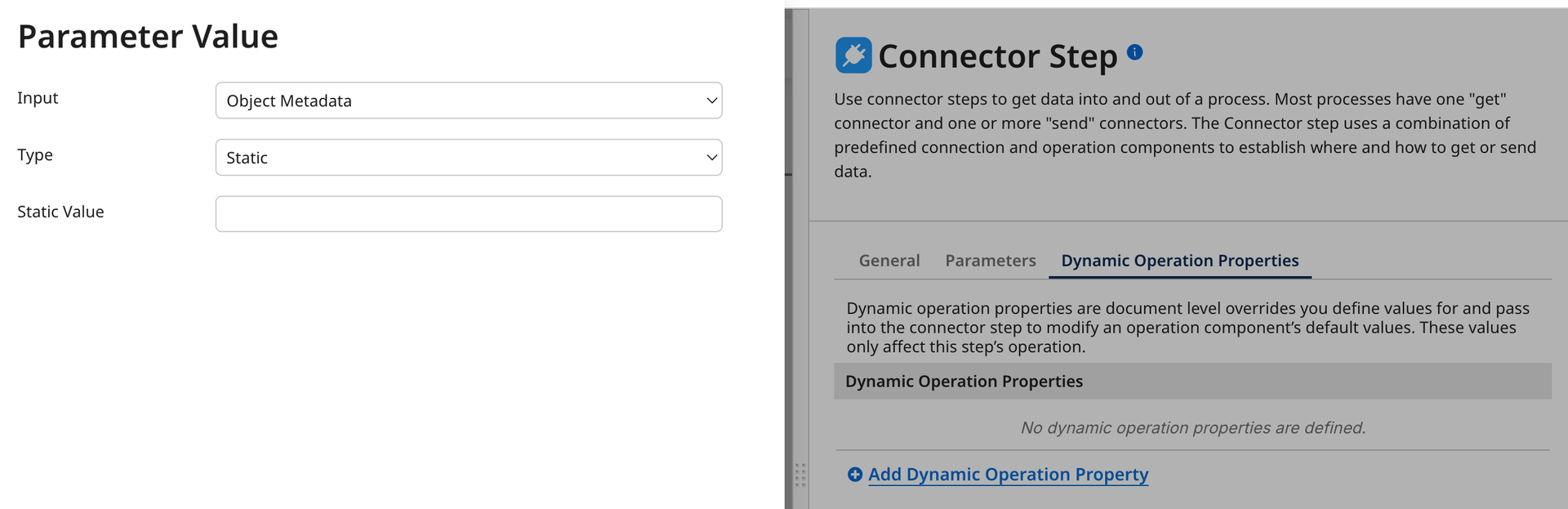
This gives the most flexibility for the user to configure the field.
To grab the Dynamic Operation Properties, use the TrackedData.getDynamicOperationProperties() method. Need more details? You can always check out the TrackedData Javadoc for the full rundown.
Pro Tip: If you’re using TrackedData.getDynamicOperationProperties(), you don’t need to worry about checking the Operation Configuration screen separately via BrowseContext.getOperationProperties()—you’re covered!
Dynamic properties
Dynamic properties allow a connector to determine and pass values at runtime based on incoming data, logic defined within the process, or responses from previous connector calls. Unlike dynamic operation properties, dynamic properties apply more broadly and can be accessed by all operations within the connector. Dynamic Properties are surfaced to the user as Document Properties in the UI.
Dynamic properties differ from dynamic operation properties in the following ways:
-
They are typically applicable for all operations, not just a single operation.
-
They are not visible or configurable within the connector operation screen.
-
They require a separate shape (e.g., the Set Properties shape) to assign values before reaching the connector shape on the process canvas.
We often recommend using Dynamic Operation Properties as they provide a more seamless user experience by keeping configuration contained within the connector shape.
Dynamic properties are ideal when certain values cannot be determined at design time and need to be set for all operations. For example, you may want to tag every document processed by the connector with a specific identifier, and this tag can be dynamically generated or retrieved at runtime.
Example
In the SAP S/4HANA OData connector, a dynamic property is exposed to provide an "X-CSRF Token." The user must first configure an operation to retrieve this token and then set the property using a Set Properties shape. The token is passed to the subsequent operation that requires it to ensure secure data submission.
Best practices
-
Design with flexibility in mind: Dynamic properties should be used to handle situations where values cannot be determined at design time but are needed across multiple operations.
-
Avoid over-complicating configuration: While dynamic properties offer a powerful way to handle runtime data, avoid over-relying on them if Dynamic Operation Properties can achieve the same result within a more streamlined user experience. This keeps the connector more user-friendly.
-
Efficient runtime access: Optimize the implementation of dynamic properties to reduce any unnecessary performance overhead. For instance, ensure the process flow efficiently retrieves or computes these values so that runtime performance remains unaffected.
-
Maintain modularity: When defining dynamic properties, aim to keep them modular and reusable across different operations. This promotes maintainability and reduces duplication in how runtime values are handled.
-
Clear API contracts: Ensure that the APIs your connector interacts with can effectively utilize dynamic properties. For example, if you're dynamically passing headers, make sure the connector exposes these properties in a way that is easy to understand and utilize in the context of the target system.
How can you use them?
Here is an example operation configuration:
<?xml version="1.0"?>
<GenericConnectorDescriptor requireConnectionForBrowse="true">
    ...
    <operation types="CREATE">
        <field id="metaData" type="string" displayType="textarea" overrideable="true" label="Object Metadata">
            <helpText>
                Specify metadata to attach to the object that is being created
            </helpText>
        </field>
    </operation>
    <dynamicProperty id="TAG" label="Tag" type="string">
        <helpText>
			The Tag that will be attached to the messages that are processed by this operation
		</helpText>
    </dynamicProperty>
</GenericConnectorDescriptor>
Notice the dynamicProperty element. The above descriptor allows the integrator to set a value for the field using a Set Properties shape:
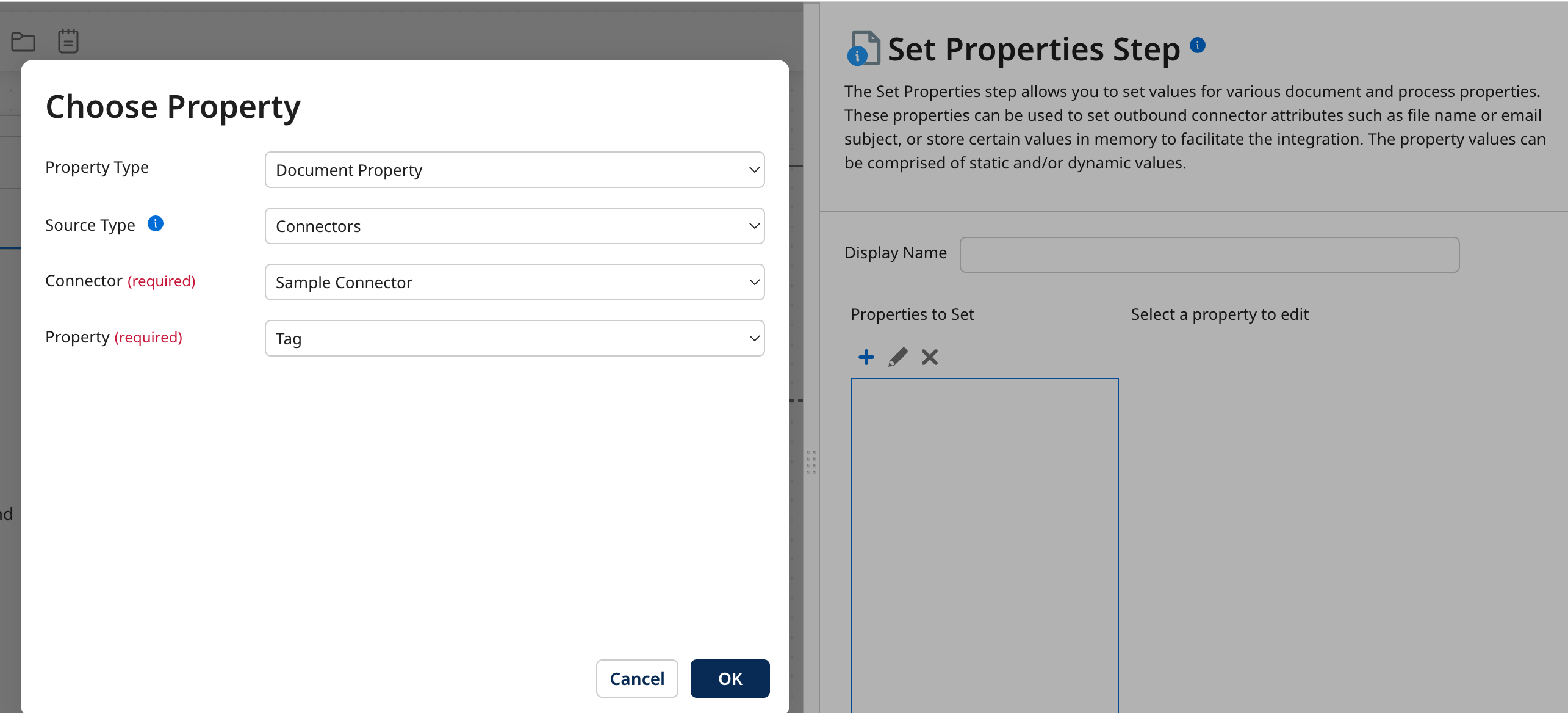
This Dynamic Property is configurable per document and is typically configured right before the intended connector operation.
To retrieve the Dynamic Properties, use the TrackedData.getDynamicProperties() method. For more information, see the TrackedData Javadoc.
Container properties
Container properties are runtime-specific configurations that are managed externally to the Boomi process. These properties are defined at the container or environment level and can be passed into a process at runtime. They are often used to inject settings like file paths, environment-specific URLs, or system-level limits into a Boomi process without altering the process design.
Container properties are useful for managing runtime configurations that are tied to the specific environment in which the connector operates. As a connector developer, container properties provide a way to control behavior based on the runtime environment without requiring changes to the process. This is particularly valuable for scenarios where configuration needs to be adjusted at runtime by system administrators, ensuring that the connector can adapt to different environments seamlessly.
Example
The Kafka connector exposes a container property, com.boomi.connector.kafka.max.request.size, which controls the maximum amount of data the server can return per request. If this value is set too high, the container could run out of memory during processing. This property allows system administrators to adjust this configuration based on the available resources in the runtime environment, without needing to modify the connector or process design.
Best practices
-
Consistent naming convention: Always name container properties using a clear and consistent naming convention that reflects the structure of your connector. A good practice is to use the fully qualified name of your connector class to create a unique namespace, e.g.,
com.boomi.connector.<connectorName>.<propertyName>. This helps avoid naming collisions and ensures that properties are easily identifiable as part of your connector's configuration, especially in multi-connector environments. -
Externalize environment-specific settings: Use container properties to externalize any configurations that may vary between environments (e.g., development, staging, production). This ensures that the connector remains agnostic of the environment and can be reused across multiple deployments.
-
Maintain clear boundaries: As a connector developer, avoid embedding runtime-specific logic in the connector itself. Instead, rely on container properties to surface environment-specific values, allowing the connector to remain focused on its core functionality.
-
Minimize dependency on container property values: While container properties provide flexibility at runtime, avoid over-reliance on them for critical connector logic. Where possible, design connectors that work with sensible defaults since these properties can only be edited by the Runtime owner. Only use container properties for non-essential adjustments (e.g., resource limits or caching).
-
Document supported container properties: Ensure that any container properties surfaced by your connector are clearly documented for the runtime owner or administrator. This ensures that those responsible for configuring the container have clear guidance on what values to set and the impact of those settings.
-
Error handling and validation: Implement proper error handling in your connector to ensure that invalid or missing container property values do not cause the connector to fail unexpectedly. Provide clear error messages or fallbacks when container properties are misconfigured.
How can you use them?
A container admin can set container properties in their Runtime Management page.
See the example below:
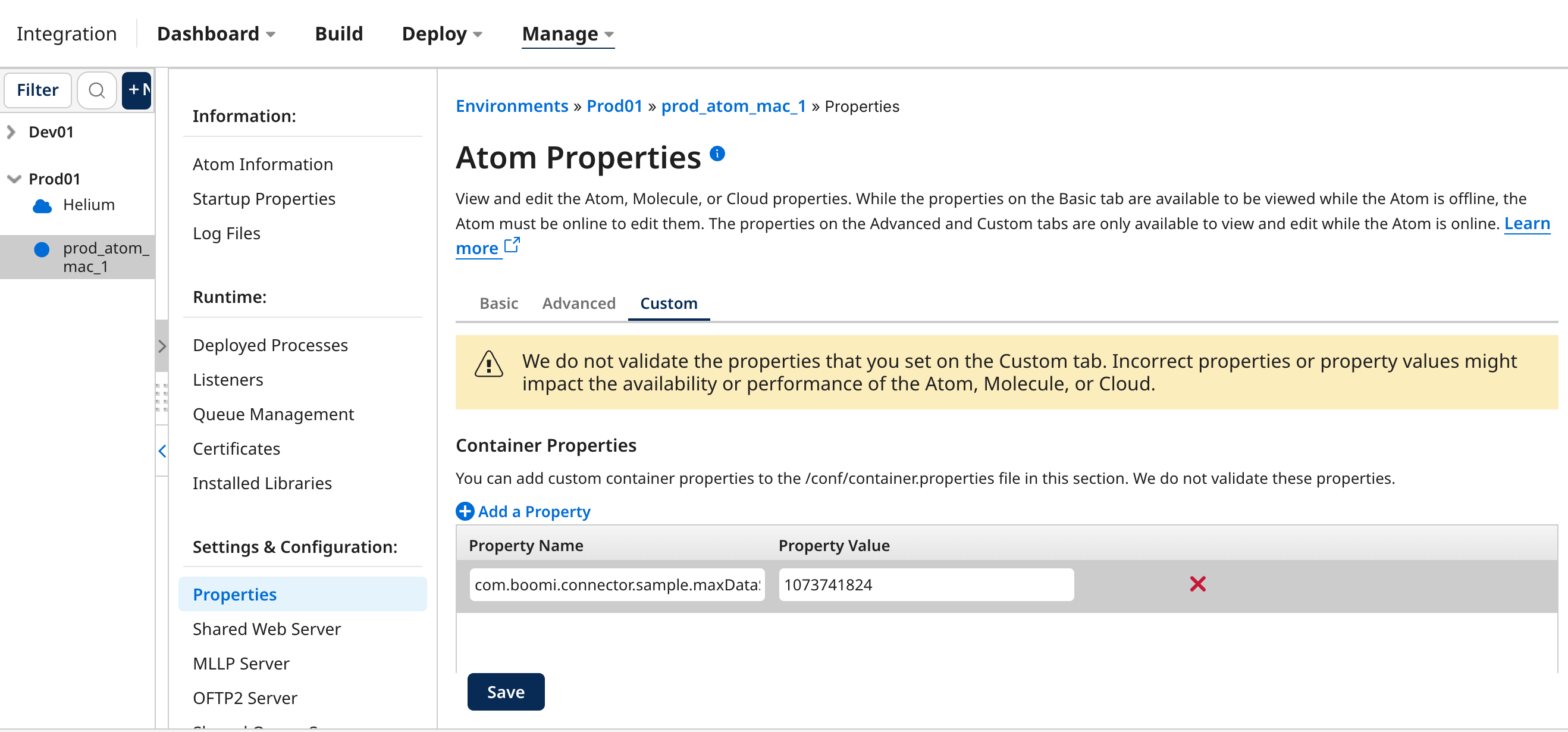
To retrieve the Container Properties, use the AtomContext.getConfig().getContainerProperty(<nameOfProperty>) method.
Here is an example:
package com.boomi.connector.sample;
import com.boomi.connector.api.BrowseContext;
import com.boomi.connector.util.BaseConnection;
/**
 * BaseConnection implementation for Sample Connector
 *
 * @param <C> indicating the Context type being held by this connection
 */
public class SampleConnection<C extends BrowseContext> extends BaseConnection<C> {
    private final Long _maxDataSize;
    public SampleConnection(C context) {
        super(context);
        // retrieve container property for the maximum data size (default to 1MB)
        _maxDataSize = context.getConfig().getLongContainerProperty("com.boomi.connector.sample.maxDataSize", 1048576L);
    }
}
For more information, see the AtomContext and AtomConfig Javadoc.
User-defined properties
Lastly, user-defined properties are set by the integrator within their Boomi processes and surfaced as Dynamic Document Properties. These properties are defined and used by the process developer to temporarily store additional information about a given document as it flows through the process.
Use user-defined properties only in rare cases where you need to pass metadata about a document between connector operations, and where dynamic operation or dynamic properties do not suffice. Even in such cases, it is recommended to avoid them due to their lack of reliability and the potential for process changes to break configurations.
As an alternative, a developer could surface a customproperties Dynamic Operation Property field. You can define their fields keys and values and also dynamically change the values per document. Reference the Connector Descriptor File for more information.
Example
In the RabbitMQ connector, integrators can pass user-defined properties (Dynamic Document Properties) to provide additional header information for messages being sent. However, this design was created before Boomi introduced more reliable alternatives, such as connector-specific dynamic properties (e.g., Dynamic Operation Properties or Dynamic Properties).
Best practices
-
Avoid reliance on user-defined properties: As a connector developer, avoid designing connectors that rely on integrators to set user-defined properties manually. Instead, prefer connector-specific properties like dynamic operation properties, which provide a more controlled and intuitive configuration experience.
-
Namespace custom properties: If using user-defined properties is unavoidable, ensure that property names are clearly namespaced (e.g.,
com.boomi.connector.<connectorName>.<propertyName>) to reduce the risk of name collisions and unintended behavior. -
Provide alternatives: Where possible, design your connector to expose dynamic or operation-specific properties directly, eliminating the need for integrators to create or manage their own user-defined properties.
-
Document clearly: If user-defined properties are used, ensure they are clearly documented, explaining how and when integrators should set them. Include specific guidance to avoid misconfiguration and conflicts with other properties.
-
Fallback and error handling: Implement appropriate fallbacks and error handling to ensure that missing or misconfigured user-defined properties do not cause the connector to fail unexpectedly. Where possible, default values should be provided or runtime warnings should be surfaced to the integrator.
How can you use them?
A process developer can set User-Defined properties through the build canvas.
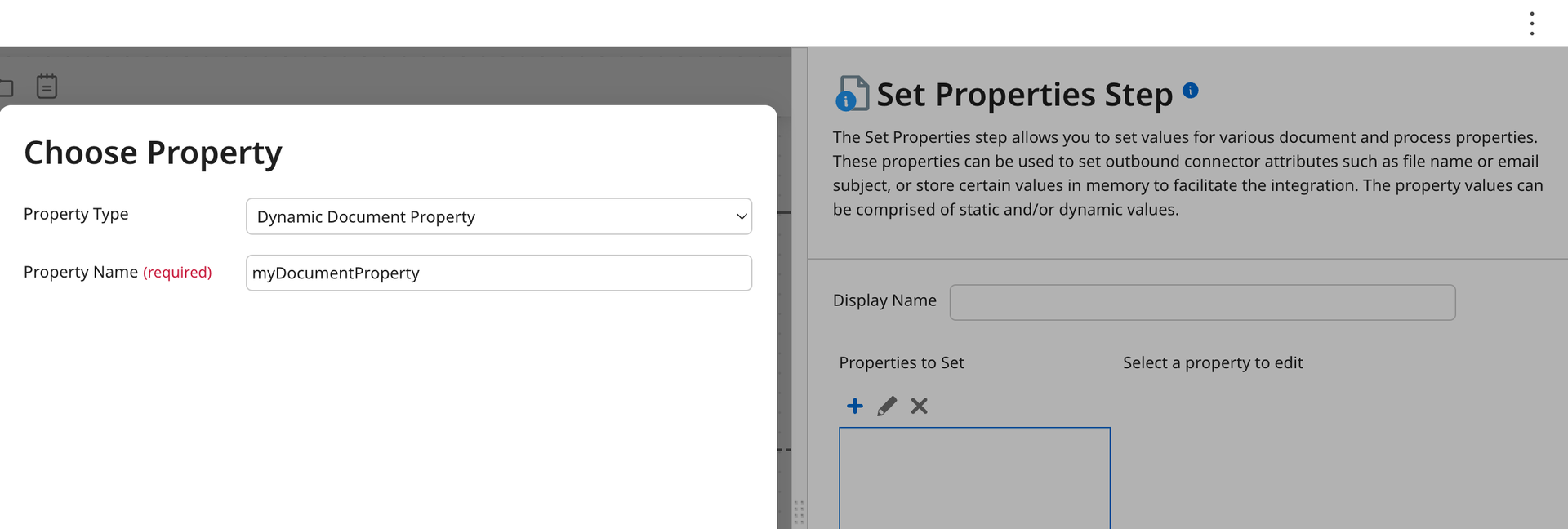
To retrieve the User-Defined Properties, use the TrackedData.getUserDefinedProperties() method:
package com.boomi.connector.sample;
import com.boomi.connector.api.OperationContext;
import com.boomi.connector.api.OperationResponse;
import com.boomi.connector.api.TrackedData;
import com.boomi.connector.api.UpdateRequest;
import com.boomi.connector.util.BaseConnection;
import com.boomi.connector.util.BaseUpdateOperation;
import java.util.logging.Level;
/**
 * Sample Operation
 */
public class SampleOperation extends BaseUpdateOperation {
    public SampleOperation(BaseConnection<OperationContext> conn) {
        super(conn);
    }
    @Override
    protected void executeUpdate(UpdateRequest request, OperationResponse response) {
        for (TrackedData data : request) {
            // log each user defined property
            data.getUserDefinedProperties().forEach((key, value) ->
                    data.getLogger().log(Level.INFO, "User defined property: {0} = {1}", new Object[]{key, value})
            );
        }
    }
}
For more information see the TrackedData Javadoc.
Setting the User-Defined Properties to documents resulting from your operation:
package com.boomi.connector.sample;
import com.boomi.connector.api.OperationContext;
import com.boomi.connector.api.OperationResponse;
import com.boomi.connector.api.OperationStatus;
import com.boomi.connector.api.PayloadMetadata;
import com.boomi.connector.api.PayloadUtil;
import com.boomi.connector.api.TrackedData;
import com.boomi.connector.api.UpdateRequest;
import com.boomi.connector.util.BaseConnection;
import com.boomi.connector.util.BaseUpdateOperation;
/**
 * Sample Operation
 */
public class SampleOperation extends BaseUpdateOperation {
    public SampleOperation(BaseConnection<OperationContext> conn) {
        super(conn);
    }
    @Override
    protected void executeUpdate(UpdateRequest request, OperationResponse response) {
        for (TrackedData data : request) {
            // create payload metadata
            PayloadMetadata metadata = getContext().createMetadata();
            // set a dynamic document property to the payload metadata
            metadata.setUserDefinedProperty("myDocumentProperty", data.getUniqueId().toString());
            response.addResult(data, OperationStatus.SUCCESS, "200", "OK",
                    PayloadUtil.toPayload("outputData", metadata));
        }
    }
}
Wrapping up
Developing Boomi connectors is all about making the right choices when it comes to configurations. Each property type—from connection properties to dynamic ones—has a specific role in making your connector both functional and easy to use. By designing with these in mind, you’ll create connectors that are powerful, flexible, and user-friendly.
So go ahead—build that bridge, make it intuitive, and happy coding!
