Publishing AI agents
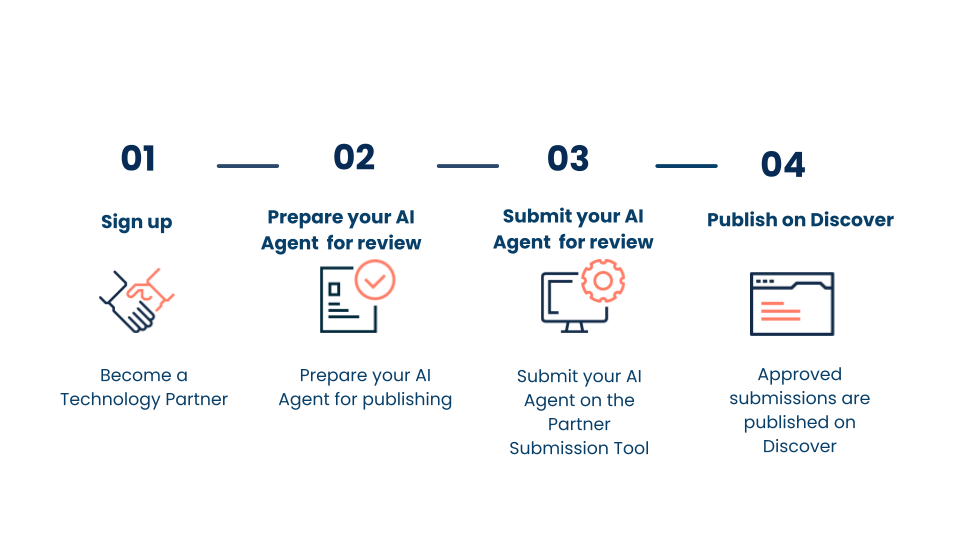
Only Technology Partners can publish AI agents on the Boomi Marketplace. To publish an agent you have built, you need to apply to become a Technology Partner with Boomi.
Export an agent
If your agent was built in the Agent Designer and is currently active, you can export it as a zip file. The export includes a YAML file (profile, tasks, instructions, tools, and guardrails configuration) and a PDF file for instructions on how users can configure their tool credentials. Exported agent files do not include authentication credentials for tools.
Installers can download these files in the Marketplace to quickly install, setup, and deploy your agent in their workspace.
Refer to Exporting an agent for step-by-step guidance.
Sign up to become a Technology Partner
- Visit the Technology Partner Program page to learn about our program.
- Click Become a Tech Partner.
- Complete and submit the Become a Technology Partner form.
- Boomi will review your application. We will email you a notification of your acceptance into the program and a link to access the Tech Partner Portal.
Bundle and package your agent
You must be accepted into the Technology Partner Program to proceed with the steps below.
Follow the steps that appear on the screen. To publish your AI Agent, you must prepare it for review, bundle your agent, and submit it for review. The instructions for these steps are in the Tech Partner Portal.
- sign into the Tech Partner Portal.
- Click Start a new Project on the home screen page.
- Select your use case, for example Publish a Designer Agent or Tool Recipe and add click Next.
- Follow the guided journey and complete the review checklist to ensure the created agent or tool aligns with Boomi standards.
- Navigate to the Labs > Bundles on Boomi Platform and bundle your AI Agent. Follow step 7 and 8 on guidance of bundling and publishing your agent for review. Refer to Adding an AI Agent asset for more information.
Review & submit your AI agent
Upon completing all packaging and bundling tasks, it is time to submit the agent for publishing on Boomi Marketplace using the partner submission tool.
The partner submission tool is only available on the Tech Partner Portal and can be navigated from step 8 in guided agent publishing journey. You can submit AI Agent Recipes and Designer Agent Accelerators through this tool. Refer to Creating a new Submission for more information.
Through the partner submission tool, you can view your agent submission progress through several stages: Draft, Awaiting Approval, Action Needed, and Published. Each stage represents a specific phase in the review and publication process, helping you understand precisely where your submission stands at any given time.
Through the comments section in the Submission tool, the Boomi team will provide notes about anything that needs revision. This feedback is available in the Action Needed status so you can take Action and make necessary changes.
Once all comments are closed and your submission is approved, it will be published, and you will see it live on Boomi Marketplace.
