Guidelines for building effective AI agents
Tasks and instructions guide an AI agent's decisions and responses. Following best practices for these components reduces latency and can help you build AI agents in the Agent Designer that respond reliably and effectively. Refer to Building AI agents for step-by-step guidance on creating an AI agent.
The Large Language Model (LLM) controls when and how to initiate tasks, execute instructions, and invoke tools. Tools can be shared across tasks, and a single tool may be linked to multiple tasks or instructions. The LLM retains user inputs and tool responses to inform further actions.
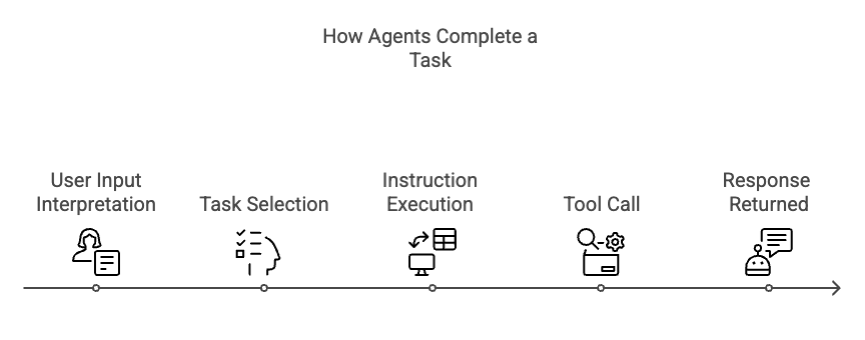
Step 1 - User Input Interpretation: The LLM interprets the user's prompt in the conversational interface.
Step 2 - Task Selection: It selects the appropriate task based on intent recognition.
Step 3 - Instruction Execution: The LLM executes relevant instructions and, if needed, asks the user for inputs. Instructions are chosen based on reasoning, not fixed order, and may be skipped if necessary.
Step 4 - Tool Invocation: The LLM invokes the relevant tool, integrates the data into its response, and may reuse tools with different parameters to complete the task.
The LLM can also loop a tool call when it is instructed and use the same tool multiple times when completing a task. For example, calling an API multiple times with varying inputs based on prior responses or user data.
Task best practices
Tasks are functional units of work or specific actions the agent performs to achieve its main goal. A task can have one or more tools attached to it. For example, "Fetch pending orders."
A task is a modular objective that tells the agent what to do. It contains a single function that guides the agent's reasoning and actions. Tasks connect user intent with applicable instructions and tools. These best practices can help you create effective tasks.
-
Break down the goal: Review your agent goal and break the goal down into small, clear, defined tasks.
-
Be specific: Ensure each task has a specific, well-defined purpose. Tasks with discrete intent improve agent accuracy, traceability, and user experience.
-
Avoid ambiguity: Create task descriptions that are clear and explain the outcome of the task. Task descriptions are considered when the LLM ranks tasks and makes a task selection.
Task examples
Good example
Task name: Check order status Description: Retrieve and display the status of a customer's order using their order number.
Why it's good: This task has a precise definition and one function only. It indicates that the agent will receive input from the user and respond with one output (status).
Bad example
Task name: Handle orders Description: Handle orders like changing an order, canceling orders, and so on.
Why it's bad: This task is too vague. Handle can refer to multiple tasks, such as changing an order, canceling an order, checking status, and so on. An ambiguous task could also lead to the need for a large amount of instructions unrelated to each other, increasing the risk for agent errors, increased latency, or irrelevant tool calls.
Good example
Task name: Get account owner Description: Return the name and email of the sales rep assigned to a specific account.
Why it's good: This task has a precise definition and one function: to find who owns the account. It indicates that the agent will receive an input from the user (account name) and respond with one output (name and email). The action requires one tool call to the CRM.
Bad example
Task name: Manage CRM data Description: Handle CRM-related tasks like finding account owners, updating deal stages, logging notes, and so on.
Why it's bad: This task is too overloaded. It bundles unrelated workflows into one task. It does not provide enough clarity to help the LLM determine which action the user wants to take. It also increases the risk of the agent asking follow-up questions. An overloaded task could also lead to the need for a large amount of instructions unrelated to each other.
Instruction best practices
Well-written instructions are key to building effective and intuitive agents. After the LLM has inferred user intent and selected the appropriate task, they act as a natural language guidebook that tells the agent how to perform a task.
Instructions define step-by-step actions, conditional logic, and fallback behavior. The agent analyzes all task instructions and determines which tasks to execute given the current context, known information, and prior tool responses. They also inform the agent when to ask users clarifying questions, handle ambiguity, or confirm details before proceeding.
-
Add details - Write instructions that offer detailed guidance. Assume the agent will not infer your intent and meaning unless you add it to the instructions.
-
Use natural language - Write instructions as if you were explaining to a colleague.
-
Anticipate user inputs - Write instructions to handle different scenarios of user inputs. For example, "If the user provides the latitude and longitude, call the Weather API tool. Otherwise, if the user provides the city, find that latitude and longitude for the given city and then call the Weather API tool using those parameters."
-
Include tool triggers - Indicate when the agent should invoke the tool. Refer to tools by name. For example, "After you receive the order number from the user, call the Order Status tool."
-
Include error handling - Indicate how the agent should handle scenarios where the tool fails.
-
Include details about visualizations and images - Indicate when you want the agent's response to include an image that is pulled from your data source or an image tool. AI agents can also render chart visualizations natively without needing tools or data sources. Agents can infer which type of chart is appropriate to showcase the data. However, if the agent needs to respond with a certain type of chart, for example a bar graph, be specific in the instruction that you expect a bar graph to display.
Instruction example
Good example
Task name: Check order status Instruction: If the user has not provided an order number, ask them for it. Once you have a valid order number, call the Get Order Status tool. Return the delivery status to the user. If the order cannot be found, apologize and suggest contacting support.
Why it's good: This example describes a logical flow from user input to action and response. It includes conditional logic with simple "If" "then" structure. Also, it mentions when the LLM should invoke the tool. It tells the agent what to do if the tool fails.
Bad example
Task name: Check order status Instruction: Look up the customer's order. Use the tool when you can. Make sure they're happy.
Why it's bad: This example is too vague and does not include enough detail to guide the agent. It lacks any conditional logic to handle different scenarios and problems, such as when an order number is missing or when the tool fails. The instruction does not mention the name or the action the tool takes, which makes it difficult for the agent to identify the right tool to use.
Next steps
After you've defined tasks and instructions, apply guardrails to keep your agent's behavior safe and compliant.
- Refer to Configuring guardrails to restrict topics, filter words, and block sensitive data patterns.
- Refer to Testing and debugging agents to validate your tasks and instructions in the agent trace.
