Choosing the framework
Boomi offers DSL, REST, and SOAP frameworks to develop your connector. If these frameworks don't fit into your requirement, you can develop a custom connector by implementing the required interfaces from the Connector SDK.
To learn more about the connector development process and to choose the right framework, refer to Connectors development process.
Prerequisites
Ensure that you've setup your development environment and created a local project.
- OpenAPI DSL
- REST
- SOAP
- Custom Connector
The OpenAPI Specification (OAS) creates a common framework for the entire API lifecycle to define your RESTful service's feature, including their resources, and associated request-response cycles. The OAS is both human and machine readable, and acts as the blueprint of your entire API development and delivery letting you communicate the value and feature of your API, both to internal stakeholders, and external consumers.
Using the OpenAPI Domain Specific Language (DSL) framework allows developers to map OpenAPI REST-based language endpoints to a user-friendly integration developer experience.
Why build an OpenAPI connector?
- It's faster to build from a spec and this approach cuts down on the development time significantly (80%) from custom SDK development approach
- Creates a more standardized Boomi connector
- Ensures higher code quality and consistency
- Easier maintenance and support
- Auto-generated help text
Boomi provides a Gradle plugin that supports OpenAPI DSL to create a structured and local java project for your OpenAPI connector:
Before you begin
- Refer to the OpenAPI specification file that helps you with the requests and responses.
- Refer to the Build an OpenAPI Connector video tutorial.
Building the project
- Open the
build.gradlefile and define the Boomi plugin version, the SDK version, and the OpenAPI 3.0 specification to use.
For latest versions of the plugin and Connector SDK, refer to the Boomi Gradle plugin and the Connector SDK Changelog respectively.
To checkout the sample build.gradle file, OpenAPI specifications, and other details, refer to the Gradle plugin --> Readme.md --> OpenAPI Connector Extension section.
You can customize your build.gradle file with your OpenAPI 3.0 specification location, authentication parameters, and operation definitions.
- OpenAPI DSL is a no-code way of building a Boomi connector. Hence, there's no need to create Java code or mention any
classNamein yourbuild.gradlefile. build.gradleconfiguration is the key here. You need to configure only yourbuild.gradlefile with all the required authentication and operations, which generates all the required files for you to upload to the Boomi Enterprise Platform.
-
Open a terminal window to start a new command line local session. Ensure that you are in the base directory of the project where the
gradlew/gradlew.batfile is located. -
To build all the necessary files for your connector, run
./gradlew buildcommand in your terminal window. -
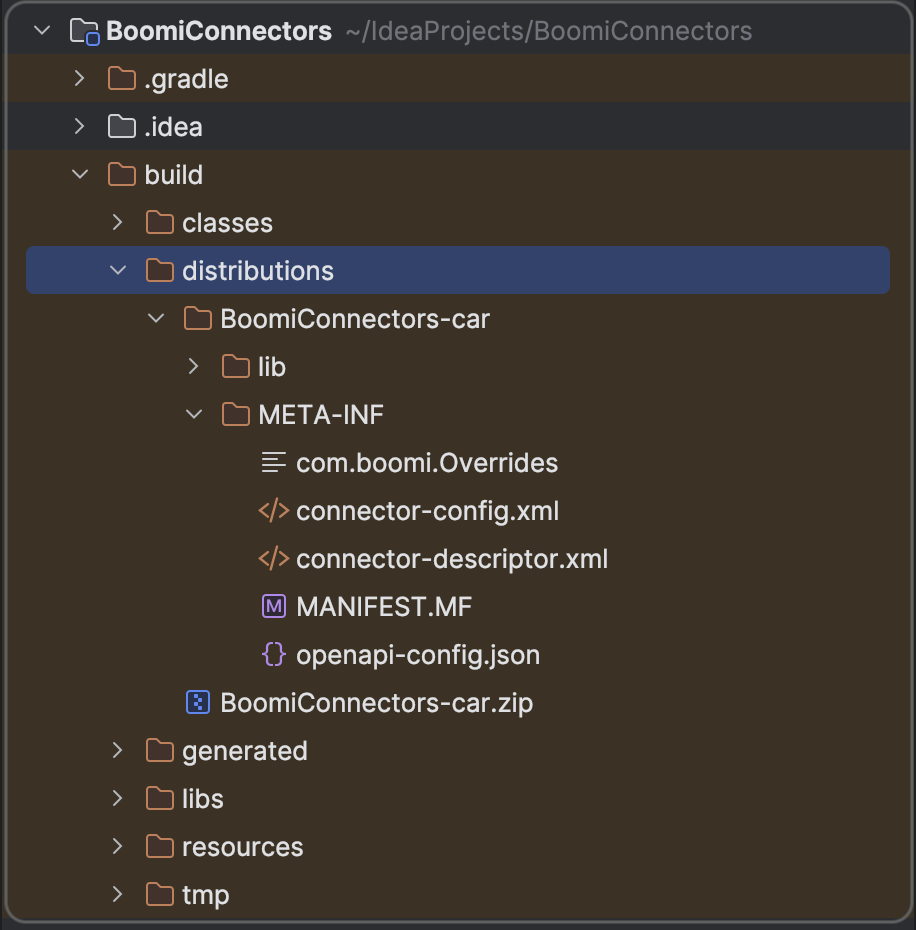
Upon a successful build, a connector archive file (*.car) gets created in the
build/distributionsdirectory within your project and contains:
-
META-INF/connector-descriptor.xml -
META-INF/connector-config.xml -
lib/connector-sdk-util-sdkVersion.jar- For example, connector-sdk-util-2.14.6.jar
-
lib/projectName-projectVersion.jar- For example, MQTTConnector-0.0.1-SNAPSHOT.jar
Next Steps
To customize the Java files as per your requirement, you can extend the OpenAPI connector and implement the Connector and Operation interfaces.
Else, you can upload the generated files to the Boomi Enterprise Platform: Deploying your connector to Boomi Enterprise Platform.
References
Build an OpenAPI Connector video tutorial.
Using the REST Framework to build a connector
When building a REST connector, Boomi recommends that you use Gradle as a build tool as well as leveraging Boomi's Gradle Connector plugin. This plugin facilitates most of the connector project configuration. For more information, refer to this REST framework example.
Introduction
REST is not a protocol or standard but a set of architectural constraints. With its growing popularity among web services, providing some standard utilities for connector developers made sense. The REST framework introduces:
- a REST client
- standard authorization protocols
- CRUD operation handling
- typical response handling
The recipes are simplified to show the relevant details. They may not compile, and they often omit things such as sanity checking and error handling, which should always be present in production code.
REST framework libraries
Use the REST Framework libraries (the Boomi libraries and third-party libraries) to develop and package a REST connector. You do not need to include all of the libraries in your deployed connector package. For example, some are not required because they are already included in the Runtime. The required libraries are specifically highlighted.
All of the files that you need to work with the REST Framework are in the Connector SDK artifacts available from the public repository.
Boomi libraries
| Name | File Names | Include in Connector | Description |
|---|---|---|---|
| Connector SDK REST Framework | connector-sdk-rest.jar | Required | REST Framework template for connector implementation |
| Boomi Apache HTTP Util | common-apache-http.jar | Required | Utility classes for making HTTP calls (transitive dependency of connector-sdk-rest) |
| Apache HttpClient | httpclient.jar | Required | Third party utility that provides a full implementation of all HTTP methods in an extensible OO framework (transitive dependency of connector-sdk-rest) |
| Apache HttpCore | httpcore.jar | Required | Third party utility that provides a set of low level HTTP transport components that can be used to build custom client and server side HTTP services with a minimal footprint (transitive dependency of connector-sdk-rest) |
| Apache HttpClient Mime | httpmime.jar | Required | Third party utility for working with mime encoded entities (transitive dependency of connector-sdk-rest) |
| Boomi AWS Util | common-aws.jar | Required | Optional utility class for adding AWS Signature Authentication (transitive dependency of connector-sdk-rest) |
| Connector SDK Util | connector-sdk-util.jar | Required | Optional utility classes for facilitating connector implementation |
| Connector SDK API | connector-sdk-api.jar | Not required, included in the Runtime | |
| Boomi Util | boomi-util.jar | Not required, included in the Runtime | General utility code |
REST framework components
Among the many components in the REST Framework, the RestConnector, RestOperation, and RestOperationConnection components are the most used and extended:
-
RestConnector— The REST “Template” connector is a functional SDK Connector implementation that can handle simple EXECUTE operations for REST based services. When building a REST based connector, you can extend this class. Many of the extension points for common feature are in theRestOperationConnectionandRestOperationclasses, which are instantiated for each operation invocation from a process.A custom REST based connector will benefit from providing a functional browser by overriding the
createBrowsermethod and creating a customBrowser(possibly extending theBaseBrowserclass and even implementing theConnectionTesterinterface for an added user experience). -
RestOperation— This component serves as the main common action for an EXECUTE operation type (as configured by default in the RestConnector class). This can be extended for custom handling of the REST service’s path, http headers, and request body. -
RestOperationConnection— This component is used to configure the http request executor that will make the http invocations. It is responsible for holding connection information (for example, URL, http method, authentication schemes, and so on). -
RestClient— This component is used to execute the http requests and return the results to the operation. If you extend this class, ensure to also extend theRestOperationConnectionclass and override thegetClientmethod.
Code Sample
Next steps
To create a REST project and other details, refer to these REST framework cookbook recipes.
When building a SOAP connector rather than one that is REST-based, use the Boomi SOAP Framework, which enables easy integration with any SOAP web service.
Introduction
The syntax of SOAP is standardized, but the semantics to interact with a given SOAP web service is not. Implementation details such as authentication, resource protection, and object representation are handled in different ways so that almost every web service is unique in some aspect.
To make things easier when building a connector, the Boomi SOAP Framework provides a shortcut and starting point. The framework is a collection of third-party libraries and custom code to develop and package the SOAP connector. It provides building blocks and templates to handle many common web service implementation features.
When assembled, the framework provides a full-featured Boomi SDK connector implementation.
SOAP Framework libraries
Use the SOAP Framework libraries (the Boomi libraries and third-party libraries) to develop and package a SOAP connector. You do not need to include all of the libraries in your deployed connector package. For example, some are not required because they are already included in the Runtime. The required libraries are specifically highlighted.
When deploying a SOAP connector, follow the same process as you would for a REST-based connector.
All of the files that you need to work with the SOAP Framework are in the Connector SDK artifacts available from the public repository.
Boomi libraries
Boomi libraries
Use the libraries to develop and package a SOAP connector. Not all libraries for development should be included in your connector package.
| Name | File Name(s) | Include in Connector | Description |
|---|---|---|---|
| Boomi Webservices Util | common-webservices | Required | Utility classes for working with SOAP web services |
| Connector SDK SOAP Framework | connector-sdk-ws.jar | Required | SOAP Framework template for connector implementation |
| Connector SDK Util | connector-sdk-util.jar | Required | Optional utility classes for facilitating connector implementation |
| Connector SDK API | connector-sdk-api.jar | Not required, included in the Runtime | |
| Boomi Util | boomi-util.jar | Not required, included in the Runtime | General utility code |
Third-party libraries
Third-party libraries
Use the third-party libraries to develop and package a SOAP connector. Not all libraries for development should be included in your connector package.
| Name | File Name(s) | Include in Connector | Description |
|---|---|---|---|
WSDL4J 1.6.2 | wsdl4j.jar | Required | WSDL parsing |
Apache Axis 1.4 | axis-nspatch.jar, axis-jaxrpc.jar, commons-discovery.jar | Optional, needed for RPC binding | Invoker implementation for "rpc" binding style web services |
Apache WSS4J 1.5.4 | wss4j.jar, opensaml.jar, xmlsec.jar | Optional, needed for WS-Security | WS-Security support |
S 2.0 | (part of JDK) | Not required, included in all supported Java versions | Invoker implementation for "document" binding style web services |
JDOM 1.0 | jdom.jar | Not required, included in the Runtime | Used for some legacy XML processing. Newer code should use the JDK DOM |
SOAP Framework components
SOAP Framework components
Of the many components in the SOAP Framework, the WSConnector, WebServiceExecutor, and WSDLUtil, SchemaMap components are the most used and extended.
-
WSConnector— The web service "Template" connector is an almost completely functional Connector SDK connector implementation that can handle "raw" EXECUTE operations for SOAP web services. When building a connector, you can extend this class when writing a custom web service connector implementation. Many of the extension points for common feature are in the WSConnection class, which is instantiated for each operation invocation from a process. As a starting point for a custom web service connector implementation, use the initial connector-d.xml that is included. -
WebServiceExecutor— This component is a wrapper around various supported web service invocation frameworks (JAX-WS/Axis). The wrapper allows the connector implementation to invoke the web service without needing to handle most of the details. Many customizations configure or reconfigure an instance of this class. When you add support for other OperationTypes, you can use an instance of this class to perform the web service operation invocation. -
WSDLUtil,SchemaMap— Use these utilities to manipulate WSDLs and XML Schemas.
Next steps
Refer to these SOAP framework cookbook recipes that address different types of semantic differences.
If the OpenAPI DSL, REST, or SOAP frameworks don't fit into your requirement, you can develop a custom connector by implementing the required interfaces from the Connector SDK.
- Gradle
- Maven
To build a custom connector using Gradle:
-
Configure the
build.gradlefile. For more details, refer to the Boomi Gradle plugin: -
Configure the connector-descriptor.xml file.
-
Implement the
ConnectorandOperationinterfaces.To get started, the Boomi Gradle plugin offers a
connectorHelloWorldSourcetask that generates the Hello World sample source files.To run this task:
-
Open a terminal or command window to start a new command line local session.
-
Ensure that you're in the base directory of the project where the
gradlew/gradlew.batfile is located. -
Run
./gradlew connectorHelloWorldSourcetask. -
This task generates all the sample source files under
/build/generated/src/connectorHelloWorldfolder.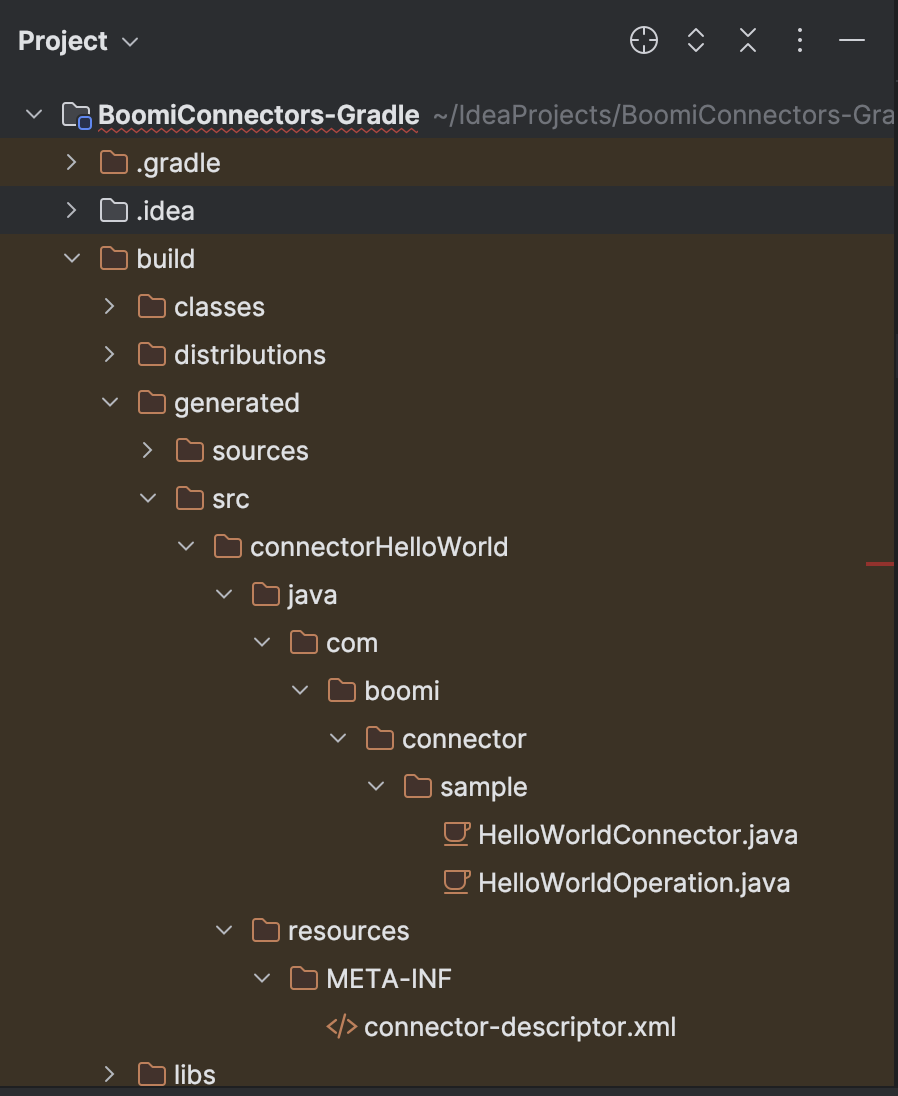
You can copy these files to your
/src/main/folder and customize them as per your requirement. -
Currently, Boomi doesn't provide any specific Maven archetype that generates a sample connector project. We'll update this section whenever the archetype is available.
