Creating a local project
Create a local connector project to start building a connector.
Before you begin
Ensure that you've setup your development environment.
About this task
This task provides an overview of how to create a structured, local connector project (Java project) for your connector.
Boomi highly recommends using Gradle to manage the dependencies.
Our Gradle plugin provides the connectorHelloWorldSource task that generates a sample connector code for you to get started.
Also, to build a connector that leverages a known OpenAPI specification, you can use our Gradle DSL plugin and get started.
On the other hand, Maven doesn't generate any sample connector code.
- Gradle
- Apache Maven
To create a project with Gradle, you can refer to Gradle's Building Java Applications Sample.
Alternatively, you can use an IDE, for example, IntelliJ IDEA to setup and initialize the project for you:
Open your IDE and define your project:
-
Your project name. Do not use any spaces.
-
Confirm the location of your project.
-
Select Java as the project language.
-
Select Gradle as your build system. Gradle 7.0 or higher is required.
-
Point to a Java 8 JDK. If needed, download the appropriate JDK from your preferred vendor.
-
Select Groovy as the Gradle DSL.
-
In the Advanced Settings, mention the GroupId and ArtifactId details.
-
Create the project.
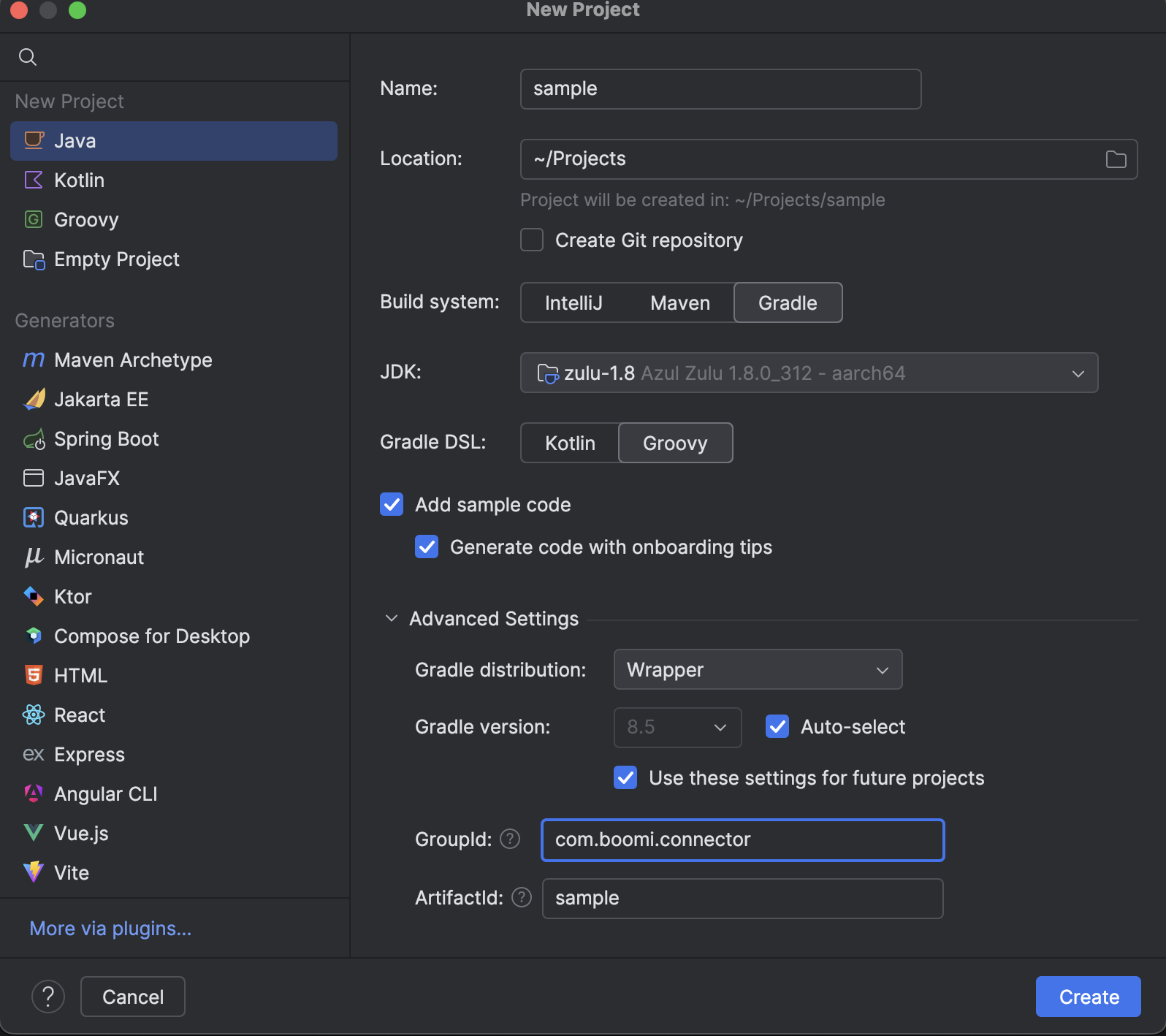
Example from IntelliJ IDEA
You can download Boomi's sample project to get started. This sample project has a few placeholder files. Specifically, a Java class to represent the core Connector class, and skeleton platform or runtime configuration files.
Building the project
-
Boomi recommends that you use the Gradle plugin to manage the dependencies and build your project. The plugin streamlines and simplifies connector development. The Readme.md file in the repo has all the details that you need to configure your
build.gradlefile.
Basic structure of the
build.gradlefile:plugins {id 'com.boomi.connector' version '0.4.3'}connector {sdkVersion '<latest-connector-sdk-version>'className 'com.boomi.sample.SampleConnector'// If you're building an OpenAPI connector using Gradle DSL plugin, you need not mention this className.// The DSL has an internal Java class that it refers to.}dependencies {api "com.boomi.connsdk:connector-sdk-util"api "commons-io:commons-io:2.8.0"implementation "com.boomi.util:boomi-util:2.3.8"testImplementation "junit:junit:4.12"}- To know the latest plugin version, refer to the Boomi Gradle Plugin page.
- To know the latest sdk version, refer to the Connector SDK changelog
-
After setting up your
build.gradlefile, ensure that you are in the base directory of the project where thegradlew/gradlew.batfile is located. -
To build all the necessary files for your connector, run
./gradlew buildcommand in your terminal window. -
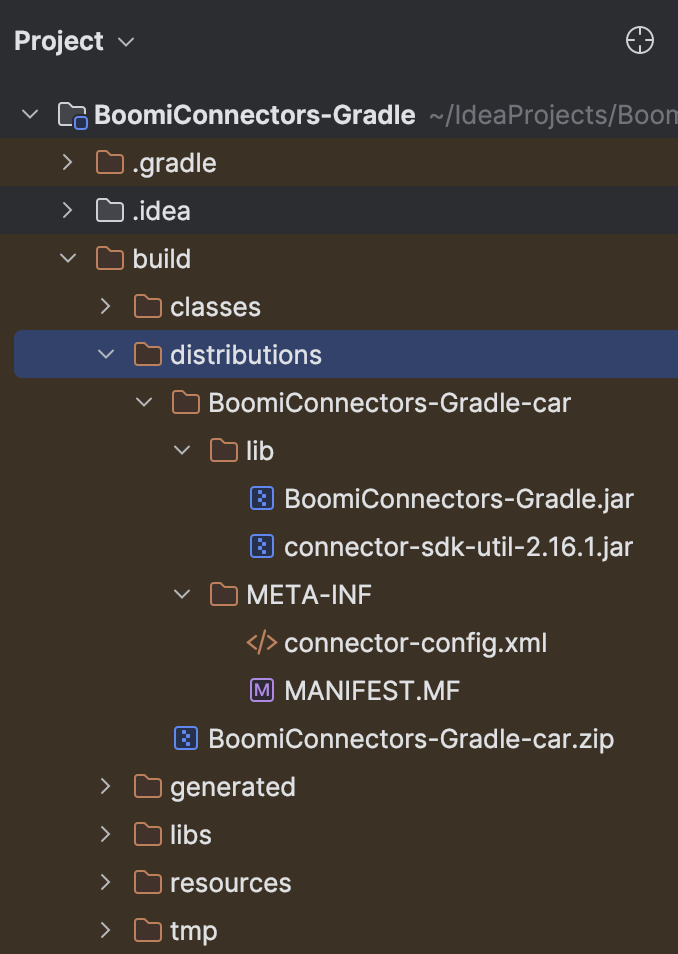
The connector archive (*.car) file should be created in the
build/distributionsdirectory.This task ensures that you've created a local project and can go ahead developing the connector based on the framework you choose.
A Maven archetype is a project templating toolkit providing a consistent means to generate a project structure and its resources. Boomi provides an archetype containing the necessary components to easily get started building a connector.
When creating and managing your build script for production builds, it is recommended you replace RELEASE with explicit build versions in the DarchetypeVersion and DsdkVersion. Newer versions allow you to take advantage of new features, however, you can use previous versions. For the latest version of the SDK and Boomi util, refer to the Connector SDK artifacts topic.
-
To create a new local connector project, open a terminal or command window, and run the following command:
mvn archetype:generate -DarchetypeGroupId=com.boomi.connsdk -DarchetypeArtifactId=connector-sdk-archetype -DarchetypeVersion=RELEASE -DsdkVersion=<SDKReleaseVersion>To know the latest Connector SDK version, refer to the SDK changelog.
For example:
mvn archetype:generate -DarchetypeGroupId=com.boomi.connsdk -DarchetypeArtifactId=connector-sdk-archetype -DarchetypeVersion=RELEASE -DsdkVersion=2.16.1 -
Follow the on-screen prompts to populate values in the POM file:
For example:
sdkVersion: 2.16.1 // Connector SDK versiongroupId: com.boomi.connectorartifactId: my-test-connector // This is your project nameversion: 1.0-SNAPSHOTpackage: com.boomi.connector.mytestconnectorThis command generates a connector project in a directory corresponding to its
artifactIdand contains thepom.xmlwith all the dependencies.importantThis archetype generates an incorrect dependency for the boomi.util jar file due to some technical issues. While we're working on fixing that issue, please modify the
pom.xmlfile of the generated project and update the version of the boomi.util jar from2.3.0to2.3.8. -
The resulting Maven pom.xml file is used to generate other required files and compile your connector into a
*.carfile. To generate the*.carfile:-
Open a terminal or command window
-
Ensure that you are inside the corresponding
artifactIdfolder.For example,
cd my-test-connector -
Run
mvn verify.This command generates all the required files and a
*.carfile that you need to upload to your Boomi Enterprise Platform account as a part of the connector deploying process.importantDue to technical issues, the archetype generates the
*.carfile with two hyphens in the file name. To fix this issue, please modify thesrc/main/assembly/assembly.xmlfile from the generated project and remove the hyphen from the<id></id>tag.The connector project contains:
pom.xmlsrc/main/assembly/assembly.xmlsrc/main/assembly/dependency.xmlsrc/main/resources/connector-config.xmlsrc/main/resources/connector-descriptor.xmlsrc/main/java/'package_name' (empty directories)src/test/java/'package_name' (empty directories)target/*.car.zip
-
Next steps
Use the resulting project to start developing a connector:
- The skeleton project includes the Java package inside which you can start implementing the Connector interfaces.
- Add the base class to the connector-config.xml file.
- Configure the connector-descriptor.xml file based on your connector requirements.
- To learn more about the Connector SDK artifact content and the required components, review the Connector SDK artifacts.
