Configuring the Integrations Component and Plugin
This topic describes how to configure the Integrations Component and install the Boomi EmbedKit plugin in your application.
Configuring the Integrations Component
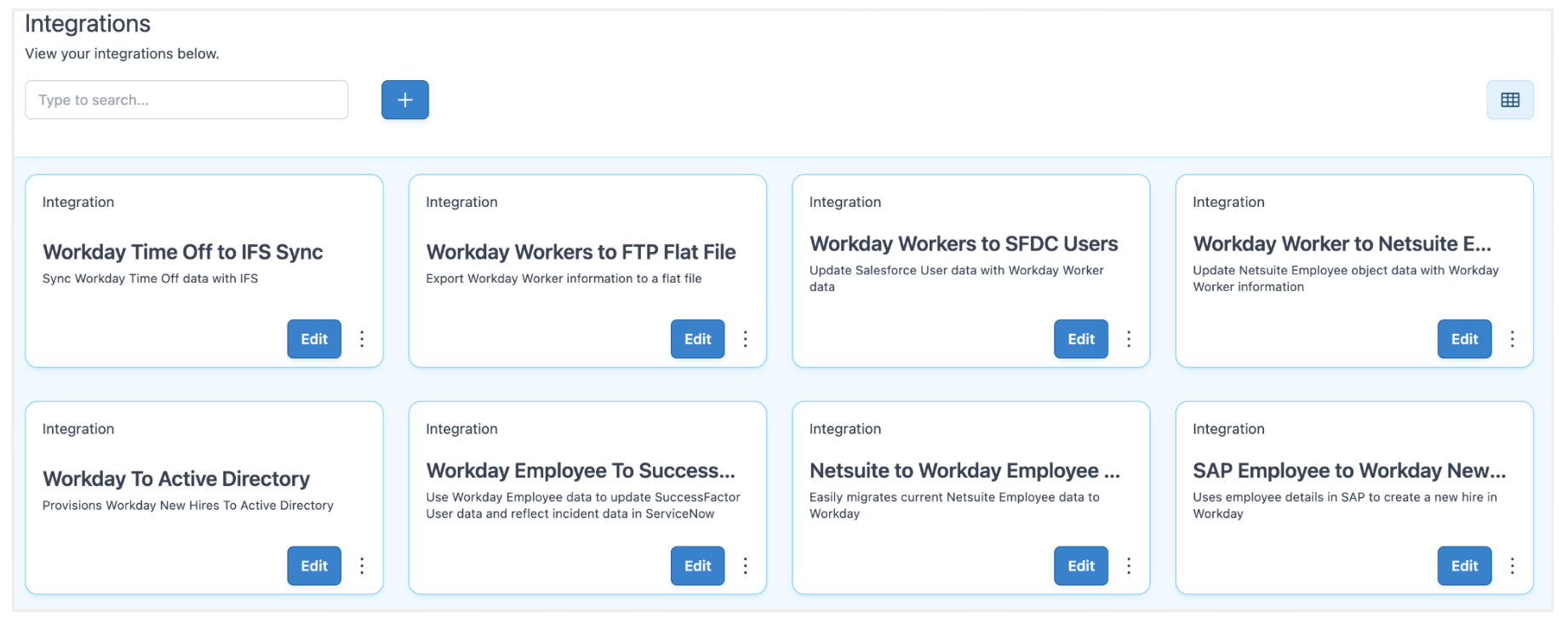
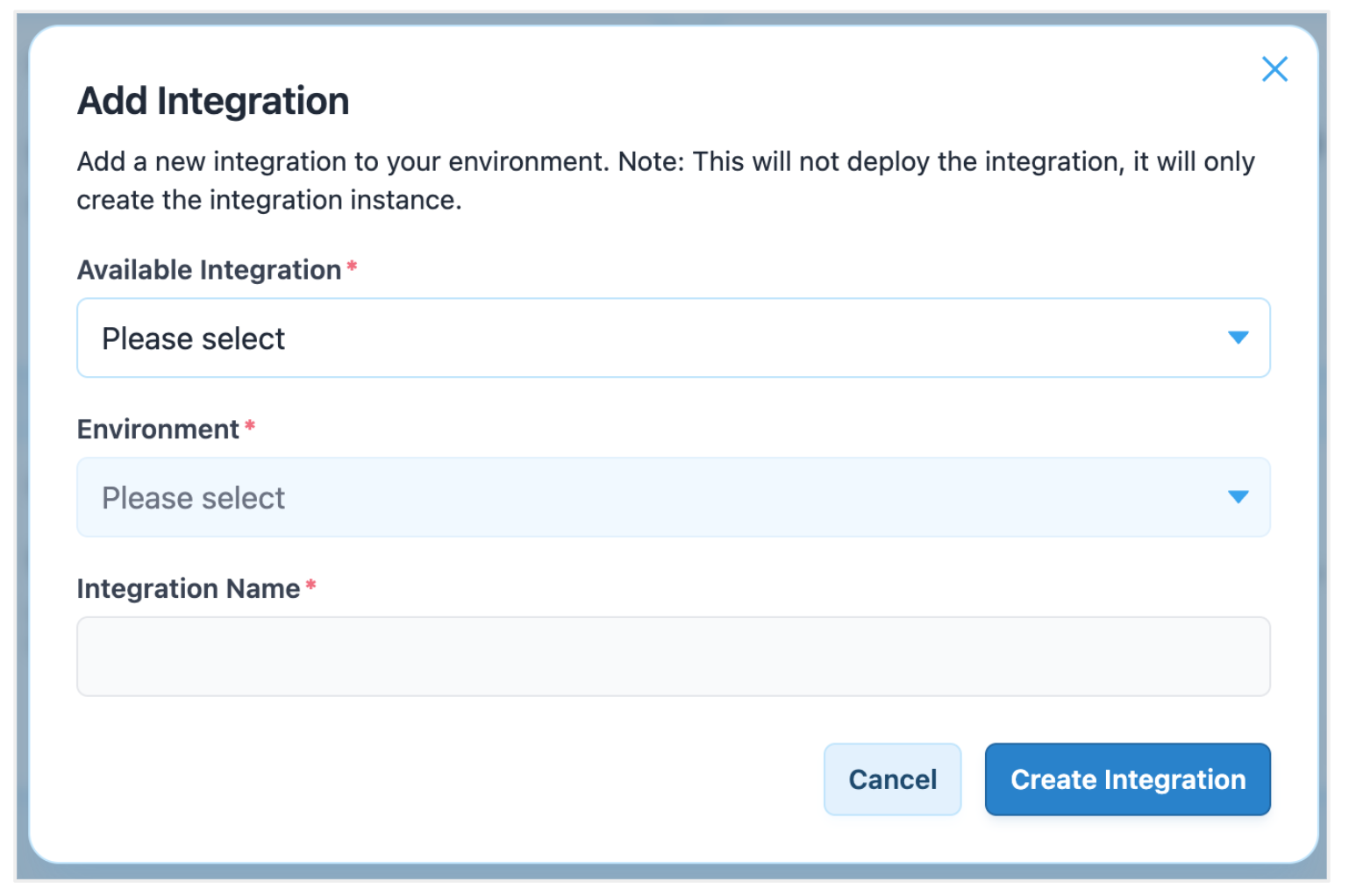
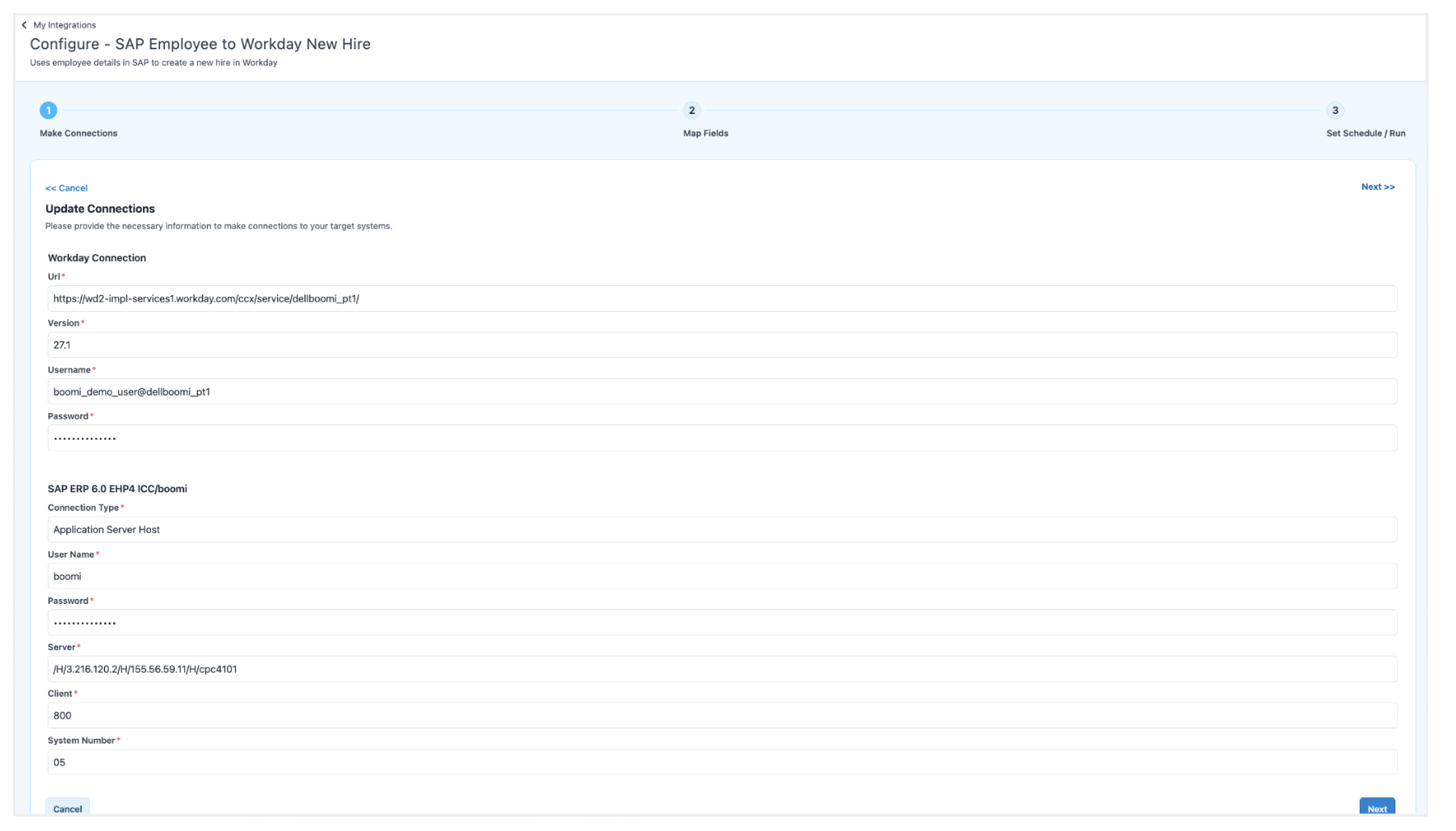
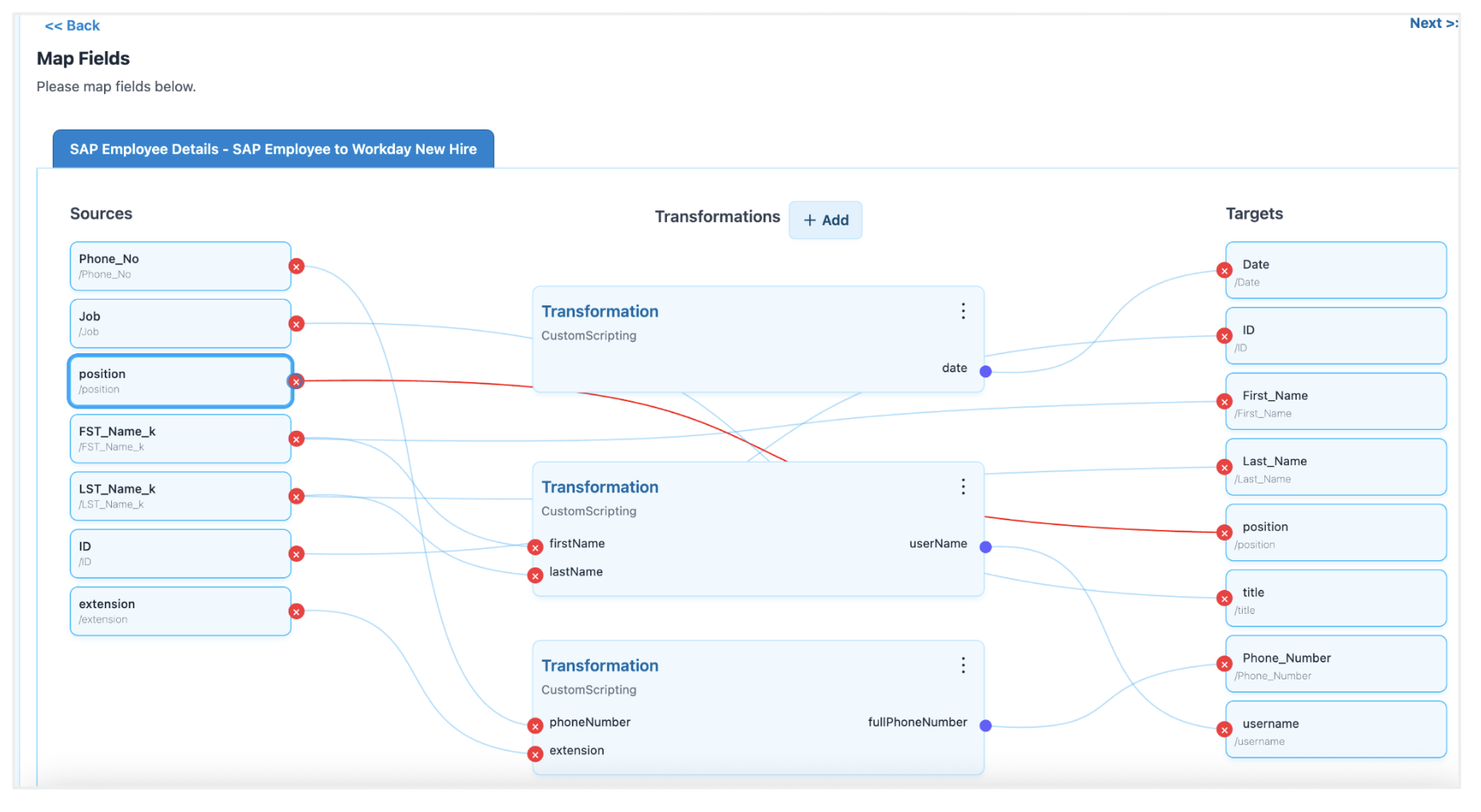
The Integrations Component is a complete user interface that you can embed in your application. It simplifies the process of connecting, mapping, and orchestrating Integration Packs that you configure in Boomi. This component enables users and citizen integrators to manage integrations directly within your custom SaaS application. The following images show the key capabilities of this component.
The Integrations home page displays different integration cards
Adding integration to your UI portal
Configure connection details for the source and target systems
Mapping data fields between the source and target systems
Set your integration to run immediately or schedule it for later
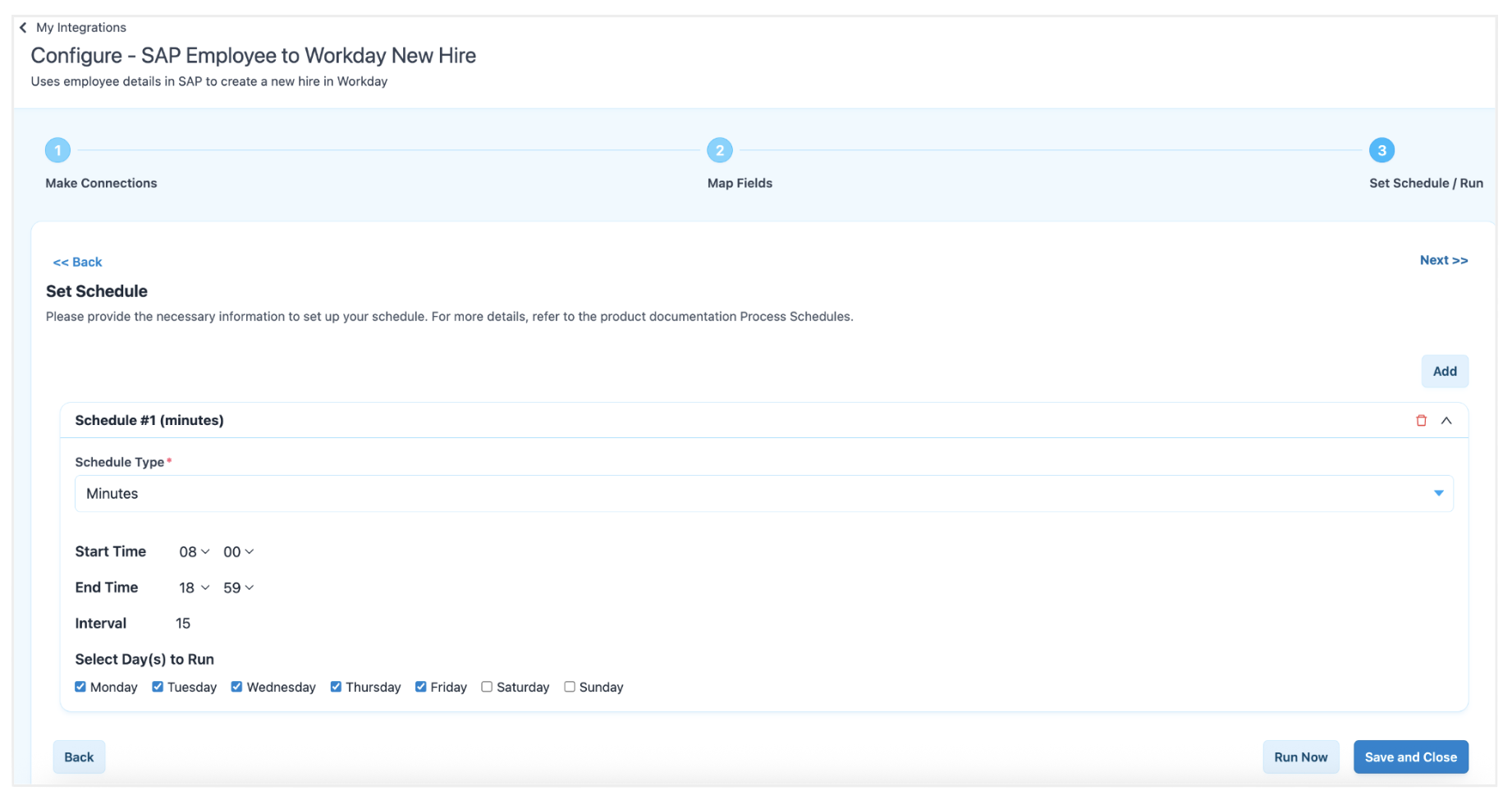
You can fully customize the component user interface. For more information, refer to the Customizing your styling and themes topic.
Installing and configuring the Plugin
This section describes how to install and configure the Boomi EmbedKit Plugin in your application.
Prerequisites for the Plugin
Before you install the Plugin, ensure that you have the following:
npmis installed on your system.- A web application that uses React, CommonJS, or another JavaScript UI framework.
- A Parent and Child account structure is enabled in the Boomi Platform.
- Each user using the EmbedKit must have an assigned subaccount under your primary Boomi account. These can be generated programmatically within your application using the Boomi Platform API.
- A web application and server that can make HTTP calls to the EmbedKit API.
- For authentication, your SaaS application's user records must include the Boomi subaccount IDs and account group. These values must be passed to the Plugin for authentication.
- You must generate a Platform API Token within the Boomi Platform. For more information, refer to the Platform API Tokens overview topic.
- To allow the EmbedKit server to communicate with your web application, you must configure a Cross-Origin Resource Sharing (CORS) policy for your application origins and Boomi Parent Account ID (tenantId). This can be done using:
- Self-service: Configure the IP address/URL CORS policy in your parent account in Boomi. For more information, refer to the Account security for CORS topic.
- Support request: Contact Boomi Support or the Boomi Embedded team and provide a list of all known origins to add to the allowlist.
Step 1: Installing the EmbedKit Plugin
To install the EmbedKit package, run the following command:
npm install @boomi/embedkit
Step 2: Configuring server-side authentication
Create a server endpoint that authenticates your user and obtains a one-time HMAC nonce from the EmbedKit server. The following example shows a Node.js endpoint that handles POST requests from your web application client.
Your tenantId is your Boomi Parent Account Id. You can find this value in the Boomi Platform. Review all requirements in this topic before you develop your solution.
Server-side example
/* API endpoint to handle auth requests to this server */
app.post('/api/session', async (req, res) => {
  /**
   * Authenticate your user against your database.
   * In this example we are using MongoDB and looking the user up by email address.
   * Once found, we compare the password provided during login.
   **/
  const { email, password } = req.body || {};
  const user = await Users.findOne({ email });
  if (!user || user.password !== password) {
    return res.status(401).json({ error: 'Invalid Credentials.' });
  }

  /**
   * Build the Boomi credential payload (server-to-server only).
   * Never expose these credentials to the browser.
   **/
  const boomiPayload = {
    url: env.BOOMI_PLATFORM_URL,                    // Boomi Platform API endpoint. Example: https://api.boomi.com/partner/api/rest/v1
    parentAccountId: env.BOOMI_PARENT_ACCOUNT_ID,   // Your Boomi Parent Account ID. Found in Boomi Platform → Account Settings.
    apiUserName: env.BOOMI_API_USER_NAME,            // Boomi API username. Must come from the parent account.
    apiToken: env.BOOMI_API_TOKEN,                   // Boomi API token. Must come from the parent account.
    childAccountId: user.boomi_account_id,           // The child account ID stored on your user record.
    accountGroup: user.boomi_account_group,          // The account group stored on your user record.

    // Optional: Required only if your integrations use OAuth2-connected systems within Boomi.
    oauth2: {
      connections: {
        'INTEGRATION_PACK_ID': {                     // The connection ID for this OAuth2 connection. Found in Boomi Platform.
          clientId: 'CLIENT_ID',                     // The client ID provided by the Identity Provider.
          clientSecret: 'CLIENT_SECRET',             // The client secret provided by the Identity Provider.
        },
      },
    },

    // Optional: Required only if you are enabling AI features in EmbedKit.
    ai: {
      enabled: true,
      model: 'gpt-4o-2024-08-06',                   // The OpenAI model to use. OpenAI is the only supported LLM at this time.
      apiKey: 'API_KEY',                             // Your OpenAI API key.
      url: 'BOOMI_LISTENER_URL',                     // The Boomi listener URL. Found in the runtime configuration.
      userName: 'BOOMI_LISTENER_USER',               // The Boomi listener username. Found in the runtime configuration.
      userToken: 'BOOMI_LISTENER_PASSWORD',          // The Boomi listener password. Found in the runtime configuration.
    },
  };

  /**
   * Call the auth/login endpoint on the EmbedKit Server to obtain a one-time-use HMAC nonce.
   * The nonce has a TTL of 2 minutes and must be exchanged for a JWT by the EmbedKit client immediately.
   **/
  try {
    const origin = req.headers.origin || '';
    const r = await fetch(`${env.EMBEDKIT_SERVER_BASE}/auth/login`, {
      method: 'POST',
      credentials: 'include',
      headers: {
        'Content-Type': 'application/json',
        'Origin': origin,
        'X-Tenant-Id': config.boomi_primary_account || '',
      },
      body: JSON.stringify(boomiPayload),
    });

    if (!r.ok) {
      const errText = await r.text().catch(() => '');
      return res.status(r.status).json({ error: 'Login failed.', detail: errText });
    }
    const { nonce, ttlSec } = await r.json();

    /**
     * Return the nonce to your user interface.
     * The nonce will be used by the EmbedKit Plugin to mint a short-lived JWT.
     **/
    return res.json({ nonce, ttlSec, serverBase: env.EMBEDKIT_SERVER_BASE, tenantId: config.boomi_primary_account });
  } catch (e) {
    return res.status(502).json({ error: 'EmbedKit Server unreachable.' });
  }
});

// Logout — destroy the server-side session when the user logs out of the host application
app.delete('/api/session', (req, res) => {
  res.clearCookie('sid', cookieOptions(req));
  res.json({ ok: true });
});
Step 3: Configuring client-side initialization
After your application authenticates your user and receives the nonce, initialize the EmbedKit Plugin. You must wait for the Plugin to fully initialize before rendering any components.
The following steps describe the expected flow of information from your client and server to EmbedKit.
-
Create an HTML
divelement on the page where you want to render the Boomi EmbedKit components. Thedivelement must have anidofboomi.<body><div id="boomi"></div></body> -
Initialize the Plugin within your application using a
<script>tag or a separate.jsfile.index.html
<!doctype html><html lang="en"><head><meta charset="UTF-8" /><meta name="viewport" content="width=device-width, initial-scale=1.0" /><title>Boomi EmbedKit</title></head><body><div id="boomi"></div><script type="module" src="./main.js"></script></body></html> -
Create the
BoomiPlugininstance and render a component, passing the required credentials to the Plugin.noteThe following example calls the server endpoint described above to authenticate your user and retrieve the nonce.
BoomiPlugin
import BoomiPlugin from '@boomi/embedkit'; // Import the EmbedKit Pluginimport uiConfig from './boomi.config'; // Import your local UI config// Track whether the plugin has been initialized before attempting to render componentslet boomiReady = null;/* Authenticate the user and initialize the Plugin */async function login(email, password) {if (!email || !password)return { ok: false, message: 'Email and password are required.' };const res = await serverLogin(email, password);if (!res.ok) return res;await initBoomiFromServer(res.data);return { ok: true };}/* POST credentials to your server, which calls the EmbedKit auth endpoint */async function serverLogin(email, password) {const res = await fetch(`${import.meta.env?.VITE_SERVER_URL}/api/session`, {method: 'POST',headers: { 'Content-Type': 'application/json' },credentials: 'include',body: JSON.stringify({ email, password }),});if (!res.ok) {const raw = await res.text().catch(() => '');let data = null;try { data = JSON.parse(raw); } catch {}const msg = data?.error || data?.message || raw?.slice(0, 200) || 'Unable to sign in.';return { ok: false, message: msg };}const ct = res.headers.get('content-type') || '';const raw = await res.text();let data = null;if (ct.includes('application/json')) {try { data = JSON.parse(raw); } catch {}}return { ok: true, data };}/* Destroy the EmbedKit session when the user logs out of the host application */async function logout() {boomiReady = null;await serverLogout();DestroyPlugin({ removeHost: true, clearTheme: true, clearAuth: true });}/* Call your server logout endpoint to invalidate the session cookie */async function serverLogout() {try {await fetch(`${import.meta.env?.VITE_SERVER_URL}/api/session`, {method: 'DELETE',credentials: 'include',});} catch {}}/* Use the nonce returned from the server to initialize the EmbedKit Plugin and mint a JWT */async function initBoomiFromServer(res) {BoomiPlugin({serverBase: res.serverBase, // Base URL of the EmbedKit servertenantId: res.tenantId, // Your Boomi Parent Account IDnonce: res.nonce, // One-time-use nonce from the EmbedKit auth endpointboomiConfig: uiConfig, // Contents of your boomi.config.js file});// Wait one animation frame to ensure the plugin has fully mounted before rendering componentsboomiReady = new Promise((resolve) => requestAnimationFrame(resolve));return boomiReady;}/* Ensures all component renders wait until the plugin is ready */function runAfterBoomiReady(fn) {(boomiReady || Promise.resolve()).then(fn);}/* Renders an EmbedKit component into the specified host element */let __boomiRenderNonce = 0;function renderBoomiComponent({ hostId, component, props = {} }) {__boomiRenderNonce += 1;runAfterBoomiReady(() =>RenderComponent({hostId, // e.g. 'boomi'component, // e.g. 'Integrations'props: { ...props, __refresh__: __boomiRenderNonce },}));}/* Example: Render the Integrations component into the dashboard */function renderDashboard(node) {node.innerHTML = `<div id="boomi"><p>Loading integrations...</p></div>`;const dashBoomi = node.querySelector('#boomi');if (dashBoomi) {renderBoomiComponent({hostId: 'boomi',component: 'Integrations',props: { componentKey: 'integration' },});}}
Step 4: Rendering the Integrations component
Each EmbedKit component has a set of predefined configuration options that you pass when the component renders. You pass these options through properties.
Each component supports the following properties:
@property {boolean} showTitle - Whether the component title should be displayed.
@property {string} [title] - Optional text for the component title.
@property {boolean} showDescription - Whether the component description should be displayed.
@property {string} [description] - Optional text for the component description.
Use the following code to render the component. The component renders within the div element mentioned earlier:
<div id="boomi">{component will render here with full context}</div>
Call RenderComponent to mount the component:
import { RenderComponent } from '@boomi/embedkit';

RenderComponent({
  targetId: 'boomi',                   // Optional: override to target a different element ID (default: "boomi")
  component: 'Integrations',           // Required: the name of the component to render
  props: {
    componentKey: 'integrationsMain',  // Optional: use a unique key when rendering more than one component of the same type
  },
});
Understanding authentication and authorization
EmbedKit does not store passwords on disk or in the Boomi Platform. The plugin initializes with the parent accountId and authToken. However, you must provide the authUser (Boomi Sub Account ID) to the plugin during initialization, along with the accountGroup that the plugin renders for the authUser. For more information about the account hierarchy in the Boomi Platform, refer to the Account Group settings topic.
EmbedKit assumes that your application authenticates and authorizes your users before initializing the EmbedKit plugin. We recommend that you store the BoomiAccountId and AccountGroup in your internal user's profile, and provide this information after your application successfully authenticates and authorizes your users.
Authentication flow
- Your client-facing web application authenticates users against your server endpoint.
- After authentication, your server constructs the Boomi Payload as described in this topic.
- Your server sends an authentication request to the EmbedKit Server
(POST /auth/login). - If authentication succeeds, the EmbedKit Server responds with a one-time HMAC Nonce .
note
The nonce has a two-minute TTL.
- Your server returns the nonce to your web application client.
- The EmbedKit Plugin is initialized on the client, providing the nonce as an argument.
- The EmbedKit plugin exchanges the nonce for a JWT.
note
The token has a TTL of 10 minutes. EmbedKit handles all token refreshes automatically.
- The EmbedKit Server generates the JWT and a refresh token cookie.
- To render an EmbedKit Component, call the provided
RenderComponentmethod as described in this topic. - If the user ends their session on your web application client, call auth/logout on the EmbedKit Server endpoint.
Building your own component using hooks
The EmbedKit exposes several hooks. You can use these hooks to build your own components within your React application. These hooks require the EmbedKit PluginContextProvider.
The current hooks implementation requires React. Your application must wrap the hook usage in the EmbedKit PluginContextProvider.
For more information, refer to the GitHub repository.
Wrapping your app (or a subtree) with the provider
To use one of the provided hooks in your React application, wrap your app with the PluginContextProvider as shown:
PluginContextProvider
  import React from 'react';
  import ReactDOM from 'react-dom/client';
  import { EmbedKitProvider } from '@boomi/embedkit';
  import App from './App';

  ReactDOM.createRoot(document.getElementById('root')!).render(
    <EmbedKitProvider
      accountId="<PARENT_ACCOUNT_ID>"
      userName="<CHILD_ACCOUNT_ID_OR_USERNAME>"
      token="<BOOMI_API_TOKEN>"
      authUser="<CHILD_ACCOUNT_ID_OR_USERNAME>"
      accountGroup="<OPTIONAL_GROUP>"
    >
      <App />
    </EmbedKitProvider>
  );
Using the hook inside your components
In this example, the hook returns { fetchEnvironments, environments, isLoading, error }. Call fetchEnvironments with either a classification ('PROD' | 'TEST' | 'ALL') or a specific environmentId:
App.tsx (consumer app)
  // App.tsx (consumer app)
  import { useEmbedKit } from '@boomi/embedkit';
  import { useFetchEnvironments } from '@boomi/embedkit';

  export default function App() {
    const { isReady } = useEmbedKit();
    const { fetchEnvironments, environments, isLoading, error } = useFetchEnvironments();

    React.useEffect(() => {
      if (isReady) void fetchEnvironments('ALL');
    }, [isReady, fetchEnvironments]);

    if (!isReady) return <p>Booting…</p>;
    if (isLoading) return <p>Loading environments…</p>;
    if (error) return <p style={{ color: 'crimson' }}>{error}</p>;

    return (
      <ul>
        {environments.map((e: any) => (
          <li key={e.id}>
            {e.name} – {e.classification} – {e.isActive ? 'ONLINE' : 'OFFLINE/MIXED'}
          </li>
        ))}
      </ul>
    );
  }
