Enabling AI transformation
To use AI features in your integrations component, add the AI configuration parameters in the boomi.config.js file and initialize the plugin. This activates the Ask AI to generate transformation feature in the Transformation Editor integration user interface, which remains off by default.
For more details on Transformation Editor, refer to the Boomi EmbedKit docs on the GitHub repository.
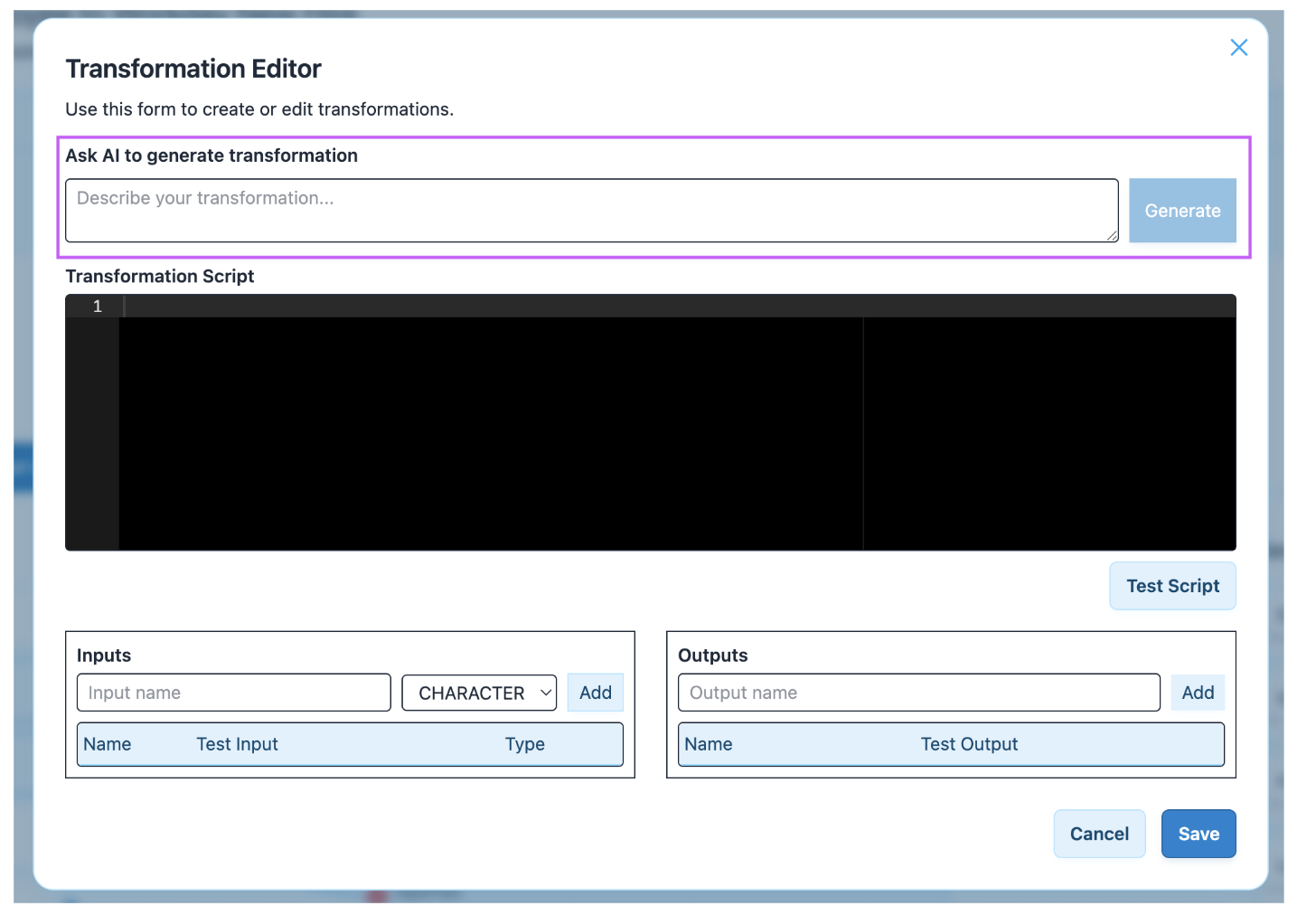
To enable AI Transformation, configure one of the following providers: OpenAI or Boomi Agentstudio.
Using OpenAI
-
In the
boomi.config.jsfile, add the following AI Boomi plugin configuration.AI configuration
ai: {enabled: true,model: 'gpt-4o-2024-08-06',apiKey: import.meta.env.VITE_OPENAI_API_KEY,} -
Reinitialize the plugin.
Your complete
boomi.config.jsfile should now look like this:boomi.config.js
// boomi.config.jsexport const boomiConfig = {theme: {allowThemes: true,defaultTheme: 'dark',},ai: {enabled: true,model: 'gpt-4o-2024-08-06',apiKey: import.meta.env.VITE_OPENAI_API_KEY,},};
The enabled: true line activates the AI feature, while model and apiKey specify the large language model and authentication key to use.
Using Boomi Agentstudio
Use a tenant-configured Boomi Agentstudio agent instead of OpenAI. This reuses the existing per-tenant Boomi platform token, so no apiKey is required. Configure the Agentstudio agent in structured mode (JSON Schema draft-04) before use.
-
In the
boomi.config.jsfile, add the following AI Boomi plugin configuration.AI configuration
ai: {enabled: true,model: 'boomi-agent-studio',boomiAgentId: '<agent id>',sessionType: 'single',} -
Reinitialize the plugin. Your complete
boomi.config.jsfile should now look like this:boomi.config.js
// boomi.config.jsexport const boomiConfig = {theme: {allowThemes: true,defaultTheme: 'dark',},ai: {enabled: true,model: 'boomi-agent-studio',boomiAgentId: '<agent id>',sessionType: 'single',},};
The enabled: true line activates the AI feature:
modelselects the provider.boomiAgentIdis the Agentstudio agent to invoke.sessionTypemust be'single'(the only supported value currently).
An agent refusal returns a 422 response; an unparseable or schema-invalid agent response returns a 502.
Disabling AI transformation
To disable the AI feature, set enabled: false in the boomi.config.js file.
For example, to disable AI feature for OpenAPI,
AI configuration
   ai: {
       enabled: false,
       model: 'gpt-4o-2024-08-06',
       apiKey: import.meta.env.VITE_OPENAI_API_KEY,
   },
This ai block turns off the AI feature in the integrations component.
Similarly, you can disable AI feature for Boomi Agentstudio with enabled parameter as false.
