Executing a Process using the ExecutionRequest API
Learn how to programmatically execute an integration process and track its execution status. Use the ExecutionRequest API to trigger your process and correlate it with the resulting ExecutionRecord object.
Overview
External testing and scheduling clients need to programmatically execute integration processes and verify whether they succeed or fail. The existing executeProcess API doesn't provide a way to track execution outcomes, making it difficult to determine if a process completed successfully.
The ExecutionRequest API addresses this need by providing:
-
Execution tracking - Identify the ExecutionRecord object that corresponds to your execution request, enabling you to determine whether the process succeeded or failed.
-
Dynamic property values - Pass Process Property component property values in the request to use during execution.
-
Enhanced validation - Provides additional functional validations and error conditions, such as ensuring the process is still deployed to the given basic runtime.
The executeProcess API remains available and is not deprecated, but Boomi recommends using the ExecutionRequest API to take advantage of these enhancements.
Understanding asynchronous execution
Execution requests from the API or the user interface are asynchronous actions due to the Boomi Enterprise Platform architecture and the availability of basic runtimes.
The ExecutionRecord, which contains details of the actual execution (such as whether it was successful or not), is generated only after the basic runtime receives the request, begins executing the process, and reports the information back to the platform. You can view this information on the Process Reporting screen.
Prerequisites
Before using the ExecutionRequest API, make sure you have:
- API authentication credentials and
accountId processId,runtimeId/atomId, andExecuteprivilege for the target environment
To learn more about Boomi API authentication, refer to the Getting started with Boomi Platform APIs topic.
Workflow
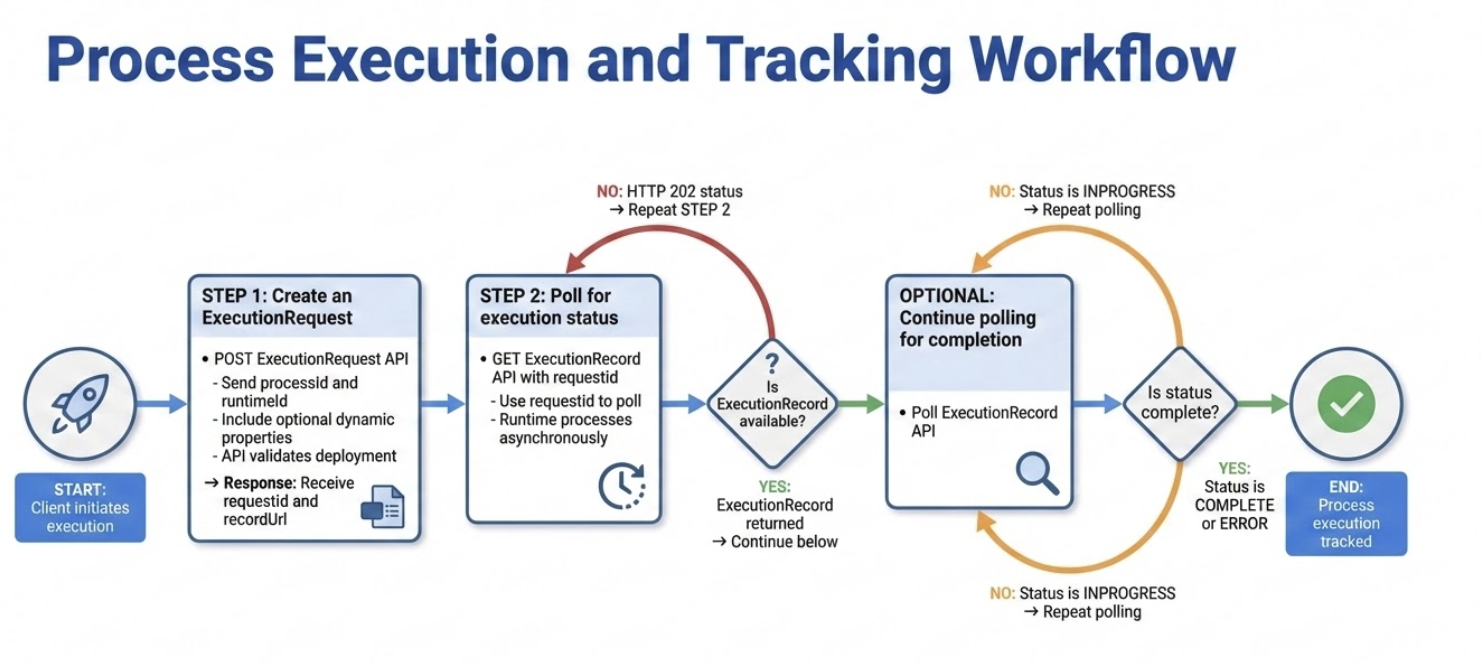
The ExecutionRequest API workflow differs from the executeProcess API in one important way. Instead of returning a simple success response, the API provides a requestId that you use in a subsequent API call to identify the corresponding ExecutionRecord object.
Follow these steps to execute a process and track its status:
-
Call the ExecutionRequest API and receive a requestId in the response.
-
Poll the ExecutionRecord API with the requestId until the ExecutionRecord becomes available, and this occurs when the basic runtime receives the request, starts executing the process, and reports back to the platform.
-
Optionally, continue to poll the ExecutionRecord API until it shows a completed status, such as COMPLETE or ERROR.
Implementation
Step 1: Create an ExecutionRequest
Send a POST request to the ExecutionRequest API to receive a requestId. The system correlates this requestId with the eventual execution. For the complete request and response format, endpoint, parameters, and examples, refer to the ExecutionRequest API reference.
- The API validates that the process is currently deployed to the specified basic runtime.
- You can pass Process Property component property values in the request. However, the API does not validate the property data types or allowed values.
Response details
- The
requestIdparameter contains the value you use to poll for the ExecutionRecord. - The
recordUrlparameter provides the complete URL for the next API call for convenience.
Step 2: Poll for execution status
Use a GET request to poll the ExecutionRecord API repeatedly with the requestId until the ExecutionRecord becomes available. This occurs when the basic runtime sends back the ExecutionRecord to the platform. For the complete request and response format, endpoint, parameters, and examples, refer to the ExecutionRecord API reference.
Response details
The API returns different responses based on the execution status:
- If the ExecutionRecord is not yet available, the API returns an HTTP 202 status code.
- When the ExecutionRecord becomes available, the API returns the ExecutionRecord object directly.
Additional considerations
For long-running processes, you may need to continue polling until the ExecutionRecord shows a completed status, such as COMPLETE or ERROR.
