Managing Runtime listener process status
Take control of your Runtime listener processes with the Boomi Platform REST API. Pause listeners when downstream endpoints aren't available, then resume or restart them once your systems are back online.
Overview
A listener process monitors incoming requests to an endpoint. The endpoint is defined by a connector with the Listen action, such as Web Services Server, JMS, or AS2 Shared Server, configured in the process Start step. Listener processes are deployed to Runtimes, Runtime clusters, and Runtime clouds.
You can pause a listener to temporarily stop processing incoming traffic during maintenance windows or when downstream endpoints are unavailable. After maintenance is complete or systems are restored, you can resume or restart the listener to restore normal operations.
Common scenarios include:
- Scheduled maintenance - Pause listeners to prevent processing during maintenance windows.
- Downstream system failures - Pause listeners when downstream endpoints are unavailable.
- System restoration - Resume or restart listeners after systems are restored.
- Bulk management - Control multiple listeners across containers simultaneously.
Prerequisites
Before using the changeListenerStatus API, make sure you have:
- API credentials with
Runtime Managementprivilege - A Boomi Account ID
- A Container ID for the Runtime, Runtime cluster, or Runtime cloud
- A Listener ID (for single listener operations)
To learn more about Boomi API authentication, refer to the Getting started with Boomi Platform APIs topic.
Workflow
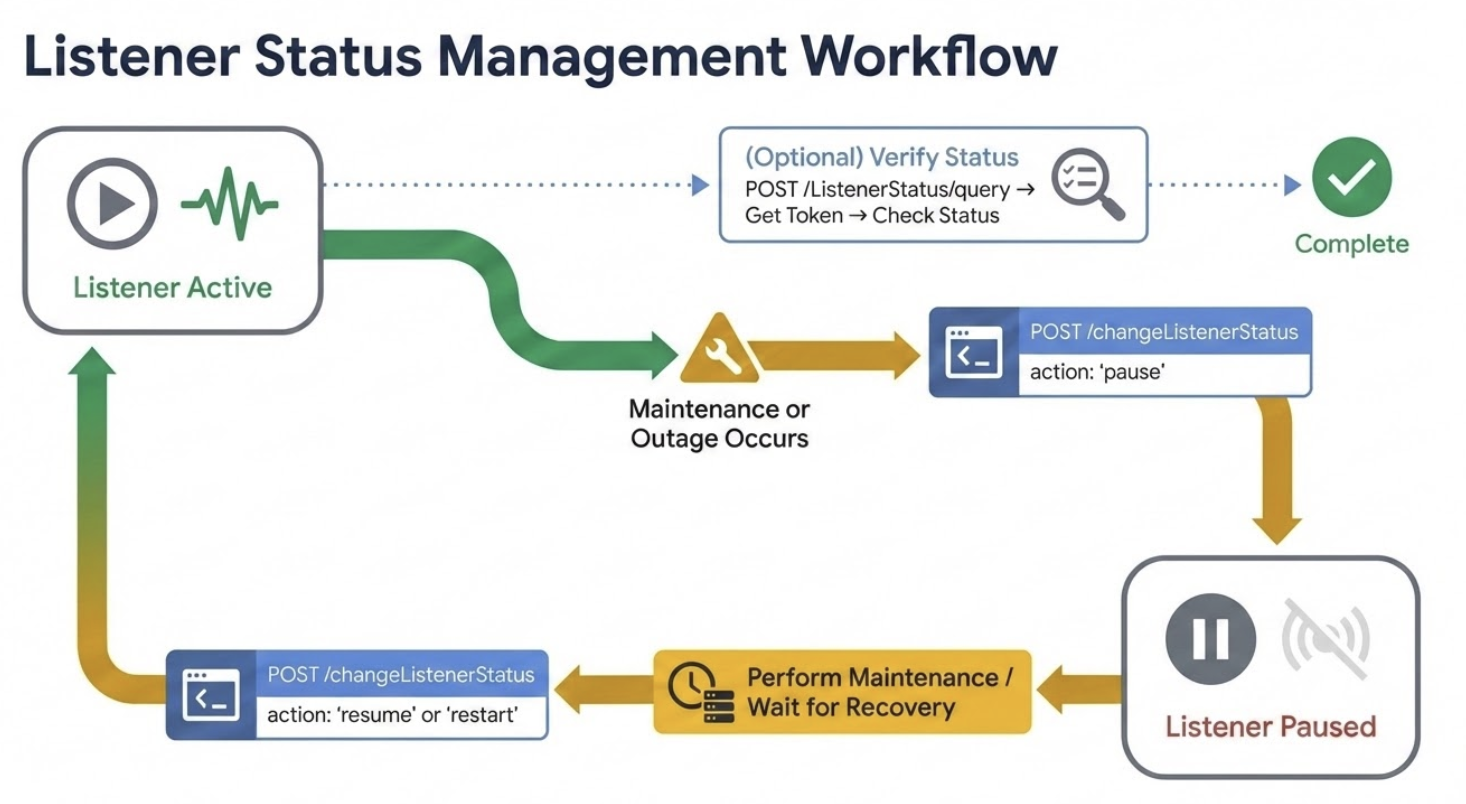
The following workflow shows how to manage listener process status:
Implementation
Step 1: Pause the listener
Send a POST request to pause the listener during maintenance or when downstream endpoints are unavailable. For complete API details, request and response formats, parameters, and examples, refer to the changeListenerStatus API reference.
Step 2: Resume or restart the listener
Send a POST request to resume or restart the listener after maintenance is complete or systems are restored.
If the listener remains in an inconsistent state after restarting, you may need to restart the specific node or the entire runtime.
Optional: Verify the listener status (asynchronous)
After pausing, resuming, or restarting a listener, query the listener status to confirm the change:
- Send a POST request with the
containerIdandlistenerIdto:- US:
https://api.boomi.com/api/rest/v1/{accountId}/async/ListenerStatus/query - GB:
https://api.platform.gb.boomi.com/api/rest/v1/{accountId}/async/ListenerStatus/query
- US:
- Retrieve the status token from the response.
- Send a GET request with the token to get the current listener status.
For complete details on querying listener status, refer to the ListenerStatus API reference.
Manage all listeners on a container
You can manage all listeners on a container simultaneously instead of managing individual listeners.
The changeListenerStatus API operates in two modes:
- Single listener - Specify a
listenerIdto update one listener - All listeners - Omit the
listenerIdto update all listeners on a container
To manage all listeners, use these actions:
pause_all- Pauses all listenersrestart_all- Restarts all listenersresume_all- Resumes all paused listeners
Example:
{
  "containerId": "your-container-id",
  "action": "pause_all"
}
You cannot selectively update multiple specific listeners in a single request.
Best practices
-
Always verify the listener status after making changes to prevent data loss or downtime.
-
Use pause or resume instead of restart to minimize service disruption during maintenance.
-
Automate status checks using scripting or orchestration tools when possible.
