Implementing Connection
(Optional implementation)
The connection (com.boomi.connector.api.Connection interface) implements common behavior across all types of interactions with the target service you are connecting to. This can include common code for making an HTTP request, or parsing an XML or JSON file.
Introduction
The Connection class is different from other implementation classes. The core API project does not contain a Connection interface. Instead, the Connector SDK utility project provides the BaseConnection class (refer to the Javadocs).
The Connection class provides a shared abstraction that can encapsulate and share common feature across Browser and Operation implementations. Connectors are not required to implement a connection, but most do and most connectors benefit from this additional abstraction.
Implementation considerations
Some key points for consideration when implementing the connection:
- Connection implementations can maintain account-specific data
Connection implementations do not need to be thread-safe because they are only used for a single browse or operation.
Code sample
This code sample illustrates the implementation of a simple connection for the ExampleConnection.java service.
Code sample for a basic Connection
public class ExampleConnection extends BaseConnection
{
    public ExampleConnection(BrowseContext context) {
        super(context);
    }
}
Configuring connector-descriptor.xml file
Configuration Example
<?xml version="1.0" encoding="windows-1252"?>
<GenericConnectorDescriptor browsingType="any" requireConnectionForBrowse="true">

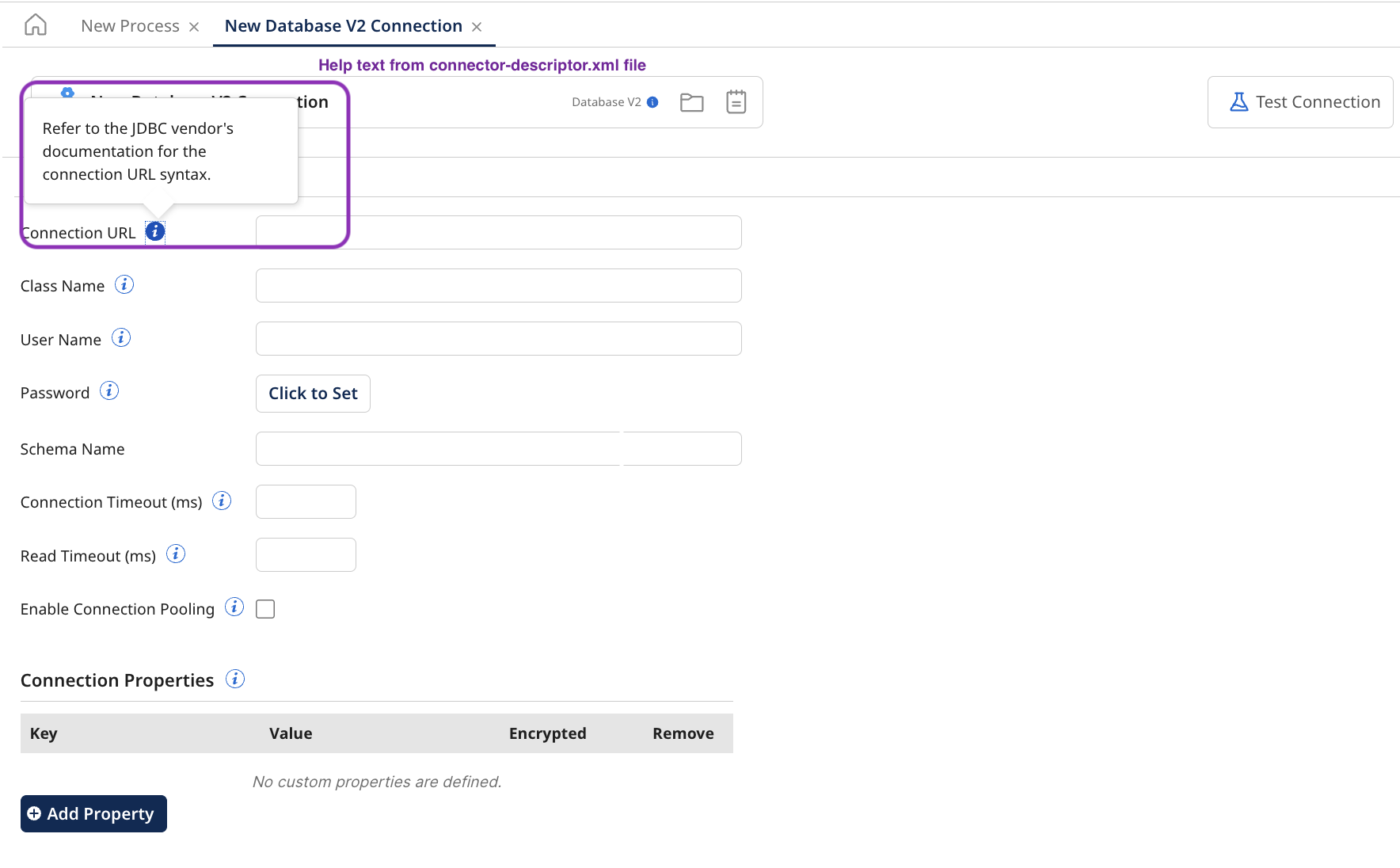
  <field type="string" id="url" label="Connection URL">
    <helpText>Refer to the JDBC vendor's documentation for the connection
      URL syntax.
    </helpText>
  </field>
  <field type="string" id="className" label="Class Name">...</field>
  <field type="string" id="username" label="User Name">...</field>
  <field type="password" id="password" label="Password">...</field>
  <field type="string" id="schemaName" label="Schema Name">...</field>
  <field id="connectTimeOut" type="integer" label="Connection Timeout (ms)">...</field>
  <field id="readTimeOut" type="integer" label="Read Timeout (ms)"></field>
  <field id="enablePooling" label="Enable Connection Pooling" type="boolean">
      <defaultValue>false</defaultValue>
  </field>
  ...
</GenericConnectorDescriptor>
How it appears in the Boomi Enterprise Platform
Visibility condition
Configuration Example: Visibility condition
<?xml version="1.0" encoding="windows-1252"?>
<GenericConnectorDescriptor browsingType="any" requireConnectionForBrowse="true">
  <field id="enablePooling" label="Enable Connection Pooling" type="boolean">
      <defaultValue>false</defaultValue>
  </field>
  <field id="maximumConnections" label="Maximum Connections" type="integer">
      <helpText>Enter the maximum number of connections allowed in the pool at any time. The default is -1, which indicates an unlimited number of connections. You will receive an error if you attempt to exceed the maximum.</helpText>
      <defaultValue>-1</defaultValue>
      <visibilityCondition>
        <valueCondition  fieldId="enablePooling">
            <value>true</value>
        </valueCondition>
    </visibilityCondition>
  </field>
  <field id="minimumConnections" label="Minimum Connections" type="integer"></field>
  <field id="maximumIdleTime" label="Maximum Idle Time" type="integer"></field>
  <field id="whenExhaustedAction" label="When Exhausted Action" type="string" displayType="list"></field>
  ...
  </GenericConnectorDescriptor>
How it looks on the Boomi Enterprise Platform

