Uploading a very large File
In this scenario, the client application will upload a very large file that will require a chunked uploading processing.
The definition of a very large file is arbitrary; the 2 GB limit of the web server could be used as the parameter (any file larger than 2 GB would be considered a “very large file”).
However, experimentation with the upload protocol showed that 600 MB is a better limit both for the client and server memory utilization and for the overall performance of the protocol.
So, in this scenario, the client application will take 600 MB as the limit and split up a file that is larger than that in chunks of 600 MB and upload each chunk in a separate request.
A chunked upload is always comprised with at least two requests, the first being an “upload file first chunk” action and the second being an “upload file last chunk” and zero or more optional “upload file middle chunk” requests.
For instance, in case a very large file can be split up in two chunks of 600 MB or less, the “upload file middle chunk” request will not be necessary.
The exception is in the case of a upload with resume (which is explained in the next section), which uses the chunk upload protocol, but has no “upload file first chunk” action, since the first file chunk is “already” in the server.
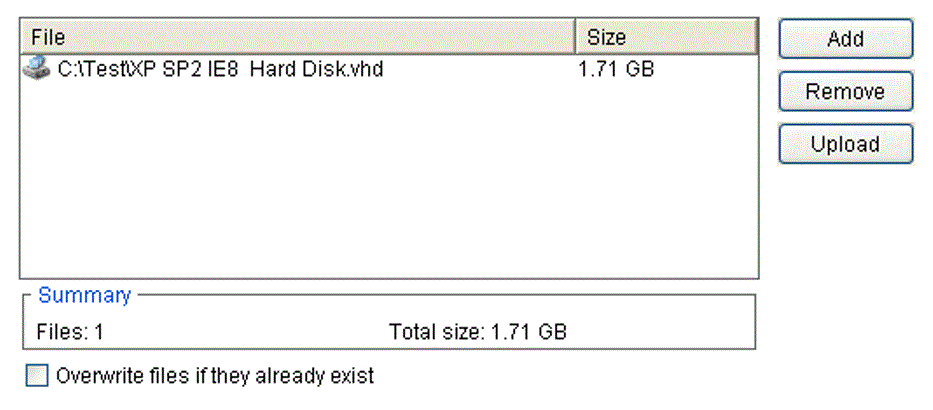
Considering the file in the screenshot (“XP SP2 IE8 Hard Disk.vhd”), which has 1.71 GB, the client application will split it up in 3 chunks: the first one will have 600 MB (first chunk request), the second one also 600 MB (middle chunk request) and the last one will have 571 MB (last chunk request).
Since it is an internal upload scenario, the app has connected to the server and been provided a Session ID (SessionID_NNN). Also, the ID of target folder in the server is already known (RootFolderID_NNN).
Here it is the sequence of the requests (and resulting responses) required for this chunked upload. Note that after the first chunk upload request, the form field FileID and ExpectedSizeBeforeAppendChunk become required fields for all subsequent upload requests.
FileID should contain the X-FIleID provided by the first request, while ExpectedSizeBeforeAppendChunk should contain the number of bytes already uploaded to the server.
Request 1
| Form Fields | Example |
|---|---|
| Upload operation | Internal upload |
| Upload action | Upload file first chunk |
| InternalUpload_AppletUID or InternalUpload_SessionID | SessionID_NNN |
| ImmediateParentFolderID | RootFolderID_NNN |
| RootFolderID | RootFolderID_NNN |
| DeletePartiallyUploadedFile | 0 |
| File Fields | Example |
| name | File1 |
| filename | XP SP2 IE8 Hard Disk.vhd |
| [first chunk – 600 MB] |
Response 1
| X-FileSystemLogOpID | LogOpID_NNN |
| X-FileID | FileID_NNN |
| X-FolderID | RootFolderID_NNN |
Request 2
| Form Fields | Example |
|---|---|
| Upload operation | Internal upload |
| Upload action | Upload file middle chunk |
| InternalUpload_AppletUID or InternalUpload_SessionID | SessionID_NNN |
| FileID | FileID_NNN |
| ImmediateParentFolderID | RootFolderID_NNN |
| RootFolderID | RootFolderID_NNN |
| FileSystemLogOpID | LogOpID_NNN |
| FolderName | IRM Functional Spec Screen |
| DeletePartiallyUploadedFile | 0 |
| ExpectedSizeBeforeAppendChunk | 629,145,600 (600 MB) |
| File Fields | Example |
| name | File1 |
| filename | XP SP2 IE8 Hard Disk.vhd |
| [second chunk – 600 MB] |
Response 2
| X-FileSystemLogOpID | LogOpID_NNN |
| X-FileID | FileID_NNN |
| X-FolderID | FolderID_NNN |
Request 3
| Form Fields | Example |
|---|---|
| Upload operation | Internal upload |
| Upload action | Upload file last chunk |
| InternalUpload_AppletUID or InternalUpload_SessionID | SessionID_NNN |
| FileID | FileID_NNN |
| ImmediateParentFolderID | RootID_NNN |
| RootFolderID | RootFolderID_NNN |
| FileSystemLogOpID | LogOpID_NNN |
| DeletePartiallyUploadedFile | 0 |
| ExpectedSizeBeforeAppendChunk | 1,258,291,200 (1.2 GB) |
| File Fields | Example |
| name | File1 |
| filename | XP SP2 IE8 Hard Disk.vhd |
| [final chunk – 571 MB] |
Response 3
| X-FileSystemLogOpID | LogOpID_NNN |
| X-FileID | FileID_NNN |
| X-FolderID | RootFolderID_NNN |
