Connectors overview
Connectors are the main components that facilitate Boomi integration and contain the information needed to connect to a data source or application.
You can build your integrations with the help of existing connectors. If you don't find any connector that suits your requirements, leverage the Connector SDK to build your own connector.
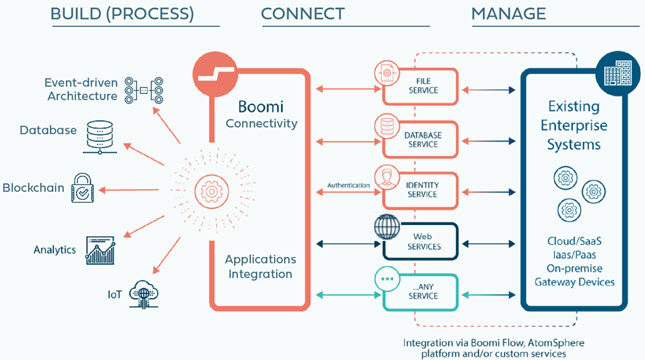
You can either build a connector for your internal use (PRIVATE) or make it available to others (PUBLIC).
- Public connectors are available to all Boomi customers regardless of who built them.
- Private Connectors are available only within your Boomi Enterprise Platform account. They aren't visible or usable to other Boomi customers. They are private to the account that built them.
Connector benefits
Boomi connectors make it faster and easier for you to unify your data, systems, applications, processes, and people. Connectors let you easily connect and integrate third-party applications, such as Salesforce to NetSuite, to send and receive data between them. When you are assigned a Boomi account, you have access to all public applications and technology connectors. You can also use the Connector SDK to build your own private, custom connectors.
Connectors provide the following benefits:
- Simplifies application support
- Automatic updates and lower cost of ownership. When a new version of an API is available, the connector automatically updates to support that version.
- To protect access to your data, connectors support authentication types that include basic authentication, password digest, client certificate, OAuth, and so on.
- Connectors automatically discover the latest objects supported in an application API. For example, creating data, inserting data, deleting data, querying data, and so on.
- Connectors are highly configurable and support advanced options to fine-tune their behavior. For example, the HTTP Client connector supports cookie scope to set the persistence of cookies. Many connectors support advanced options so you can manipulate and fine-tune data.
- Built-in data manipulation
- Increase your productivity while working with data by automatically paging through large data sets and retrieving the entire data set from the API.
- Optimize data transfer and efficiency by splitting large files into smaller chunks.
- Support batches to improve efficiency and performance, thereby reducing the processing time for an operation.
- Real-time support
- For real-time data processing, integration, and process orchestration, some connectors provide listener support. For example, the Microsoft Azure Service Bus connector listens for messages from queues and topics. The JMS connector works with any JMS v1.1 messaging provider to send and receive messages from JMS queues or topics. The Runtime Queue connector sends and receives messages to and from native Integration Atom message queues. This helps ensure you are working with the latest and most current data.
- Other listen-only connectors, such as the Listener Connector, the Flow Services Server connector, and the AS2 Shared Server connector, are available to provide real-time data validation and integration, including communication with trading partners.
Connector types
Boomi categorizes connectors into: Application, Event-driven, and Technology connectors
Application connectors
- Provide connectivity to software applications such as Netsuite, Salesforce, SAP, Amazon, and many others
- Resolves many specific issues to get you connected faster
- Also supports multiple versions of a specific API
When you build endpoints into an integration, make your first choice to use an application connector.
Event-driven connectors
- Provide connectivity to event-based systems using application and technology connectors.
- Event-driven connectors respond to user actions, such as mouse clicks and messages from another application or program, and define the data, security model, integration path and control flow of such events.
- Provides connectivity to multiple EDA technologies, such as Kafka, SQS, Solace and RabbitMQ.
Technology connectors
- Provide connectivity to and from web applications, on-premise applications, and common data repositories using various protocols (including HTTP, FTP, JMS, and so on), using a standard data transport method or generic data driver.
Connector components
Connectors are a combination of two components that you can store separately in the Component Explorer:
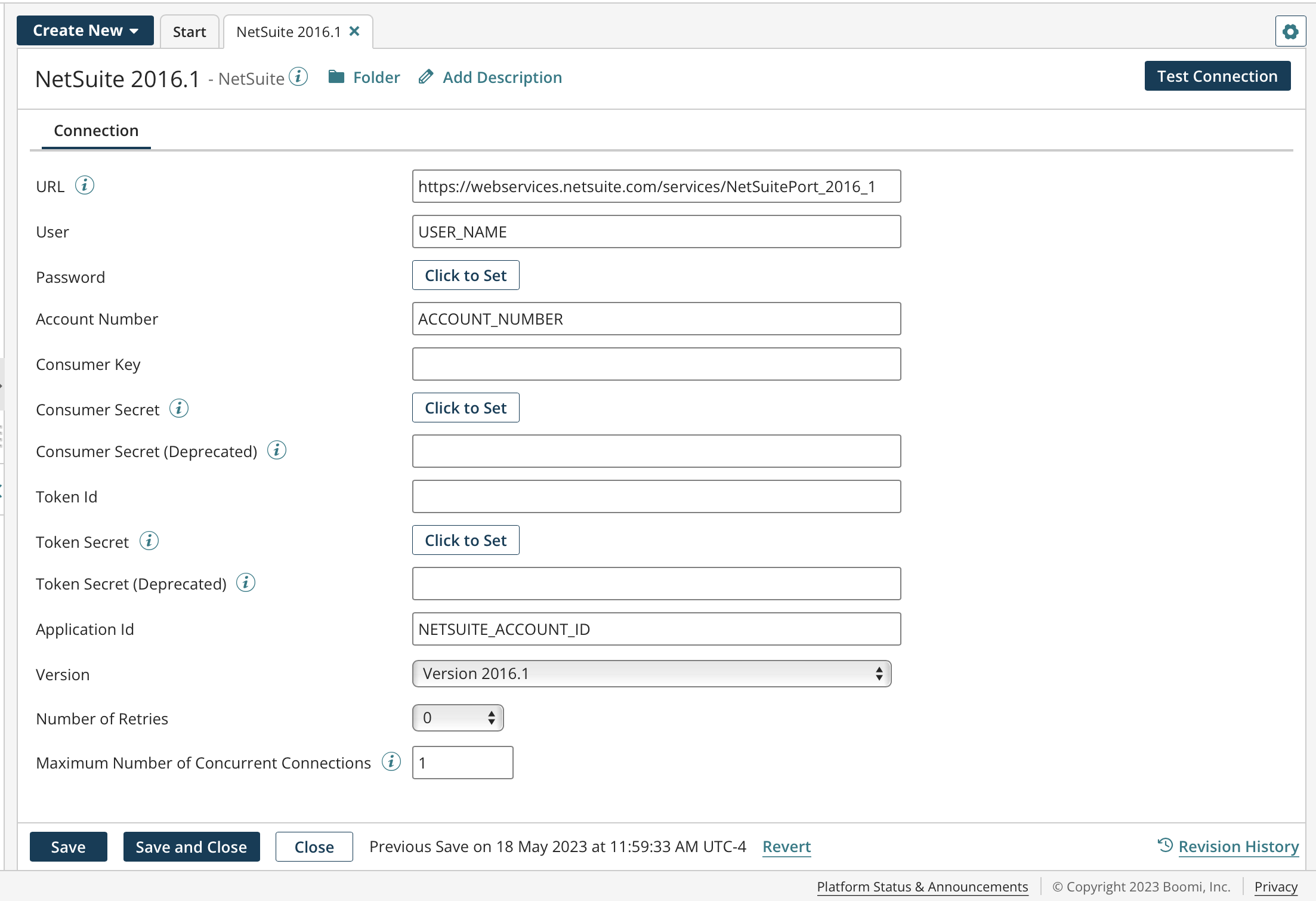
- Connection — The physical connection information; you define the URL of a data source or application, and provide credentials to access it.
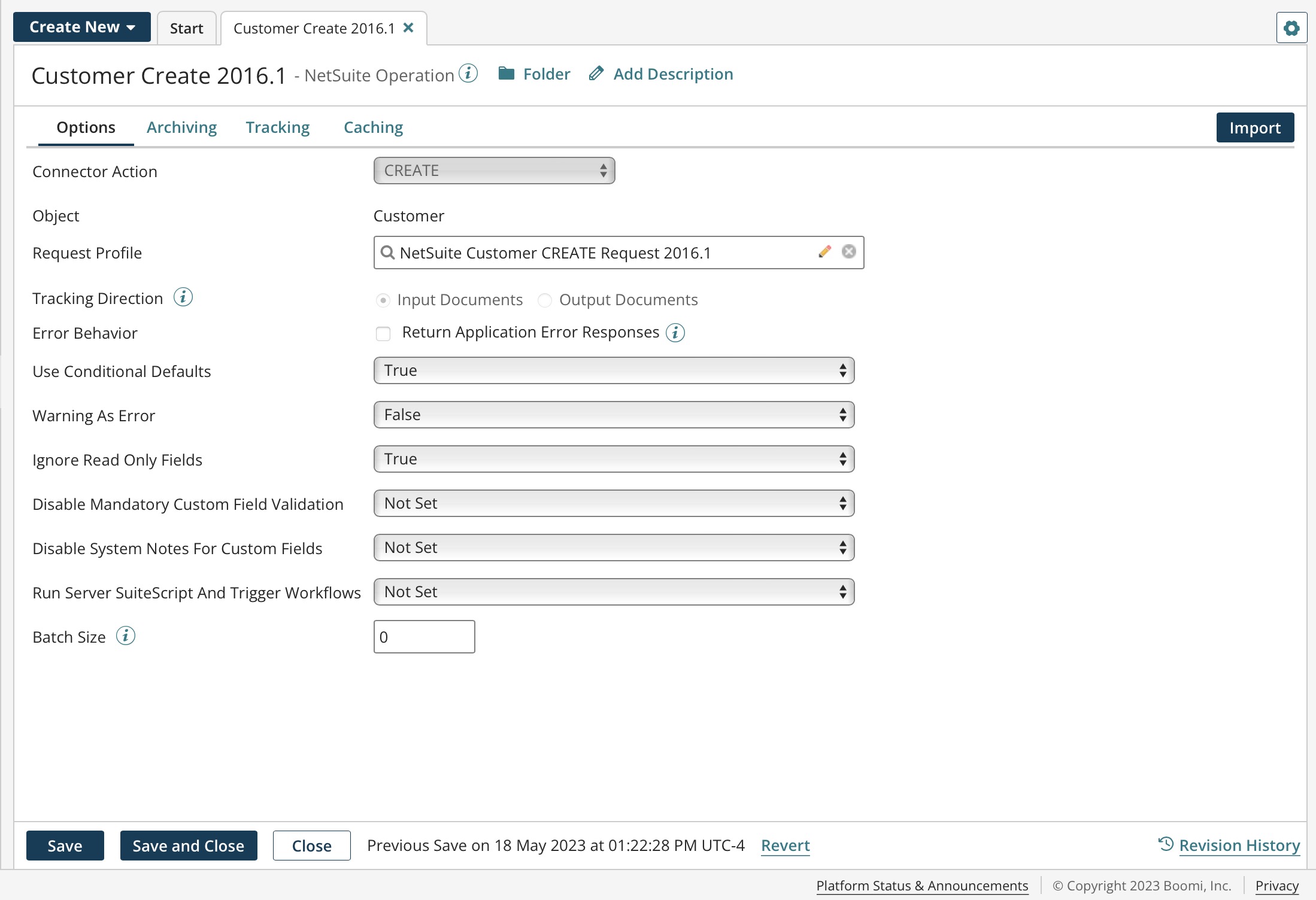
- Operation — The function to call or files to act upon; how to process the data.
Because both connections and operations are reusable components, you can, for example, create a single connection and pair it with different operations
Connector configuration
In the connection, you define the URL, provide the credentials needed to access an application’s API, and often specify the version. For technology connections, you can also optionally specify a connection pool or advanced options like time-outs.
An example of the NetSuite 2016.1 connection:
In the operation, you define a specific action or API call to the designated source in the connection. The options change from operation to operation depending on the API capabilities of each application or data source. Typically, you configure application connector query operations with filters or other selection criteria to limit the returned results.
An example of the NetSuite CREATE operation:
Connector licenses and classes
Connection licenses are categorized and provisioned by connector classes:
- Small Business — For example, QuickBooks and Sage 50/Peachtree.
- Standard — For example, NetSuite, Salesforce, SFTP, Disk, and so on. Most connectors are Standard class connectors.
- Enterprise — For example, SAP and Oracle E-Business.
- Trading Partner — For example, your trading partner profiles, such as X12, HL7, EDIFACT, and so on.
Provisioning your account with the number of connection licenses is based on your subscription. You can deploy connections up to the number of licenses across your various integration processes.
Connector deployment and management APIs
These APIs provide programmatic access to features that are normally accessed through the Boomi Enterprise Platform --> Developer tab.
- Connector Deployment API: To deploy any connector that was created using the Boomi Software Development Kit (SDK)
- Connector Management API: Access the connector administration feature, for example, uploading a connector icon.
Open source connectors
The following connectors are open source and their code is available in their respective connector repositories:
Open source connectors
| Connector | Description |
|---|---|
| Amazon EventBridge connector | The Amazon EventBridge connector allows you to transfer any number of events (data) in JSON format to any Amazon services by connecting through Amazon EventBridge. |
| Amazon Redshift connector | Amazon Redshift Connector enables you to connect to an Amazon Redshift database cluster setup via Amazon Redshift JDBC driver. |
| Microsoft Azure Data Lake Storage connector | Microsoft Azure Data Lake Storage (ADLS) Gen2 connector enables you to access and interact with your ADLS Gen2 storage account using the ADLS Gen2 REST APIs. |
| Microsoft Azure Cosmos DB connector | Microsoft Azure Cosmos DB connector allows you to transfer data from/to Microsoft Azure Cosmos DB server, using Integration and REST APIs. |
| Database V2 connector | The Database V2 connector allows you to process or retrieve data in any JDBC supported database using Database drivers. |
| Google Sheets connector | With the Google Sheets connector, you can create, delete, get, query, and update objects in Google Sheets. |
| JMS v2 connector | Use the JMS v2 connector to work with either JMS v1.1 or 2.0 to send and receive messages from JMS queues or topics. |
| MongoDB connector | The MongoDB connector allows you to perform single/bulk transfer of data from/to a MongoDB server using MongoDB Java APIs. |
| Okta connector | The Okta connector allows you to interact with an Okta account, to leverage Okta's REST APIs to easily provision and manage users. |
| Oracle Database connector | The Oracle Database connector allows you to select, insert, update, delete, upsert records and also allows you to call stored procedures in an Oracle database. |
| Salesforce REST connector | The Salesforce REST connector is a key part of the Boomi Integration process that makes it easy to work with any native Salesforce application, including Sales Cloud and Service Cloud as well as any Custom Cloud or Force.com. |
| SAP S4/HANA OData connector | SAP S4/HANA OData connector enables you to connect to SAP S4/HANA Cloud or SAP S4/HANA system via OData V2 (Open Data Protocol) services. |
| SFTP V2 connector | The SFTP V2 connector allows you to download files from or upload files to the SFTP-enabled server. |
| Snowflake connector | The Snowflake connector allows you to leverage the capabilities of a Snowflake data warehouse i.e. speed, usability, and flexibility. |
| Veeva connector | Veeva is a cloud-based customer relationship management platform for the life sciences and pharmaceutical industries. |
| Workday Prism connector | Workday Prism Analytics allows you to bring together your data (Workday Prism Analytics and non-Workday Prism Analytics data) from any source so you can prepare, analyze, and securely share it with your organization. |
Develop your own connectors
- If the catalog of connectors do not fit into your requirements, you can develop, deploy, and publish your own connectors
- Your build can leverage the Connector API using the Connector SDK and its companions.
- The Connector SDK supports REST web services, the SOAP Framework, a collection of third-party libraries, and custom code that enables easy integration.
Another valuable resource for connector developers is the Connector SDK Developers Community, where you can collaborate with other SDK developers, view knowledge articles, and ask questions.
