Account security for CORS
Use the CORS page (Settings > Account Information and Setup > Boomi Enterprise Platform API > CORS) to configure CORS rules for RESTish requests in the Boomi Enterprise Platform API and Partner APIs.
CORS
CORS rules govern the handling of cross-server, JavaScript-powered, RESTish API requests under an account.
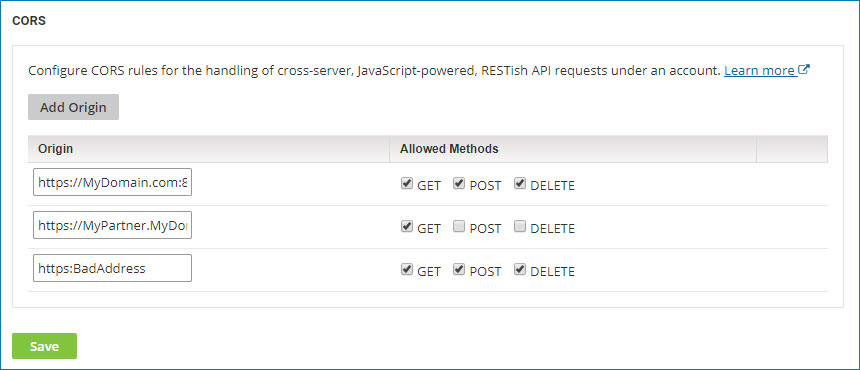
Add Origin
Provides controls for adding a CORS rule to the list. Each rule specifies:
-
An origin for matching cross-server RESTish API requests under the account. The matching criteria specified for an origin are protocol (HTTP or HTTPS), originating domain, and originating port. A matching request is one that matches on all criteria.
-
The allowed HTTP methods — GET, POST, DELETE — for matched requests.
Origin
Specifies the origin in URL syntax:
-
Type :// as the delimiter between protocol and domain.
-
If you are specifying a port explicitly, type : as the delimiter between domain and port.
For example: https://mydomain.com:8081.
The default ports are 80 for HTTP and 443 for HTTPS.
The wildcard character * is permitted in the domain — for example, *.mydomain.com. However, specifying only * (to represent any domain) is not permitted.
Allowed Methods
Sets the allowable HTTP methods for requests from the specified origin.
GET - If selected, GET requests are allowed.
POST - If selected, POST requests are allowed.
DELETE - If selected, DELETE requests are allowed.
Highlighting a rule and clicking the Delete icon  deletes that rule.
