Uploading a new version of a connector group
By uploading a new version of the connector group, you provide the modified connector descriptor file, the archive file and optionally describe the change in the latest version.
API reference
To upload a new version of the connector group using the connector deployment API, refer to Create Connector Group API reference topic.
Before you begin
Ensure that you package the required files. For more details, refer to the Packaging connectors page.
Procedure
-
Sign into the Boomi Enterprise Platform.
-
Select Settings > Account Information and Setup and select the Developer tab.
-
From the Connector Groups list, select the connector group to add the new version.
-
Click Add Version.
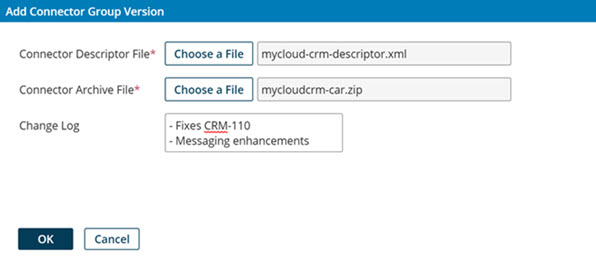
The Add Connector Group Version dialog opens.
-
Click Choose a File next to the Connector Descriptor File field. The system file upload dialog opens.
-
Select the modified connector descriptor file to upload and click the OK button or equivalent. The path to the selected file appears in the Connector Descriptor File field.
-
Click Choose a File next to the Connector Archive File field. The system file upload dialog opens.
-
Select the newer version of the connector archive file and click the OK button or equivalent.
The path to the selected file appears in the Connector Archive File field.
-
Optional: In the Change Log field, enter a comment describing the changes in the new version and/or the reasons for adding it.
-
Click OK.
Files uploaded or imported pass through a virus scanner. If the scan detects a virus, you receive an error message, and the scan rejects the file. If an error persists, contact Boomi Support.
The selected files are uploaded, the new version is added to the selected connector group, and the version is assigned the next available version number.
