Safely auditing and decommissioning Global Variables at scale
Global Variables centralize configuration values that many components reference through $V{variableName} syntax, with per-environment overrides layered on top. As integrations evolve and variables accumulate, there is no safe, scalable way to know which variables are still referenced anywhere before decommissioning one. The GlobalVariable API does not support DELETE; it only supports moving a variable to status: archived, and archived variables can no longer receive value updates. Archiving a variable that is still wired into a live component silently breaks that component's config path next time someone tries to update it.
This use case shows how to programmatically audit variable usage across all components before archiving, rather than manually checking each variable in the UI.
Why does bulk-checking Global Variable usage matter?
An administrator managing dozens of environments and hundreds of components needs to clean up unused Global Variables, for example, after decommissioning an integration. There is no bulk way to answer: "Is this variable referenced by any component, and does it have per-environment overrides still in use anywhere?" Guessing wrong means either leaving unused variables indefinitely or breaking a live process.
Prerequisites
Before using the Global Variable APIs, make sure you have:
- API authentication credentials and
accountId - GLOBAL_VARIABLES feature is enabled on the account
- GLOBAL_VARIABLE_CREATE privilege (write) or BUILD/BUILD_READ_ACCESS (read)
- Familiarity with
GlobalVariable,GlobalVariableValue,Component, andGlobalVariableUpdateTransactionAPIs
To enable the GLOBAL_VARIABLES feature, contact your Boomi Account representative.
To learn more about Boomi API authentication, refer to the Getting started with Boomi Platform APIs topic.
Workflow
-
Query
GlobalVariablewithstatus=activeto get an inventory of all active variables. -
For each variable name, check its usage:
- Query
Component, filtering onGlobalVariableReferences, to find components still referencing it. - Query
GlobalVariableValueby variable name across environments to find per-environment overrides still set.
- Query
-
Classify the variable: zero component references and zero per-environment overrides mean it is safe to archive.
-
Update
GlobalVariableto setstatus: archived, decommissioning the variable. -
Get
GlobalVariableto confirm the status change took effect. -
Query
GlobalVariableUpdateTransactionfor an audit trail of the change.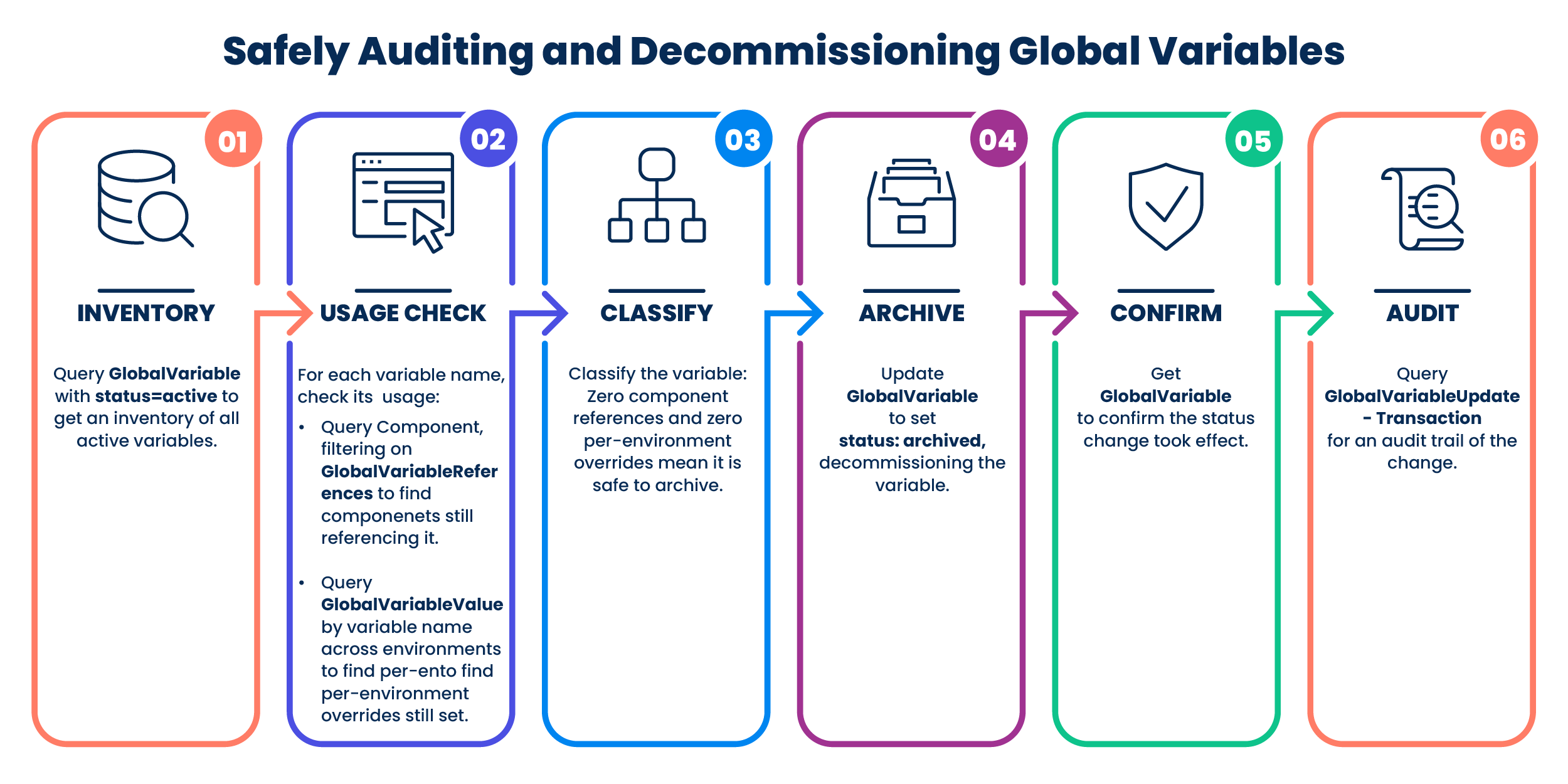
Implementation
Step 1: Inventory active variables
Send POST /GlobalVariable/query
{ "QueryFilter": { "expression": { "operator": "EQUALS", "property": "status", "argument": ["active"] } } }
Returns all active GlobalVariable records (name, encrypted, initialValue, description). Paginate with queryToken if over 100 results.
Refer to the GlobalVariable API for the complete request and response schema.
Step 2: Check component references for each variable
For each variable name from Step 1, query components whose GlobalVariableReferences array contains it:
"GlobalVariableReferences": {
  "GlobalVariableReference": [{ "name": "ACCESS_TOKEN_URL" }]
}
This field is read-only and reflects live usage: a non-empty match means that the variable is still referenced in that component's configuration, regardless of whether the component is currently deployed.
Refer to the Component API for the complete request and response schema.
Step 3: Check per-environment overrides
Query GlobalVariableValue for the variable name across environments. A variable with no active component references but a remaining per-environment override is still worth flagging. It suggests someone configured the override for something that no longer exists, useful context for the decision, not only a blocker.
Refer to the GlobalVariableValue API for the complete request and response schema.
Step 4: Archive the confirmed-unused variable
Send POST /GlobalVariable/{name}/update
{ "status": "archived" }
Once archived, the platform stops accepting further value assignments for that variable. This restriction is platform-enforced, not only a UI convention.
Refer to the GlobalVariable API for the complete request and response schema.
Step 5: Verify and audit
Send GET /GlobalVariable/{name} to confirm status: archived. Query GlobalVariableUpdateTransaction for that name to get the change record (who made the change and when) for compliance logging.
Refer to the GlobalVariable and GlobalVariableUpdateTransaction APIs for the complete request and response schemas.
If you archive a variable by mistake, you can reactivate it using UPDATE. However, per the July 2026 Boomi Platform release update, you cannot modify any other field while a variable is archived. Reactivate it first, then make additional edits.
Related APIs
- GlobalVariableValue: Per-environment value assignments
- Component: Read-only usage tracking through the
GlobalVariableReferencesfield, the key signal this use case depends on - GlobalVariableUpdateTransaction: Audit trail for status or value changes
