Boomi Agent Garden REST APIs overview
The Boomi Agent Garden REST API lets you programmatically create, configure, package and deploy, and execute AI agents within your Boomi account. Use it to automate the full agent lifecycle, from creation to live deployment in a runtime environment, without touching the UI.
The API follows REST conventions and uses JSON for all request and response payloads. Two API groups cover the full lifecycle: Design APIs for building and configuring agents, and Execute APIs for invoking agent sessions at runtime.
The Agent Garden API supports the following core operations:
-
Agent management: Using the API you can create agents by specifying objectives, tasks, guardrails, and custom configurations. You can also retrieve paginated lists of agents with optional filtering or fetch the detailed configuration of a specific agent. The API supports soft-deletion, which preserves records for potential recovery and restoration to DRAFT status.
-
Packaging and deployment: You can generate snapshots of an agent's configuration and prepare it for deployment into an environment. A package encapsulates the complete agent definition at the time of creation. You may optionally trigger immediate deployment to an environment during the packaging request. Packages can be listed per agent or account-wide and are eligible for deletion provided no active deployments reference them. Once the agent is packaged you can deploy it to a target environment and make it available to others. Deployment records are retrievable per agent, per package, or across the account. Specific deployments are removable when they are no longer required.
-
Agent execution: Execute APIs handle the runtime layer of the Agent Garden invoking agent sessions.
Prerequisites
Before you make your first API call, confirm the following:
- You have an active Boomi account with Agent Garden access enabled.
- You have a Platform API token or a Platform JWT bearer token. To learn more about creating Platform API tokens, refer to Platform API Authentication.
- You know your Boomi account ID. This appears in the Boomi Platform under Settings > Account Information.
- You need an environment ID to deploy an agent.
Base URLs
The base URL you use depends on the API group (Design or Execute) and the platform region hosting your Boomi account. Replace {accountId} in each URL with your Boomi account ID.
| API group | Platform / region | Base URL |
|---|---|---|
| Design APIs | US Platform | https://ai-agent-garden.datalake-prod.boomi.com/design/api/v1/{accountId} |
| Design APIs | UK Platform | https://ai-agent-garden.datalake-uk-prod.boomi.com/design/api/v1/{accountId} |
| Execute APIs | US Region | https://c01-usa-east.ai-agent-garden.boomi.com/execute/api/v1/{accountId} |
| Execute APIs | ANZ Region | https://c01-aus.ai-agent-garden.boomi.com/execute/api/v1/{accountId} |
| Execute APIs | JP Region | https://c01-jp.ai-agent-garden.boomi.com/execute/api/v1/{accountId} |
| Execute APIs | GBR Region | https://c01-gbr.ai-agent-garden.boomi.com/execute/api/v1/{accountId} |
| Execute APIs | UK Platform | https://c01-gbr.ai-agent-garden.gb.boomi.com/execute/api/v1/{accountId} |
Key concepts
| Concept | Description |
|---|---|
| Agent | The primary AI entity. An agent defines goals, behavior, tasks, and constraints. Agents exist in a DRAFT state until packaged and deployed. |
| Task | An individual unit of work assigned to an agent. Each task contains specific objectives, instructions, and optional tool assignments. |
| Tool | Specialized functions enhancing capabilities. |
| Sources | A configured external connection that provides tools to an agent. |
| Guardrail | A policy control applied to an agent to restrict behavior. Guardrail types include content filters, topic deny lists, and regex blocklists. |
| Personality trait | Is the agent's voice and interaction style. Only available for conversational agents. |
| Package | An immutable, versioned snapshot of an agent's complete configuration at the time of creation. Packages are the unit of deployment. |
| Deployment | An active instance of a package assigned to a target environment. Once deployed, the agent is accessible to end users. |
| Environment | The runtime infrastructure where agents execute. Examples: development, staging, production. |
| Deletion | Deleting an agent removes it from active use. |
Agent Lifecycle
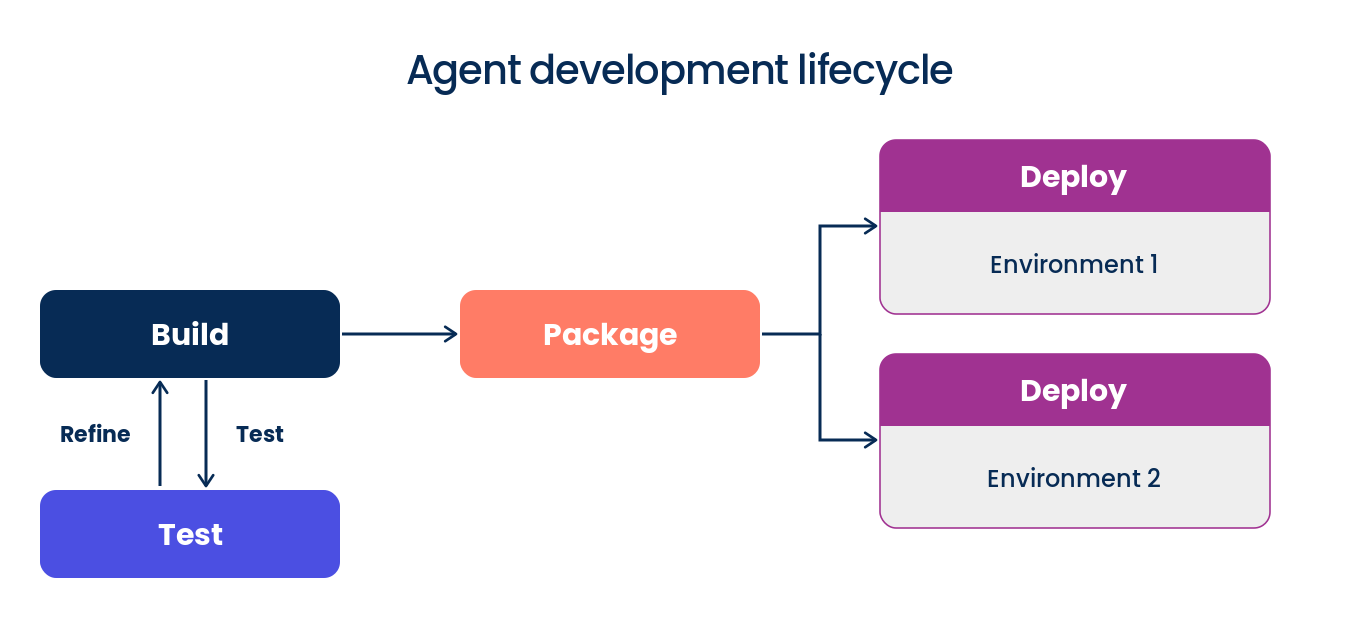
In Agentstudio, building an agent and running it in production are separate steps. There are four main components to the agent development lifecycle.
-
Build: Build the agent configuration, tasks, tools, and guardrails in Agent Designer. An agent is in a draft state until you deploy it. You can edit it at any time without affecting anything currently running in production.
-
Test: Before creating a package, test your agent directly in the Agent Designer. In the Test panel, select a test runtime cloud to control which regional infrastructure runs your test session. Test sessions do not appear on the Deployments page and have no effect on active deployments.
-
Package: When you are ready to release your agent, you create a package. A package is a versioned snapshot of your agent at that point in time. This means you always have a record of exactly what was deployed and when.
-
Deployment: A deployment is a running instance of a package in a specific environment. When you deploy a package, you choose which environment it runs in, which determines the runtime cloud and geographic region that handles your agent traffic. A deployment has a status of Active or Disabled.
Interactive API Testing
Import the Boomi Agent Garden API collections into Postman to test endpoints, view request examples, and accelerate your integration development.
For more information about Postman collections, forking, and making your first API call, refer to the Working with Boomi APIs on Postman page.
