
 LinkedIn
 X
X A developer's guide to listener status in Boomi connectors

You've deployed a custom connector to Boomi. Listener processes are running. Everything looks fine until someone notices messages stopped flowing an hour ago. No alert fired, no error in the UI, just a silent queue and a gap in process reporting.
If you've been there, here's what's actually happening: Boomi Platform knows whether your listener is aware of the deployment state and whether it started up successfully, but it has no built-in way to know if your connector can actually still reach the external system it's talking to. That visibility gap is what the updateStatus APIs are designed to close.
In this post, we'll walk through the three updateStatus overloads on the Listener interface and show exactly how to apply them using the Boomi Event Streams connector with a real-world example covering the most common scenarios you'll run into as a connector developer.
Background
Problem with connector's silent failures
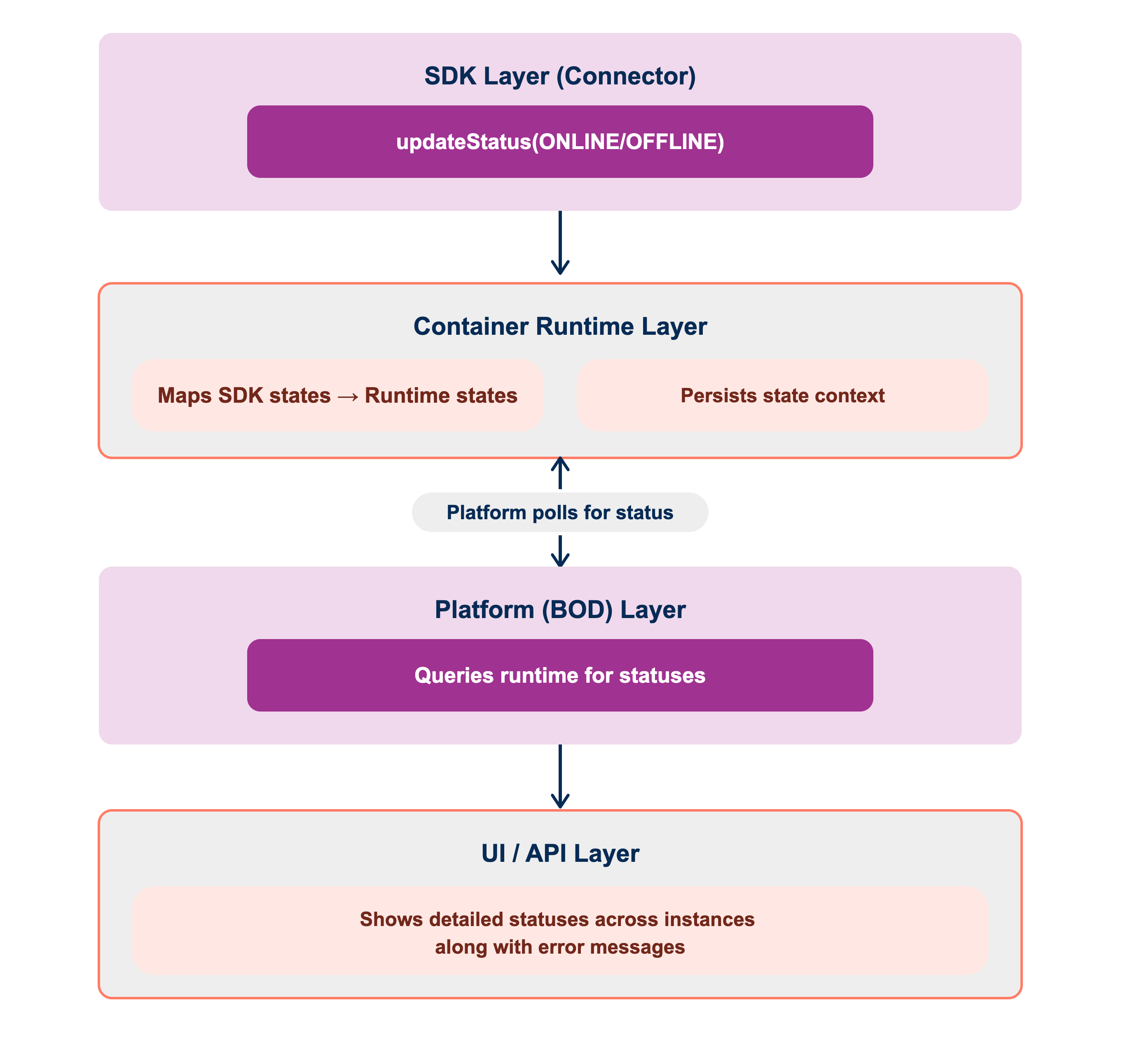
A Boomi basic runtime tracks whether your listener process component is active, but it has no visibility into connector health itself. Connection drops, authentication failures, and downstream errors can all go undetected. That's exactly what updateStatus closes.
Where updateStatus fits
The Listener object is provided by the Runtime when your ListenOperation starts. Your connector uses it to interact with Runtime and the Boomi Platform — and updateStatus is how you push health signals back through that same channel. The Boomi Platform queries the container for the listener status and updates the Listener Status panel with an ONLINE or OFFLINE indicator that administrators can see instantly.
The ListenerStatus enum has two values:
- ONLINE: The listener is connected and actively processing.
- OFFLINE: The listener has failed or lost connectivity.
Key concepts
You'll find all three methods in the Listener interface, in the com.boomi.connector.api.listen package. Before diving into each one, here is a quick way to decide which overload fits your situation:
- Did an exception cause the failure? → Use
updateStatus(Throwable). - Need to explain what happened with additional context? → Use updateStatus(ListenerStatus, String).
- Does the status alone tell the whole story? → Use updateStatus(ListenerStatus).
In practice, you will reach for updateStatus(ListenerStatus, String) most often. Even without exception, a meaningful message almost always helps whoever's monitoring the connector. The other two overloads cover the edge cases: when the exception already explains itself, or when the state change is simple enough to need no explanation at all.
Now, let us look at each one in detail.
1. Simple status update
void updateStatus(ListenerStatus status);
The bare-minimum form. Use it when the state change is self-explanatory and doesn't need any extra context.
listener.updateStatus(ListenerStatus.ONLINE);
//or
listener.updateStatus(ListenerStatus.OFFLINE);
2. Status update with a message
void updateStatus(ListenerStatus status, String message);
The one you'll use most. Attach a human-readable message: topic names, server error codes, message IDs, anything that lets an administrator act without opening a log file. A good message is the difference between an admin knowing exactly what to fix versus filing a vague "the listener is broken" ticket.
listener.updateStatus(ListenerStatus.ONLINE,
        "Successfully subscribed to topic: payments-events");

listener.updateStatus(ListenerStatus.OFFLINE,
        "Connection to broker timed out after 30 seconds, broker may be unavailable or overloaded. Check broker health. Attempting to reconnect...");
3. Status update from an exception
void updateStatus(Throwable error);
The convenience method for exception-driven failures. The SDK sets the status OFFLINE and captures the exception details automatically, so you don't have to construct the message or set the status yourself. Use this in every catch block where a failure affects the listener.
_listener.updateStatus(e); // OFFLINE + full exception details, one line
Passing null throws IllegalArgumentException. Calling any of these methods after stop() has been invoked throws IllegalStateException.
Let's look at a real example
Applying all three APIs in a Generic Listen Operation
Think of a typical long-running listen operation: it subscribes to a message broker or event stream and delivers messages to a process. Along the way, there are three natural moments where listener health can change, and each one maps to one of the APIs we just covered.
1. Startup: checking the connection
start() registers a consumer with the remote system. If the target doesn't exist or credentials are wrong, it throws a ConnectorException. Without updateStatus, it disappears after the initial attempt. Nothing in process reporting reflects it.
// GenericListenOperation.java
@Override
public void start(Listener listener) {
    boolean started = false;
    try {
        SubmitOptions options = new SubmitOptions().withWaitMode(getWaitMode());
        BrokerConnection connection = getConnection();
        GenericMessageListener messageListener = createMessageListener(listener, connection, options);
        _subscription = connection.registerListener(messageListener);
        started = true;

        listener.updateStatus(ListenerStatus.ONLINE,               // API #2
                "Successfully subscribed to: " + getTopic());

    } catch (ConnectorException e) {
        listener.updateStatus(e);                                  // API #3
        throw e;
    } finally {
        if (!started) {
            stop();
        }
    }
}
2. Message processing, checking downstream execution
The message listener submits each incoming message and waits for the result. If that result comes back unsuccessful, the connector negative-acknowledges it quietly, since the Platform never sees that decision. Attaching the message ID to an OFFLINE status makes the failure traceable, without touching the ack/retry behavior itself.
// GenericMessageListener.java
protected boolean processMessage(BrokerConsumer consumer, BrokerMessage msg) {
    try {
        ListenerExecutionResult result = _listener
                .submit(_connection.toPayload(msg), _options)
                .get(_connection.getAckTimeout(), TimeUnit.MINUTES);

        if (result.isSuccess()) {
            consumer.acknowledge(msg);
            return true;
        }

        _listener.updateStatus(ListenerStatus.OFFLINE,              // API #2
                "Message processing failed for ID: " + msg.getMessageId());

    } catch (Exception e) {
        if (e instanceof InterruptedException) {
            Thread.currentThread().interrupt();
        }
        LOG.log(Level.WARNING, "Failed to acknowledge message: " + msg.getMessageId(), e);
        _listener.updateStatus(e);                                  // API #3
    }
    return false;
}
3. Retry loop: exceptions during backoff
Some listen operations wrap processing in a retry loop with exponential backoff. For example, ordered/exclusive subscriptions where messages have to retry sequence. From the Platform’s point of view, exceptions inside that loop are usually just logged and backed off silently. One call to the Throwable overload surfaces them, without touching the retry logic itself.
// Example: FIFO/ordered message listener with retry + backoff
public void onMessage(Message message) {
    int retries = 0;
    while (!listenerStopping()) {
        try {
            if (processMessage(message)) {
                return;
            }
            backoff(++retries);
        } catch (Exception e) {
            propagateInterruption(e);
            listener.updateStatus(e);                                   // API #3
            log.warning("Exception while retrying message " + message.getId(), e);
            backoff(++retries);
        }
    }
}
Other common patterns
Beyond startup/processing/retry, a few other moments are worth reporting status from in any listen operation:
-
Transport or session failure, surfaced from whatever callback the underlying client library uses to report a dropped connection:
void onTransportFailure(String reason) {listener.updateStatus(ListenerStatus.OFFLINE, "Transport failure: " + reason);reconnect();} -
Subscription acknowledgment, when the remote system confirms or rejects a subscribe request:
void onSubscribeAck(String channelName, boolean success, String detail) {if (success) {listener.updateStatus(ListenerStatus.ONLINE, "Subscribed to " + channelName);} else {listener.updateStatus(ListenerStatus.OFFLINE, "Subscription failed for " + channelName + ": " + detail);}} -
State reconciliation for a late-joining listener, when a new listener attaches to a channel that's already active or inactive — it should inherit the current state immediately, rather than wait for the next event:
void onNewSubscriber(Listener listener, boolean channelCurrentlyConnected, String channelName) {ListenerStatus status = channelCurrentlyConnected ? ListenerStatus.ONLINE : ListenerStatus.OFFLINE;String message = channelCurrentlyConnected? "Subscribed to " + channelName: "Subscription for " + channelName + " not yet confirmed";listener.updateStatus(status, message);}
Tips and best practices
Write actionable OFFLINE messages
When something goes wrong, the message you pass to updateStatus is often the first thing an administrator sees. A vague message like "connection failed" or "error" confirms that something is broken, but it gives no clue about what to fix or where to look.
Try something like:
"Failed to connect to the broker at https://my-broker:6650. Check network connectivity or verify the environment token in the connection settings."
The more specific the message, the faster the resolution. A good OFFLINE message should ideally include:
- What failed (the operation, the connection, the message)
- Where it failed (topic name, broker URL, message ID)
- A hint at what to check (credentials, network, configuration)
This won't always be possible, depending on the exception, but even including one of these details is significantly more useful than a generic error string.
Conclusion
Three APIs, one goal. Catch listener failures visible before someone else notices them.
- Use
updateStatus()for clean state transitions that need no explanation. - Use
updateStatus(ListenerStatus, String), the one you'll reach for most, whenever a message adds operational value. - Use
updateStatus(Throwable)for every exception path. Let the SDK set OFFLINE and capture the stack for you.
Ready to put this into practice? Validate your implementation using the listener status testing utilities to verify that listener state transitions and expected behaviors are working correctly. For a detailed walkthrough and usage examples, check out our post on listener status testing utilities.
Give it a try and share your experience in the Boomi Community. We'd love to hear how you're using it.
