
 LinkedIn
 X
X Bringing Jev to Boomi: how I built a custom connector

As someone who entered the technology and iPaaS industry without a technical background, I have always been amazed at how Boomi has enabled me to achieve the same high-level technical outcomes as traditional developers, all while staying low-code. One of my first integration projects involved interacting with Salesforce's API. Boomi's branded connector allowed me to easily authenticate, interact with objects, and import profiles without needing to dig through API documentation.
But what happens when your next project involves an API without a branded connector? While you could assemble generic technology connectors like the REST Client connector, doing so means manually constructing every call. By building a custom connector, you can deliver that same seamless experience you would with branded connectors—complete with reusable authentication and the ability to import profiles.
Today, taking on custom connector development no longer requires a steep learning curve. By leveraging Boomi Companion's newest boomi-connectordev skill, which is built on the Boomi Connector SDK, AI agents can handle the heavy lifting of API research and code generation, allowing you and your team to focus on integration development.
It's been hard to miss the attention Jev has been receiving, and rightfully so. Jev is a new "System One" AI model that TypeSafe AI recently released. Jev was built to make fast, structured decisions, rather than freeform text like other AI models. The more I read about Jev, the more I keep finding places where its decision making capabilities could fit into my existing processes. Boomi is well-positioned to act on those decisions with deterministic logic, which makes Jev a strong candidate for piloting my connector development work as my team and I explore building with it.
Why Jev? The rise of "System One" AI in integration workflows
Generative LLMs are great for writing emails or drafting summary text, and most of them can now be wired into integration pipelines with reasonable confidence. Structured outputs, JSON mode, and schema-constrained decoding, have largely solved the old problem of conversational filler, breaking a downstream parser. If you tell a modern LLM to return {"requires_review": true}, it will.
But a valid schema is only half of what an integration needs. A few problems remain when you use a general-purpose LLM as a decision engine inside a high-throughput pipeline:
-
Conformance isn't calibration. A structured output guarantees the shape of the answer, not that a boolean reflects a trustworthy confidence level. You get true, not "87% likely."
-
Latency adds up. Generative models produce tokens sequentially, whereas Jev generates responses in parallel, so even a short structured response typically takes hundreds of milliseconds to several seconds. With thousands of calls an hour, that latency becomes an issue.
-
You're paying for capabilities you don't use. A model built to write prose and reason in open-ended ways is a lot of horsepower for "route this ticket to one of ten queues."
Enter TypeSafe AI's Jev, the first "System One" AI decision model.
Where Jev fits in a Boomi process
Integration builders already design processes that make smart decisions. Is this order an exception? Which team owns this ticket? How urgent is this complaint? Jev gives builders a new way to answer questions like these, especially when the answer depends on free-form text that's hard to capture in a rule. That's what "System One" means here: the fast, intuitive judgment you make at a glance; not the slow, open-ended reasoning that generative models are designed for.
Jev answers three kinds of questions, and each one maps neatly onto a step Boomi developers already use:
-
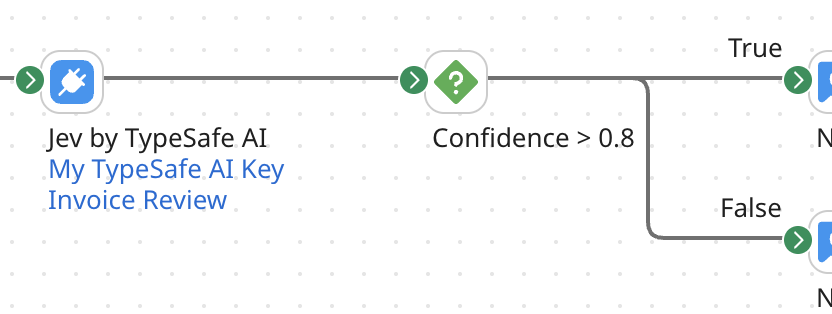
Noul (yes/no): Jev returns the probability that the answer is yes. Ask "Does this invoice need manual review?" and feed the result into a Decision step with a threshold you choose, like 0.8, instead of a hard true/false.
-
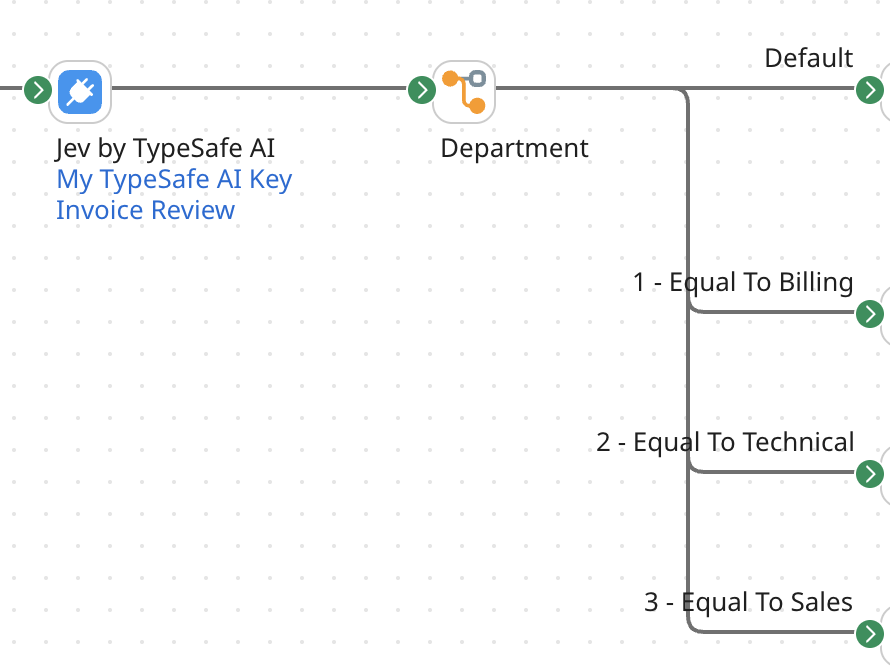
Choice: Jev picks one option from a set you define (up to 255) and returns the full probability distribution. Ask "Should this ticket go to billing, technical, or sales?" and send the answer into a Route step with one path per option.
-
Score: Jev rates the input against a rubric of two to ten levels that you write. Ask "How urgent is this customer email?" and use the score to set priority or decide whether to alert someone.
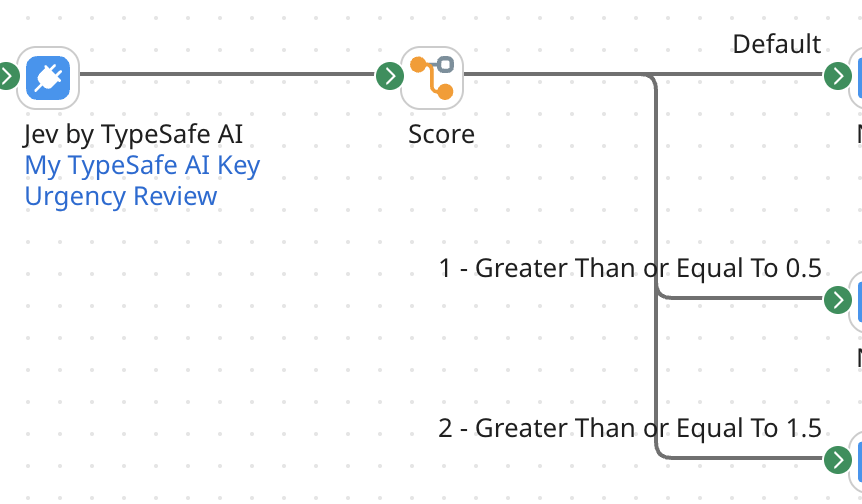
Choice and Score answers also include a confidence value between 0 and 1. That gives you something a plain true/false never could: a clean way to say "act automatically when Jev is sure, and send it to a person when it isn't." In Boomi, that's just one more Decision step before an exception path.
A few places I can see this paying off
-
Support triage: Classify and prioritize incoming tickets before they reach the helpdesk.
-
Order and EDI exceptions: Flag purchase orders or invoices that look unusual before they post to the ERP.
-
Data quality: Score inbound records for completeness before they land in a primary Data Hub.
-
Compliance checks: Screen free-text fields for sensitive or policy-violating content as they pass through.
Before building a custom connector, getting any of this into a process meant hand-building the request, writing a JSON profile for every new set of questions, and digging the answers out of the response yourself. That was enough friction to keep Jev on the "someday" list. A custom connector turns it into a single step that anyone on my team can drop onto the canvas.
How Boomi Companion accelerates custom SDK builds
Building a Boomi custom connector from scratch used to mean diving deep into Java, mastering the Connector SDK framework, writing descriptor XML files, and manually mapping API schemas.
With the new boomi-connectordev skill in Boomi Companion, an AI agent acts as your co-developer. Here is how I was able to leverage Boomi Companion to build a Jev Connector in a fraction of the time:
-
Automated API Research: The agent ingested TypeSafe AI's Jev API specifications—understanding its three question primitives (Noul, Choice, Score), payload constraints, and header requirements.
-
SDK Boilerplate Generation: The
boomi-connectordevskill scaffolded the connector's Java architecture, setting up the Connector, Connection, and Execute operation abstractions. -
Dynamic Profile & Schema Discovery: Instead of forcing developers to manually build a JSON response body, the skill configured dynamic object import capabilities (Browse and Import wizard). Boomi users simply enter the questions they want Jev to analyze, and the connector handles the rest.
What it looks like in the Boomi process canvas
With the Jev Custom Connector deployed to my Boomi account, calling TypeSafe's Jev model feels just like using one of the many branded connectors I've grown to love.
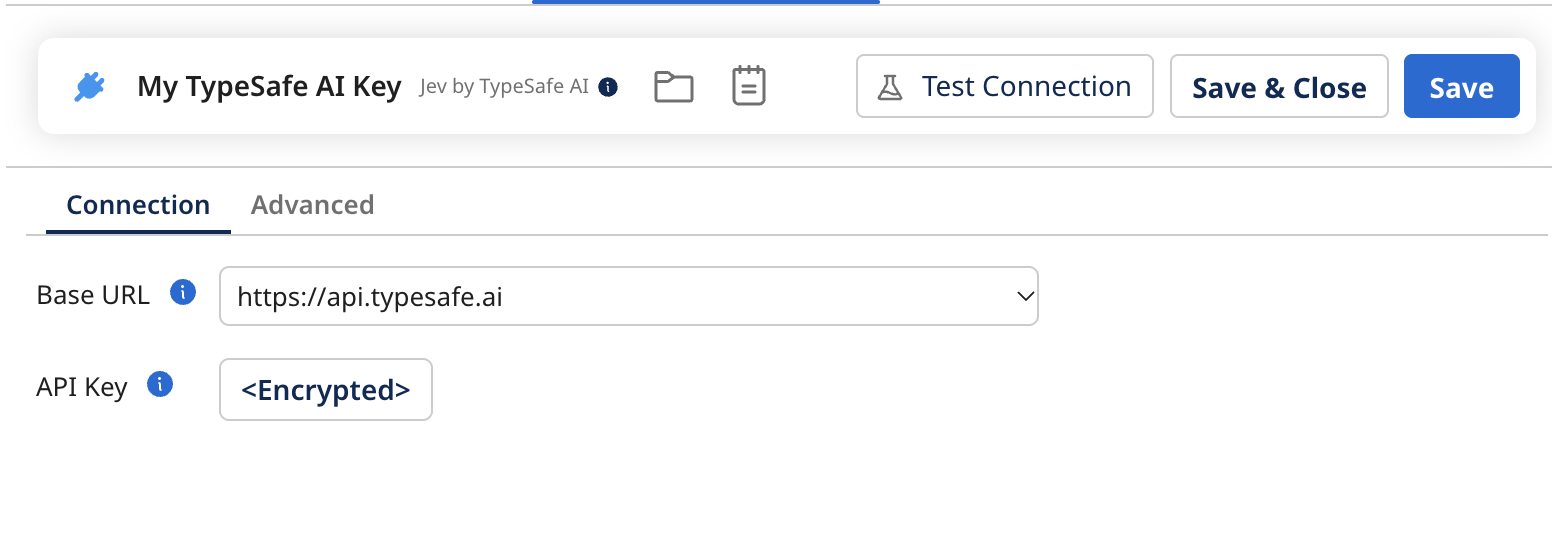
Connection Setup: I dropped the Jev Connector onto the canvas and pasted in my TypeSafe API key. That was it. The endpoint is built into the connector, so there's no URL to look up, and Test Connection confirmed my key without running a billable evaluation.
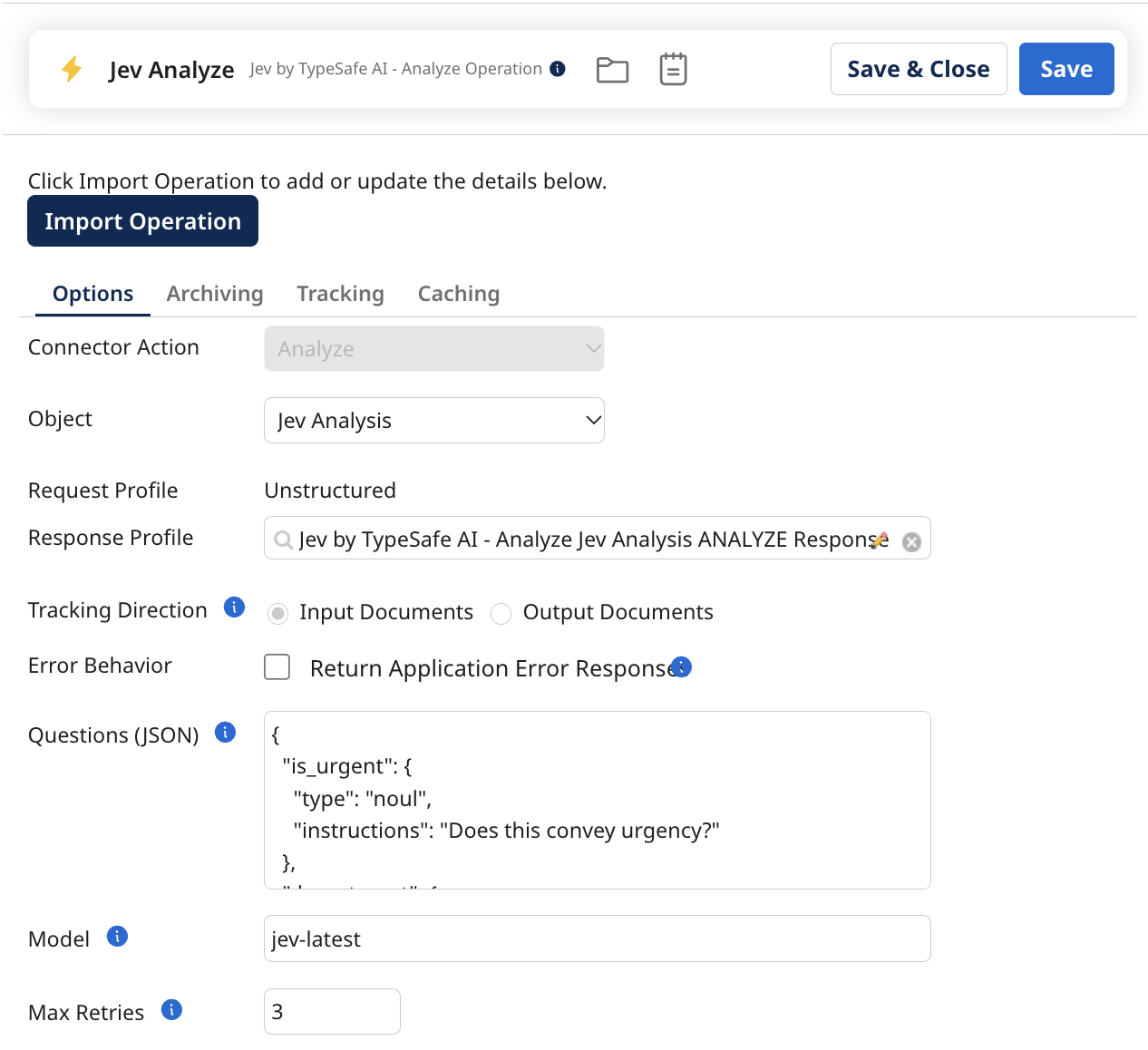
Operation Import: Next, I defined my questions in the operation's Questions field. Because of how I built the connector, the field comes pre-filled with an example, so I could start by tweaking that instead of staring at a blank box. Then I clicked Import and chose Jev Analysis, and the connector built my response profile directly from those questions. I didn't need a sample payload or any hand-built schema.
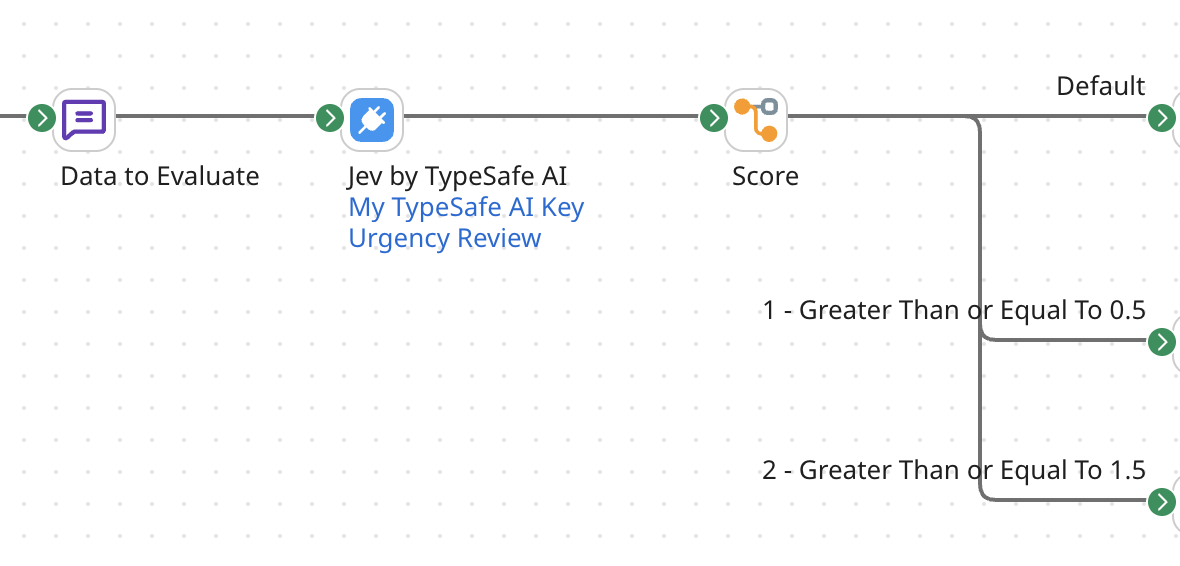
Execution & Routing: From there, I passed inbound process data (like an incoming EDI document or customer ticket) straight into the step. Each document's text goes to Jev as-is, and I can override the questions or model per document when I need to.
Because Jev returns typed numbers and set options instead of free-form text, I could branch my process right away with standard Decision or Route steps, based on a yes or no probability, the chosen option, or a confidence score. No regex, and no digging answers out of conversational prose.
Try it out
Follow the documentation to load the boomi-connectordev skill into your AI agent of choice. For Claude Code, that means installing the bc-connectordev plugin, which ships the skill. Give it a workspace with your Boomi Platform credentials in a .env file, and make sure a JDK and Gradle are installed on your machine. If you're already running the boomi-integration skill, the shared Platform details carry straight over—no extra setup needed.
To publish, your account needs a signed SDK Publisher Agreement, and your user needs the DEVELOPER privilege. Run the bundled doctor script before you build anything. It finds your JDK, verifies it matches your Gradle version, and confirms that Java itself can reach the Gradle plugin portal and the Boomi SDK repository. This catches network and certificate problems that would otherwise surface later as a confusing build failure.
Like the rest of Boomi Companion, the skill is open source, under the BSD-2-Clause license, free to inspect, fork, and adapt to other agent platforms. It's a publicly available developer offering, not a supported product; curated on a best-effort basis, and made better by what the community sends back to developer-offerings@boomi.com.
Custom connectors have always been the deep end of Boomi development: Java, an SDK class model, descriptor XML, and a publishing API; mastered by the few developers who'd done it before. That know-how now travels with the agent. Hand it the docs for the API you've been manually wiring up, and see what comes back ready for your team to build on.
