
 LinkedIn
 X
X The agent learns to build agents

Turns out, the easiest way to build an agent is to just ask for one. You know that gap between "I have an idea for an agent" and "I have a working agent"? The fastest way to close it: describe what you need — what it should do, what it should reach, how it should sound, and watch it get built on your live Boomi Agentstudio account: structured, equipped with tools, published, and tested, without you ever leaving the conversation.
That's the newest skill in the Boomi Companion portfolio. boomi-agentstudio gives AI systems like Claude Code the whole path from idea to working agent: author it, give it tools, package it, deploy it, and talk to the result.
What it looks like to use
All you need is a workspace with your Boomi credentials in a .env file. From there, you just talk to it in plain language. Below is a sample exchange that happens in Claude Code; swap in any AI system that can load the skill and you'll get the same walkthrough.
You: Build me a support agent for our hardware team. It should triage incoming issues, look up order status from our fulfillment API, and open a ticket in Boomi when it can't resolve something itself. Professional, but warm.
AI system: Here's the shape I'd give it: three tasks — triage, order lookup, escalate — with a professional voice and engagement dialed up a little for warmth. Two tools to build: an API tool for your fulfillment endpoint, and an Integration tool for ticket creation. For that second one I need the Boomi process that files tickets — which one should it call, and on which runtime?
You: "Create Support Ticket" on the production runtime. And make it ask before it files anything.
AI system: Done. Both tools built and activated, ticket creation marked as needing approval, agent packaged and deployed to your environment. It's live — try it.
You: Where's order 44182?
AI system: Order 44182 shipped Tuesday and is due Thursday.
That's the agent answering: it reached your fulfillment tool and resolved the question in a single turn. Ask it something it can't resolve, and it offers a ticket instead. Since ticket creation requires approval, it'll always check with you before filing one.
It doesn't stop at deployment. The same AI that built the agent can talk to it too, so testing happens in the same loop: ask it something, see what comes back wrong, fix the task or guardrail behind it, republish, ask again. The signals are easy to read: a guardrail set too tight returns the blocked message you wrote, and a task with vague instructions returns a vague answer. None of it needs the console.
That leaves you free to focus on getting the intent right. The refinements that get you there, retuning a task, tightening a guardrail, republishing, that's all handled behind the scenes.
Working with what you have
Chances are you're not starting from nothing, and the skill is just as useful when you turn it on the agents already in your account.
It reads your whole estate for you: search agents by name, filter down to drafts or the ones already live, browse tools by type or status to spot the ones you built and forgot to activate, check an agent's package history, and see what's actually deployed. Everything pages and sorts, so even a large account is easy to navigate.
It also reads a single agent back in full, deployments included, which is how you go from "this agent" to "a conversation with this agent" in one step. So an agent someone else built in the console is a perfectly good starting point: fetch it, describe what you want changed, publish a new version. Ask for a variant and you get a clean clone, with the server-managed fields correctly dropped, the step that makes hand-rolled copies fail.
Agent setup and interaction
Setting one up comes down to a few controls; once it's deployed, you work with it right there in the conversation.
An agent is a goal plus a handful of tasks, each with its own objective, instructions, and tools. That decomposition is where most of the quality lives, and it's the part that the skill drafts well from a description. Past that, three levers shape how it behaves:
-
Voice (for conversational agents): Professional, friendly, instructional, or playful, plus dials for creativity, decisiveness, clarity, confidence, and engagement. "More decisive, less chatty" maps onto actual numbers.
-
Reasoning depth: This is the latency-versus-thoroughness dial: how long the agent stops to think before it answers. A classifier fielding thousands of requests wants different settings than one doing multi-step diagnosis.
-
Guardrails: Patterns, banned words, and whole topics blocked semantically — the last of which holds up when a user rephrases.
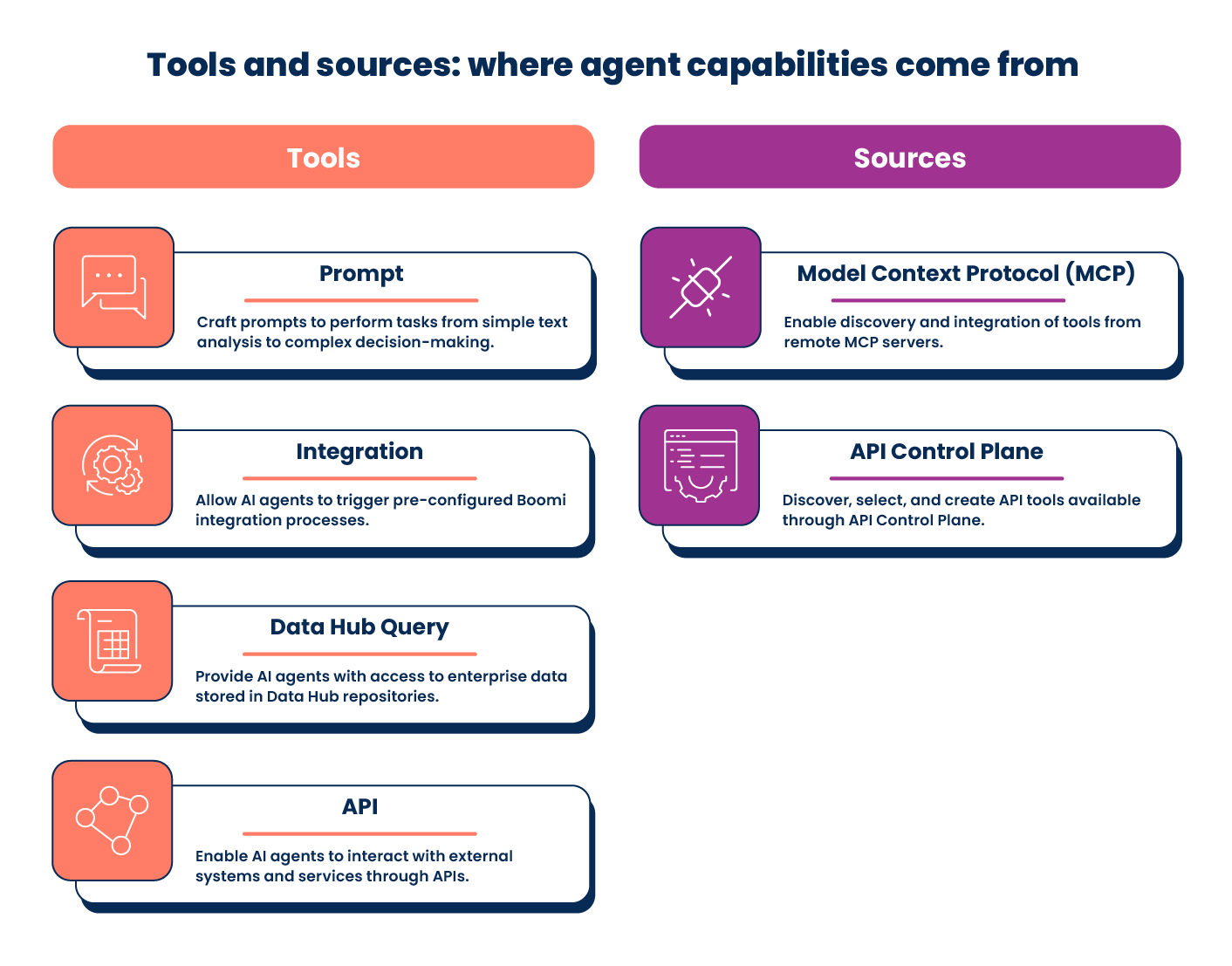
Tools are where the actual capability comes from, and the skill can author four kinds for you: Prompt tools that run a focused instruction, API tools that call a REST or SOAP endpoint, Integration tools that trigger a deployed Boomi process, and Data Hub Query tools that read filtered golden records. On top of those, there's a whole catalog of Application tools that Boomi ships and manages, so you can attach them without configuring anything. You can also connect MCP servers: the skill probes a server to show you what's available before saving anything, then imports the tools you name. Whenever you attach a tool to a task, you can flag it as needing approval, the sensible default for anything that changes data instead of just reading it.
Then comes the fun part: you actually talk to what you built. Conversational agents hold free-form chat, with replies streamed in as they're generated. Context carries across the session, and starting a fresh one wipes the slate clean, so you can run a scenario, reset, and run a variation without the first attempt bleeding into the second. Structured agents work differently: they take an object and return an object against schemas you define, which is what you want when the agent sits behind another system instead of in front of a person. Either kind can accept file attachments (PDFs, spreadsheets, CSVs, text, images) once you enable uploads and choose the formats to allow.
When a tool needs to reach into another Boomi service, the skill hands off cleanly: the process behind an Integration tool belongs to boomi-integration territory, and the data behind a Data Hub Query tool belongs to boomi-datahub.
What the skill adds
Beyond assembling what you asked for, there's a good deal it handles quietly. A few examples:
-
Changes go live when you say so. It keeps track of the difference between a revised agent and a published one, and offers to publish the moment an edit is done.
-
Tools arrive ready to use. Anything it authors gets activated as part of building it, so the agent can be packaged as soon as it's assembled.
-
Guardrails that catch what you meant. Describe what to keep out and it picks the right policy for the job — a pattern, a word list, or a semantic topic block that holds up when a user rephrases.
-
Protection you don't specify twice. It knows what Boomi already screens at the platform level, so the policies you add go toward what's specific to your agent.
-
The right endpoint, every time. Building and running happen through separate regional hosts; the skill resolves both from your region and routes each call itself.
That's the value the skill adds, the specifics handled for you, making the whole thing seamless.
Try it
Install the bc-agentstudio plugin for Claude Code, which ships the boomi-agentstudio skill. Set up a workspace with a .env holding your Boomi Platform username, API token, account ID, and your region's Design host. Add your deploy environment once you're ready to publish, and the Execute host once you want to start conversations. If you're already running bc-integration, the shared Platform details carry straight over, no extra setup needed. Run the bundled preflight check first; it will confirm your credentials and deploy target, names and flags anything missing before you build on it.
Those credentials stay yours. By default, the plugin keeps the AI's own file and shell tools out of .env entirely. The scripts load it themselves, so your token never passes through the model's context or into a transcript. The same goes for the credentials your tools use downstream: provision those in the Boomi console and reference them by ID, and the secret never enters the conversation. The skill talks to Boomi and nowhere else, there's no telemetry and nothing phones home.
Like the rest of Boomi Companion, the skill is open source under the BSD-2-Clause license, so go ahead and inspect it, fork it, and adapt it to whatever agent platform you're working with. It's a publicly available developer offering rather than a supported product, curated on a best-effort basis, and made better by what the community sends back to developer-offerings@boomi.com. So there it is, your agents can build agents now. Tell yours what you need, and see what it comes back with.
